Security & permissions

Control who can see and change your asset data

Asset records hold value, locations and custody, so access should follow the job. Asetavo gives every user a set of nine permissions, and the API refuses anything a permission doesn’t allow. Every change records who made it, and a lost handheld can be cut off in one click.

All plans (advanced roles on Business and above)Compare plans
Product screen · sample data
What it solves

What changes when security & permissions moves into Asetavo

The way it usually works today, and the way it works once it lives in one system.

Security & Permissions in use on site
  1. Before: Everyone who can open the asset spreadsheet can change the purchase cost, delete rows or overwrite a location.

    With Asetavo: Permissions separate reading, creating, editing, deleting, configuring, finance, audits, devices and alerts, so each person gets only what their job needs.

  2. Before: When a value changes, nobody can say who changed it or what it was before.

    With Asetavo: Every asset change is written to an append-only history with the old value, the new value, the event and the person, taken from their verified sign-in.

  3. Before: A handheld goes missing or a contractor leaves, and their access keeps working for weeks.

    With Asetavo: Each signed-in device is its own session. Revoke it and its next request is refused and its refresh token stops working. Deactivating the user cuts off every device they have.

  4. Before: Readers and integrations share one password, and nobody knows what they can reach.

    With Asetavo: Fixed readers use their own per-reader signing secret and can reach only the event-ingest endpoint. Integrations sign in as a named user with scoped permissions.

Product in action

What your team actually sees

Coded from the real Asetavo screens, with sample data for a fictional company, Northfield Group.

Priya Shah, Inventory manager: she can register, edit, configure and count assets, but has no finance, delete, device or alert permissions. The right-hand side shows what that means in practice.

User permission card

  1. 1
    ✓ / ✕ at a glance
    Each permission with what it unlocks, so reviewing access doesn’t need a manual.
  2. 2
    Permission-denied state
    Screens she can’t use show a clear “ask for access” message instead of an error or a blank page.
  3. 3
    Enforced at the API
    If she sends a purchase cost through the API, the field is stripped and the rest of the update is saved.
Sample data
Capabilities

Everything in Security & Permissions

Every card below is in the product today, on the plans shown above.

Nine granular permissions

view, create, edit, delete, manage, finance, audit, devices and alerts, combined into roles such as admin, technician and viewer. The app hides what a role can’t do and says why, for example “Needs the Finance role”.

Deny-by-default API

One central route-to-permission table, checked on every request. Unlisted routes are refused.

Protected finance fields

Cost, residual, accumulated depreciation, method, rate and life are stripped from writes unless the user holds finance.

Revocable device sessions

Access tokens of 12 hours or less, rotating refresh tokens, and a per-device list with one-click revoke. Lost a phone? Sign it out from More › Devices in the app or from the web; anything it hadn’t synced stays on that phone and is never sent.

Login throttling

Five failed attempts trigger a lock-out that doubles each time (30 s up to 1 h). Unknown users and wrong passwords get the same response.

Audit trail

Append-only per-asset history with the verified actor, plus who acknowledged and resolved each alert.

Separate database per company

Each workspace’s data lives in its own database with its own token-signing secret.

Signed reader ingest

Readers sign each batch with HMAC over device id, timestamp, nonce and body hash. Replays, stale timestamps and floods are rejected.

Signed, SSRF-safe webhooks

Alert webhooks carry an HMAC signature, go only to public HTTPS hosts and never follow redirects.

Not in the product yet

Everything else on this page is live today. These are the pieces we are still building.

  • Coming soonSingle sign-on (SSO)
  • RoadmapTwo-factor authentication
  • RoadmapData residency options

In the Asetavo app

Roles and privacy, enforced on the phone too

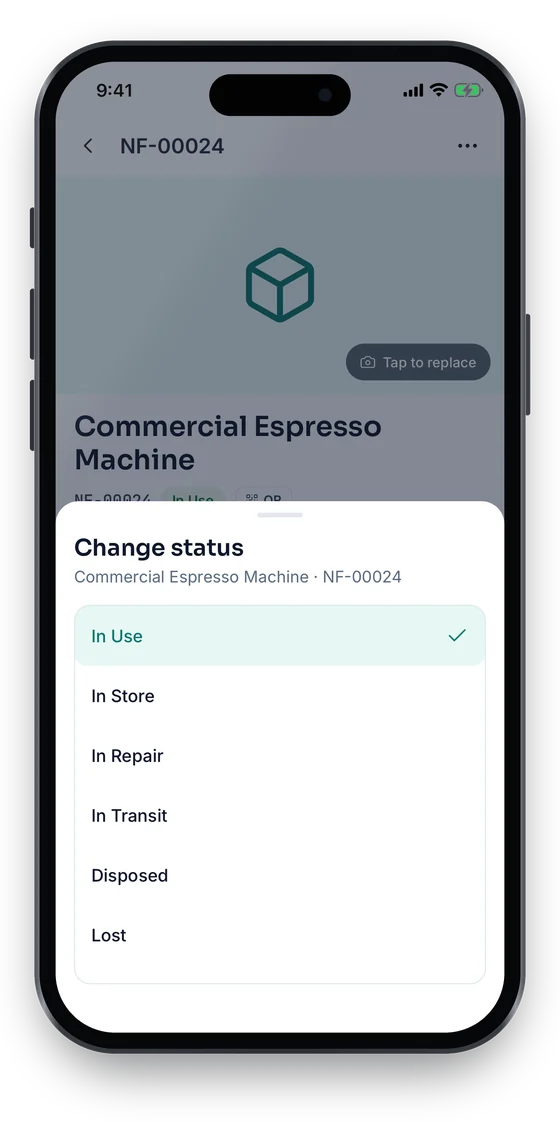
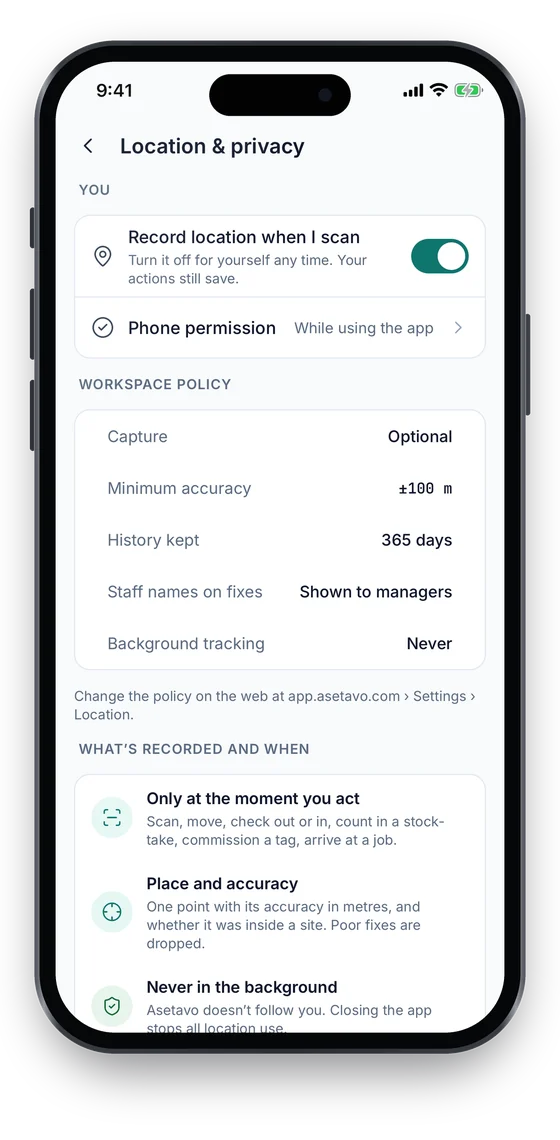
The app follows the same roles as the web: viewers look things up, editing and status changes need edit access, and money shows only to Finance. Location is recorded only at the moment of an action, never in the background, under a workspace policy of Off, Optional or Required. A lost phone can be signed out from More › Devices or the web.

Coming soon on theApp StoreComing soon onGoogle Play
Location and privacy settings: workspace policy, minimum accuracy, history kept and background tracking Never (sample data)
1Location & privacy
Change status sheet: In Use, In Store, In Repair, In Transit, Disposed and Lost (sample data)
2Needs edit access

Swipe to see more screens →

Real screens from the Asetavo phone app (demo workspace, fictional company). iOS and Android apps coming soon to the App Store and Google Play.
How it works

From first step to everyday use

  1. 01
    Organization

    Each company workspace runs on its own database. Tokens are signed with a per-workspace secret, so one company’s token is useless on another’s.

  2. 02
    Users

    Add people on the Team page and give each a role. Every sign-in creates its own device session with a short access token and a rotating refresh token.

  3. 03
    Roles

    Group permissions into roles that match real jobs, such as Finance, Inventory manager, Auditor or Security officer. Admins hold everything.

  4. 04
    Permissions

    Nine permissions: view, create, edit, delete, manage, finance, audit, devices and alerts. Anything not granted is denied.

  5. 05
    Actions

    Every API route maps to one permission and is checked on every request against the live user and device records, not just the token.

  6. 06
    Audit trail

    Changes are stamped with the verified user and appended to the asset’s history. Alert acknowledgements and resolutions record who and when.

Workflows, end to end

A handheld is lost at the Dallas dock

  1. Daniel reports the Dallas dock handheld missing.
  2. An admin opens Devices › All devices and revokes that session.
  3. The handheld’s next request is refused and it cannot refresh or sign itself back in.
  4. Daniel signs in on a replacement device, which gets a new session. His other devices keep working.

Separating finance from operations

  1. Priya (Inventory manager) registers a new forklift without cost details.
  2. Rachel (Finance) adds the purchase cost, residual value and depreciation profile.
  3. If Priya later edits the asset, any cost fields she sends are stripped.
  4. The history shows who entered each figure and when.

An external auditor for a quarter

  1. An admin creates a user with view and audit only.
  2. The auditor runs and reconciles the stock-take on a handheld.
  3. Every scan is attributed to the auditor from their sign-in.
  4. At quarter end the admin deactivates the user, and every device session stops working.
Compare

Example roles and what they can do

CriteriaCanCannotPermissions
FinanceSee cost and NBV, run depreciation, disposeCreate or move assetsview, finance
Inventory managerRegister, edit, configure, countSee cost, delete, manage readersview, create, edit, manage, audit
AuditorRun and reconcile stock-takesEdit the register, see costview, audit
Maintenance techWork orders, move and check outConfigure, finance, deleteview, edit
Security officerReaders, zones, alert rules, ack alertsEdit the register, financeview, devices, alerts
ViewerRead assets, reports, exportsChange anythingview

Roles are examples. Your workspace admin combines the nine permissions however your organization works.

Deep dive

The detail behind it

Authentication and sessions

How a person gets in, and how you get them out:

Sign-in
Email and password. The response is the same for an unknown user, a wrong password or a deactivated account, and timing is equalised so accounts cannot be enumerated.
Access token
A signed token pinned to the Asetavo audience and type, valid 12 hours or less, bound to one device session.
Refresh token
Random, stored only as a SHA-256 hash, rotated on every refresh, valid 30 days or less. Replaying an old refresh token fails.
Per-request checks
Every request re-checks the signature, that the user is still active, that the device session is still active and that it belongs to that user.
Throttling
Five failures from one IP and email combination lock sign-in for 30 seconds, doubling up to one hour.

Authorization and data protection

What each permission unlocks, and the rules around it:

view · create · edit · delete
Read the register, reports and Excel/CSV exports. Create assets. Update, move, check out, tag, attach documents and manage work orders. Delete assets, tags and records.
manage
Locations, categories, custodians, departments, custom fields and PM schedules.
finance
Cost fields, depreciation profiles and runs, and disposals.
audit · devices · alerts
Run and reconcile stock-takes. Manage readers, zones, tag orders, tag stock and NFC links. Manage alert rules and acknowledge or resolve alerts.
CSV exports
Cells starting with =, +, -, @, tab or carriage return are neutralised so exports cannot inject spreadsheet formulas.
Attachments
Up to 10 MB each. The real file type is checked on upload and again after storage, against an allow-list of PDF, image and Office formats.
FAQ

Security & Permissions questions

Want to see it with your assets?

Walk us through your sites and we’ll show you security & permissions set up the way you’d use it.

Book a demo
Nine: view, create, edit, delete, manage, finance, audit, devices and alerts. Your workspace admin combines them into roles. Admins hold all of them.

Give every person exactly the access their job needs

Set up roles, protect finance data and keep a verified record of every change from day one.

No card required · Workspace ready in minutes · Simple USD pricing