Asetavo for Manufacturing

Keep production assets moving and maintained

Machinery, jigs, fixtures, gauges, forklifts and the totes and cages that carry your product — one register, with RFID portals at the gates, zone-level movement history and preventive maintenance on the same record, so the plant knows where things are and when they are due.

  • Production equipment
  • Returnables
  • Maintenance
  • RFID infrastructure
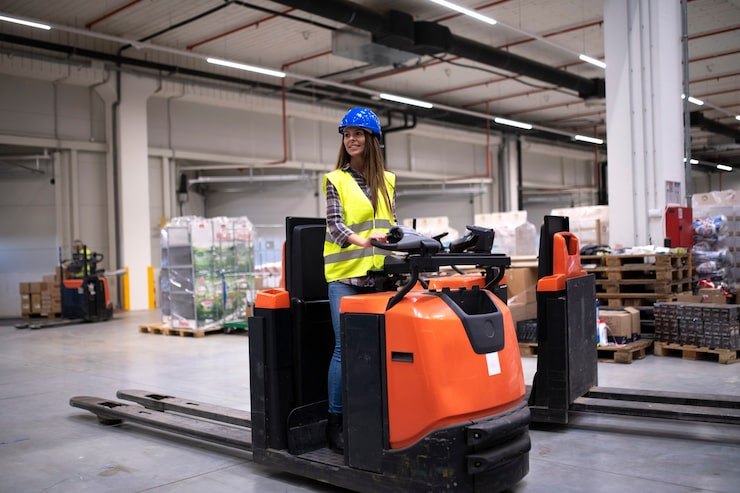
Manufacturing team member using Asetavo
The operation

Mapped to the way material flows through your plant

A plant is a sequence of areas that material and equipment pass through: goods come in at receiving, wait in the warehouse, feed the lines, pass through quality and leave from dispatch. Asetavo models each area as a location and, where you install fixed RFID readers, as a zone.

Manufacturing operations on site
  1. Step 1

    Your plants and lines

    Add each site, production line, workshop and store.

  2. Step 2

    Your machines and tooling

    Tag machines, moulds, dies and calibrated gauges.

  3. Step 3

    Keep them running

    See where each one is, when it’s due for service or calibration, and its history.

Maintenance, calibration and cost records live with the machine — not in someone’s notebook.

The problem

What goes wrong without a system

The day-to-day failures manufacturing teams describe before they move off spreadsheets and paper registers.

01

Changeovers stall while someone hunts for tooling

A die, jig or fixture set should be at the line when the changeover starts. When it has been left in the tool room, the other line or the repair bench, the line waits while people walk the floor looking for it.
02

Preventive maintenance lives outside the asset record

PM plans sit in one spreadsheet, the asset list in another and work orders on paper. Technicians cannot see a machine's history when they arrive at it, and nobody can say with confidence which services were skipped last quarter.

03

Calibration due dates get missed

Torque tools, gauges and test equipment drift. If an instrument is used past its calibration date, every part it checked is in question. Tracking due dates in a separate log means out-of-date instruments stay on the line.

04

Returnable packaging leaks out of the loop

Totes, stillages, cages and pallets leave dispatch full and are supposed to come back empty. Without a record of what left and what returned, the pool shrinks quietly until the next replacement order.

05

Plant audits take days and still disagree

Counting machinery, tooling and returnables across a whole site by hand is slow. By the time the spreadsheet is reconciled, equipment has moved, and finance and operations argue about whose number is right.

How Asetavo helps

One platform, set up for manufacturing

Fixed RFID portals at gates

Install your own fixed UHF readers at receiving, dispatch and between key areas. Asetavo ingests their signed events, updates each tagged asset's last-seen location and records the movement automatically.

Learn more

Zones that match plant areas

Define receiving, warehouse, each line, quality and dispatch as zones. Rules can flag an asset that leaves its zone, enters one it should not, or an unregistered tag seen at a portal.

Learn more

Preventive maintenance on the same record

Attach PM schedules to machines and forklifts. The due list shows what is coming up; maintenance planners generate work orders from it and technicians close them against the asset with parts, labour and notes.

Learn more

Calibration records and due dates

Log calibration through work-order completion, with certificates attached and the next due date tracked per instrument, so quality can see which gauges are current before they are used.

Learn more

Tool crib check-out

Issue jigs, fixtures and hand tooling from the crib to an operator, a line or a work cell with a due date, and see what is out and with whom at shift change.

Learn more

Bulk RFID stock-takes

Walk an area with a handheld reader and capture hundreds of tags in a pass. Asetavo reconciles the reads into found, missing and unregistered, so a plant-wide count becomes a routine exercise.

Learn more

Signed alert webhooks

Send zone and portal alerts to your own systems as HMAC-signed webhooks, so a returnable leaving through the wrong gate can surface wherever your team already works.

Learn more

Depreciation for production equipment

Run book and tax depreciation on machinery and tooling with eight methods, and report net book value by line, area or category for capital planning.

Learn more
Industry workflows

The asset lifecycle, the way manufacturing runs it

  1. 01Receive
  2. 02Tag
  3. 03Commission
  4. 04Assign to line
  5. 05Maintain & calibrate
  6. 06Audit
  7. 07Refurbish or relocate
  8. 08Dispose

Connect asset movement with maintenance

  1. Asset moves
  2. Zone event
  3. Movement history
  4. Service due
  5. Work order
  6. Technician
  7. Completed

A tagged forklift passes the portal between the warehouse and Line 1; the zone event updates its location and adds to its movement history. Separately, its PM schedule puts it on the due list. The maintenance planner generates a work order from the due list, the technician scans the forklift's tag to open it — already knowing which area it was last read in — records the work and closes it. Work orders are created from PM schedules by your team; Asetavo does not yet trigger them automatically from usage or movement counts.

Tooling changeover

  1. Tool crib
  2. Check out to line
  3. Changeover
  4. Check in
  5. Inspection

Before a changeover, the setter checks the die or fixture out from the crib to the line. When it comes back, it is checked in with a condition note; anything flagged for attention gets a work order so the next run does not start with a damaged tool.

Returnable packaging loop

  1. Filled at line
  2. Dispatch portal
  3. Customer
  4. Received back
  5. Inspected

Totes and stillages are read at the dispatch portal as they leave and at receiving when they return. The difference is your outstanding pool. Filtering by last-seen location and date lists the units that have not been read back, so they can be chased.

Calibration cycle

  1. Instrument
  2. Calibration due
  3. Work order
  4. Certificate attached
  5. Back in service

Each gauge carries a calibration schedule. When it comes due, a work order records the calibration, the certificate is attached, and the next due date is set. Quality can pull a list of every instrument and its current status for an internal or customer audit.

On the phone · Manufacturing

Line-side work without walking back to a desk

Technicians work calibration and PM jobs on the phone, with parts, labour and notes. A trolley of tooling or a whole cell moves in one bulk scan, and stock-takes run cell by cell. All of it keeps working without signal and syncs exactly once.

Coming soon on theApp StoreComing soon onGoogle Play
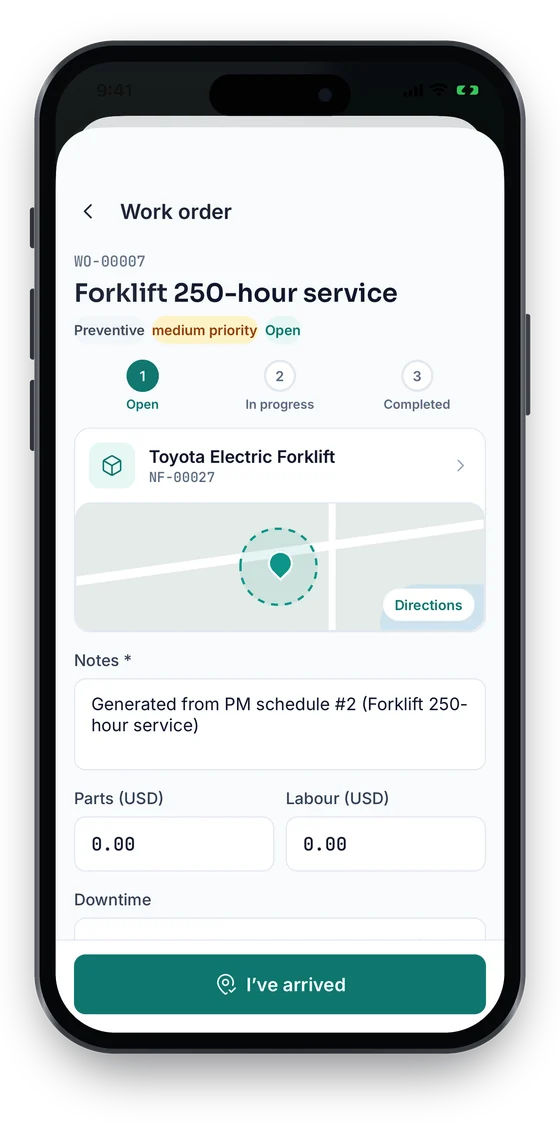
Work order WO-00007 Forklift 250-hour service with an Open, In progress, Completed stepper, notes, parts and labour (sample data)
1Work order on the line
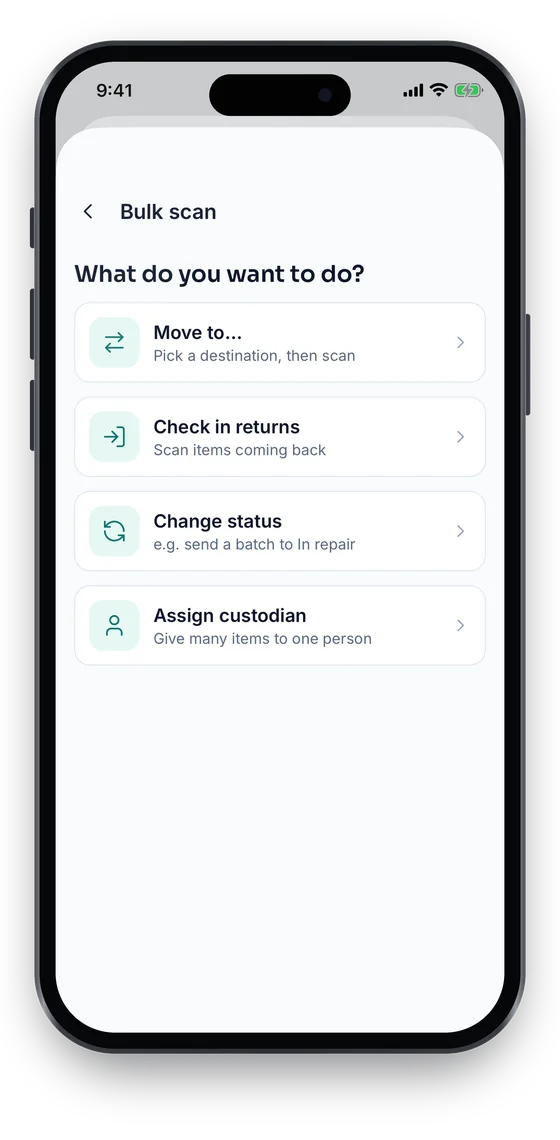
Bulk scan options: move to, check in returns, change status or assign a custodian (sample data)
2Bulk move a cell
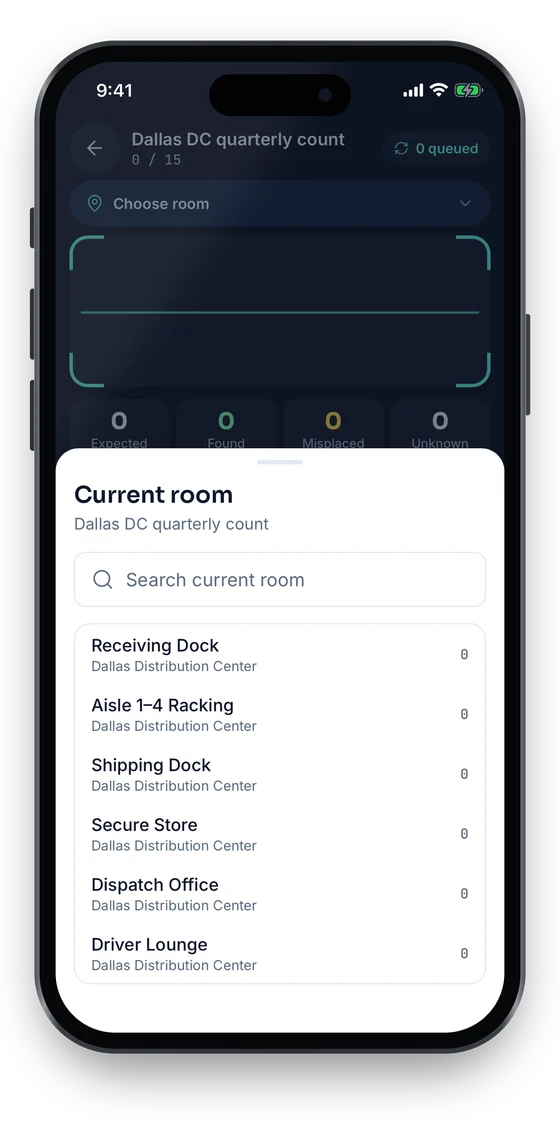
Stock-take Dallas DC quarterly count, choosing the current room to count (sample data)
3Count by area

Swipe to see more screens →

Real screens from the Asetavo phone app (demo workspace, fictional company). iOS and Android apps coming soon to the App Store and Google Play.
Product in action

What your team sees

An illustrative manufacturing overview beside a real Asetavo screen.

Plant assets overviewIllustrative example
3,418
Production assets
2,760
Returnables in circulation
19
PM due this week
11
Calibrations due
23
Open work orders
4
Zone alerts today
Recent activity
  • Forklift #FL-07Warehouse → Line 1 portal · 09:14Moved
  • Press Tool Set #JT-2210Checked out to Line 2 · Cell 4In use
  • Torque Wrench #QC-133Calibration due in 3 daysDue
  • Stillage #RT-0981Left returnables bay zone via dispatchAlert
  • Hydraulic Press #MC-004Work order WO-5521 completedServiced
Sample data for illustration — not a customer account.
Asetavo product screen

Every asset group, in one register

Categories and custom fields keep the details each group needs — serials, warranty, custodian, room.

Production equipment

Machinery and presses · Jigs and fixtures · Dies and moulds · Cutting and hand tooling · Forklifts and pallet jacks · Compressors and conveyors

Returnables

Totes and bins · Containers · Pallets · Cages and stillages · Reusable packaging · Racks and dollies

Maintenance

PM schedules · Calibration records · Work orders · Service history · Spare critical components · Warranty and service contracts

RFID infrastructure

Fixed portals at gates · Handheld readers · Zone definitions · Bulk audit sessions · Reader health and silence alerts

Quality and test equipment

Torque tools · Gauges and micrometers · CMM and metrology fixtures · Scales · Test rigs

Use cases

Where manufacturing teams put it to work

Find tooling before the changeover, not during it

Setters search the register for the fixture set they need and see its last location, whether it is checked out and to which line. If it was read at the tool-room portal an hour ago, they know where to go. Changeovers start with the right tooling on the bench.

Give technicians the history at the machine

A technician scans the press's tag with the mobile app and sees every past work order, parts used, recurring faults and attached manuals. They arrive at a breakdown with context, and the fix is recorded against the same asset for the next person.

Keep instruments in calibration

Quality maintains a calibration schedule for every gauge and torque tool. Instruments approaching their due date appear on the due list; the calibration is recorded on a work order with its certificate. When a customer auditor asks, the evidence is one export away.

Control the returnable packaging pool

Tag reusable totes and cages with UHF RFID and read them at dispatch and receiving. Reports show how many are on site, how many are out and which have not come back, turning a vague shrinkage problem into a list you can chase.

Count the whole plant in a shift

Instead of a weekend stock-take, open audit sessions per area and walk each with a handheld reader. Found, missing and unregistered items reconcile automatically, and finance gets a register it can trust for the year-end asset review.

Plan capital replacement with real data

Combine a machine's maintenance cost history, age and net book value to decide whether to keep repairing it or replace it. Export the figures for the capital budget rather than rebuilding them from invoices.

Maintenance

Maintenance that knows where the asset is

Most maintenance tools know the schedule but not the plant floor. Because Asetavo keeps PM, calibration and work orders on the same record as movement history, a planner can see that a forklift is due and that it was last read at the Line 2 portal. Work orders are generated from PM due lists by your planners; automatic generation from schedules and usage thresholds is on the roadmap.

  • Preventive-maintenance schedules per machine or category, with a due list
  • Work orders with status, parts, labour, cost and notes
  • Calibration recorded through work-order completion, with certificates attached
  • Full service history on every asset, visible from a tag scan
Finance & depreciation

Plant values finance can rely on

Production equipment is usually the largest block of fixed assets on the balance sheet. Asetavo keeps depreciation and disposal on the same records the plant uses daily, so the fixed-asset register and the physical plant match.

  • Eight depreciation methods with separate book and tax profiles
  • Net book value by line, area or category
  • Disposals and gain or loss recorded with an audit trail
  • Maintenance cost history to support repair-or-replace decisions
Identification

The right tag for each asset

Plants mix metal machinery, plastic returnables and small precision instruments, so no single tag fits. Choose by surface and by how you want to read it: automatically at a portal, in bulk during an audit, or one at a time at a workstation.

Business and up

UHF RFID

No line of sight · readers & portals · metres

The core technology for gates and returnables. On-metal hard tags go on machinery, forklifts and steel cages; standard inlays work on plastic totes. Fixed portals read them hands-free and handhelds count whole racks. Business plan and above.

What is UHF RFID?
All plans

QR

Printed label · phone camera · line of sight

For hand tooling, jigs and fixtures where a quick phone scan at the crib is enough. Use chemical- and oil-resistant labels and place them away from clamping and wear surfaces.

What is QR?
Growth and up

NFC

Tap-to-read chip · phone · a few cm

For small gauges and instruments where there is no room for a label. Operators tap to open the record and check calibration status before use. Growth plan and above.

What is NFC?
All plans

Barcode

1D label · any scanner · line of sight

Keep existing linear barcodes if your stores already scan them, and map them to asset records during onboarding so nothing needs relabelling on day one.

What is Barcode?

Not sure which to use? Try the tag technology selector or compare plans.

Security & access

Control who sees and changes what

Plants have many hands on the asset list: operators, setters, maintenance, quality, stores and finance. Role-based permissions separate who can move and check out assets, who can manage readers and zones, who can run audits and who sees cost. Reader traffic is authenticated so portal events cannot be spoofed.

  • Nine permissions, including devices, audit, alerts and finance
  • HMAC-signed reader events with timestamp window and nonce
  • Device secrets encrypted and keyed outside the tenant database
  • Audit trail of every movement, work order and edit
  • Asetavo keeps the maintenance and calibration records your own quality system can reference
Security & access
Integrations

Fits the systems you already run

Asetavo is the asset and maintenance record; your ERP, MES and quality systems remain where they are. Connect them via the REST API, push alerts out through signed webhooks and use Excel and CSV exports for anything else. We do not ship named connectors for specific ERP or MES products.

  • REST API for assets, movements, stock-takes, work orders and PM schedules
  • HMAC-signed alert webhooks for zone and portal events
  • Bring-your-own fixed and handheld RFID readers via signed ingest
  • ERP, MES or quality-system sync via the REST API
  • Excel and CSV export of the register, work orders and depreciation
Integrations & API
Implementation

From spreadsheet to live register

  1. 1
    Walk the material flow

    Map receiving, storage, each line, quality and dispatch as locations, and decide which boundaries need fixed portals. Those become your zones.

  2. 2
    Import the asset and maintenance lists

    Import your equipment register with the Excel/CSV import wizard, then set up PM plans and link schedules to the right machines.

  3. 3
    Tag by area and surface

    Apply on-metal RFID to machinery and forklifts, standard UHF inlays to totes, QR to tooling. Work area by area so each zone is complete before you move on.

  4. 4
    Commission portals and zones

    Register your readers, confirm signed events are arriving, and set zone rules for the gates that matter most — usually dispatch and receiving first.

  5. 5
    Move maintenance onto the record

    Start generating work orders from the PM due list and recording calibration on work orders, so history builds on each asset from week one.

  6. 6
    Run a plant-wide stock-take

    Once tagging is complete, run an audit session per area, resolve missing and unregistered items, and set a recurring audit cycle.

Every machine, tool and returnable gets a tag and a record. Plant areas are set up as locations and, where you install fixed RFID readers, as zones. Portal reads update an asset's last-seen location automatically, handhelds and phones handle audits and check-outs, and maintenance and calibration sit on the same record.

Keep your plant moving and maintained

Bring your plant layout and a sample of your equipment list. We will map your zones, show a portal event flowing into movement history, and walk through PM and calibration on your assets.

No card required · Workspace ready in minutes · Simple USD pricing