Asetavo for Healthcare

Hospital equipment tracking, maintenance and audits in one register

A hospital asset tracking system that gives clinical and biomedical teams one register of every infusion pump, monitor, bed and wheelchair — located by ward, department and room, with preventive maintenance, calibration and service history on each device. Asetavo tracks equipment, not patients.

  • Biomedical equipment
  • Patient handling
  • Diagnostics & theatre
  • Clinical IT & support
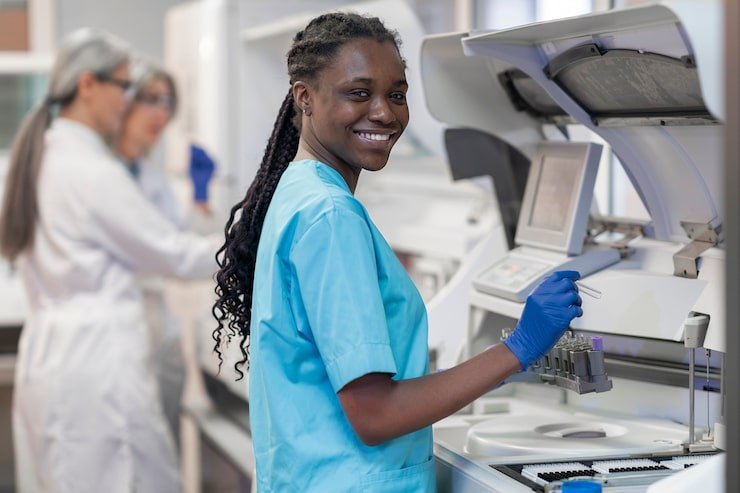
Healthcare team member using Asetavo
The operation

Mapped to your wards and departments

Hospital equipment doesn’t stay where it was bought for. A pump starts in ICU, follows a patient to theatre, spends a night on a general ward and ends up in a sluice room waiting for cleaning.

Healthcare operations on site
  1. Step 1

    Your sites and rooms

    Add your hospital, wards, theatres and stores — the same way you’d describe them.

  2. Step 2

    Your equipment

    Tag each infusion pump, monitor and bed, and give it a department or owner.

  3. Step 3

    Always know where it is

    See which ward last had it, who signed it out, and when it moved.

Whether you run one hospital or a group of clinics, Asetavo follows your real structure — so equipment doesn’t get lost between departments.

The problem

What goes wrong without a system

The day-to-day failures healthcare teams describe before they move off spreadsheets and paper registers.

01

Nurses spend shifts searching for equipment

When a ward needs a pump, a syringe driver or a bariatric wheelchair, someone phones round other wards or walks the corridors. The device is usually in the building — in a side room, a sluice or another department — but nobody knows which.
02

Wards hoard devices to be safe

Because equipment is hard to find, wards keep extras in cupboards “just in case”. The hospital ends up owning more devices than it uses while other departments still run short, and procurement keeps buying.

03

PM and calibration dates slip

Biomedical engineering can only service what it can find. Devices that move between wards miss their preventive maintenance or calibration window, and overdue equipment stays in clinical use because no one realises it is due.

04

Service history is scattered

Repair notes sit in a workshop logbook, calibration certificates in a shared drive, contract details in procurement email. When an inspector or a manufacturer asks for a device’s full history, it takes days to assemble.

05

No clear custody when equipment is lent

Devices borrowed from an equipment library, loaned to another site or sent out for repair often have no record of who took them and when they are due back — until the next person goes looking.

Industry workflows

The asset lifecycle, the way healthcare runs it

  1. 01Procure
  2. 02Acceptance test
  3. 03Tag
  4. 04Commission
  5. 05Deploy to ward
  6. 06Maintain & calibrate
  7. 07Audit
  8. 08Decommission

Find a device for a ward

  1. Search model
  2. See last-seen zone
  3. Check status
  4. Collect

A nurse searches for a syringe driver and sees which ones are marked available, where each was last scanned or read, and whether any are out of service or due for PM — before walking anywhere.

Preventive maintenance

  1. PM due
  2. Work order
  3. Locate & collect
  4. Service
  5. Return to use

When a defibrillator’s PM falls due, a work order is raised for biomedical engineering with its last known location. The technician scans it on collection, records the checks and returns it to service with the next due date set.

Calibration

  1. Calibration due
  2. Test & record
  3. Attach certificate
  4. Next due set

Calibration results and certificates are attached to the device record. Anything past its calibration date is visible on the biomedical dashboard so it can be withdrawn before use.

Equipment library loan

  1. Ward requests
  2. Check out to borrower
  3. Due back
  4. Clean & check in

Loan devices go out against a named person and ward with a return date. On return they are checked in to decontamination before becoming available again.

On the phone · Healthcare

Find the pump, then service it

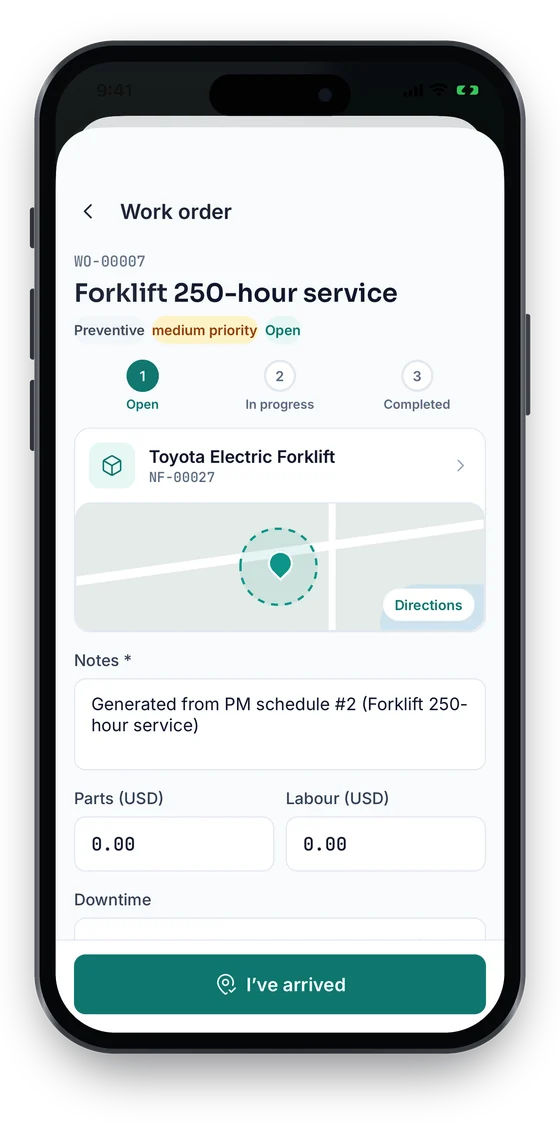
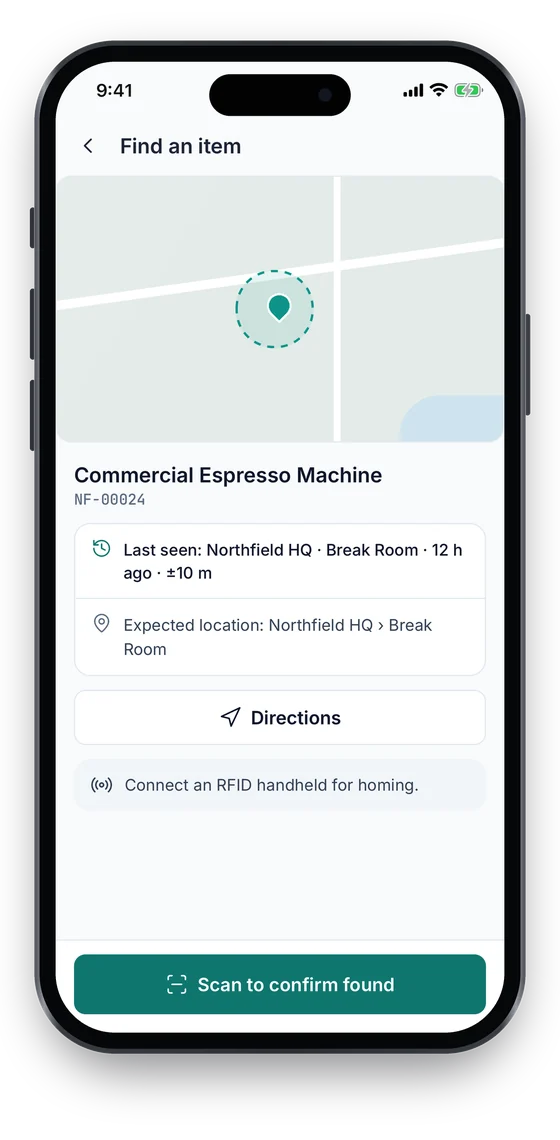
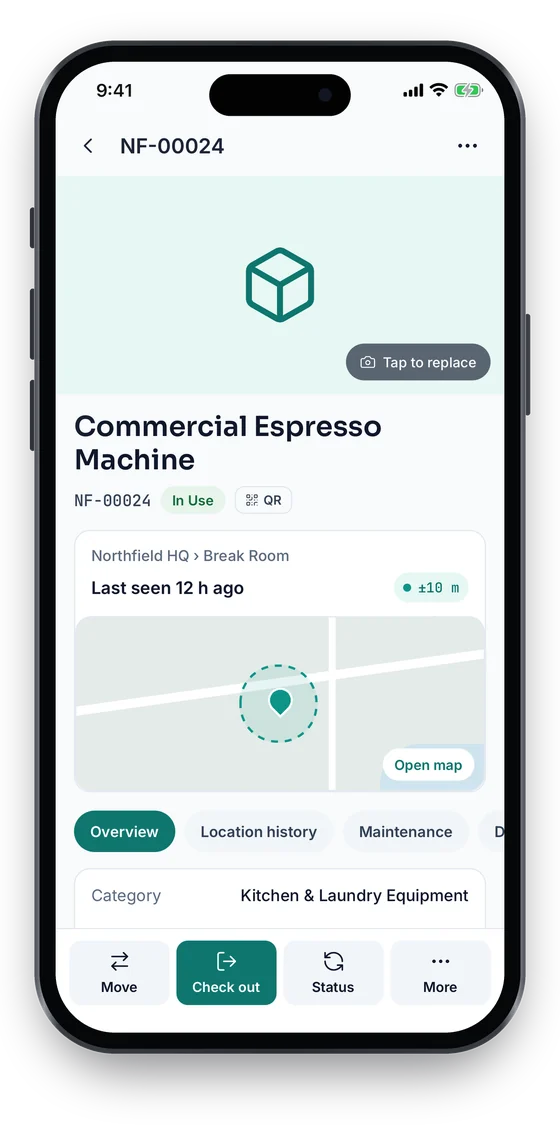
Ward staff use Find an item to see where a device was last seen and which room it belongs in. Biomed technicians run the preventive maintenance job on the phone, from Open to Completed, with notes and an I’ve arrived check-in. Location is recorded only at the moment someone acts in the app, never in the background.

Coming soon on theApp StoreComing soon onGoogle Play
Find an item screen with last-seen place, expected location and directions (sample data)
1Find an item
Asset 360 for a Commercial Espresso Machine, In Use, last seen at Northfield HQ with a ±10 m GPS fix on a map (sample data)
2Last seen, with status
Work order WO-00007 Forklift 250-hour service with an Open, In progress, Completed stepper, notes, parts and labour (sample data)
3PM work order

Swipe to see more screens →

Real screens from the Asetavo phone app (demo workspace, fictional company). iOS and Android apps coming soon to the App Store and Google Play.
Product in action

What your team sees

An illustrative healthcare overview beside a real Asetavo screen.

Biomedical overview — General HospitalIllustrative example
2,146
Tracked medical devices
318
Available now
14
PM overdue
52
Calibration due in 30 days
41
On loan from library
7
Out for repair
Recent activity
  • Infusion Pump #IP-204Read at ICU portal · checked inAvailable
  • Defibrillator #DF-011Emergency · PM overdue by 6 daysOverdue
  • Syringe Driver #SD-088Loaned to Surgical ward · due today 18:00On loan
  • Patient Monitor #PM-132Calibration certificate attachedCalibrated
  • Bariatric Wheelchair #WC-019Left Maternity zoneZone exit
Sample data for illustration — not a customer account.
Asetavo product screen

Every asset group, in one register

Categories and custom fields keep the details each group needs — serials, warranty, custodian, room.

Biomedical equipment

Infusion pumps · Syringe drivers · Patient monitors · Defibrillators · Ventilators · ECG machines · Suction units · Ultrasound units

Patient handling

Hospital beds · Wheelchairs · Stretchers & trolleys · Hoists · Pressure-relief mattresses · Commodes

Diagnostics & theatre

Imaging support equipment · Theatre lights & tables · Electrosurgical units · Lab analysers · Sterilisers & autoclaves · Blood fridges

Clinical IT & support

Workstations on wheels · Tablets & handhelds · Label printers · Pagers & radios · Medication fridges · Keys to controlled stores

Use cases

Where healthcare teams put it to work

Clinical engineering asset register

Replace the biomedical spreadsheet with a single register of every device: manufacturer, model, serial, owning department, commissioning date, warranty and service contract. Custom fields hold what your team already records, such as risk class or asset owner.

Equipment library and pooled devices

Pool pumps and drivers in a central library and let wards check them out. Utilisation becomes visible, overdue loans are chased, and the argument for (or against) buying more devices is based on actual demand.

Inspection and accreditation readiness

When inspectors or accreditation assessors ask for evidence of maintenance, Asetavo produces each device’s PM, calibration and repair history with dates and names. The records support your own compliance processes; they don’t certify compliance on your behalf.

Recalls and safety notices

When a manufacturer issues a field safety notice for a model or serial range, filter the register to find every affected unit, see where it was last located and track each one through inspection or withdrawal.

Theatre and critical-care kit

Keep high-value theatre and ICU equipment within its department using zones on department doors, and get an alert if a tagged device is read leaving. Staff can still move it — the record just keeps up.

Capital replacement planning

Use age, repair frequency and depreciation to build the capital replacement list, rather than relying on which department shouts loudest at budget time.

Maintenance

Biomedical PM, calibration and service history

Clinical engineering teams manage thousands of devices with different service intervals, calibration requirements and manufacturer contracts. Asetavo keeps each device’s schedules and history together, so the team can plan the week’s work and prove what was done.

  • PM schedules by device or by model, with automatic work orders
  • Calibration records with results, due dates and attached certificates
  • Repair work orders with fault, parts, labour and technician
  • Manufacturer warranty and service-contract tracking
Finance & depreciation

Equipment value and replacement budgets

Medical equipment is one of a hospital’s largest capital investments. Asetavo keeps purchase cost, useful life and depreciation on every device so finance and clinical engineering can agree on replacement priorities.

  • Book and tax depreciation using eight methods
  • Net book value by department, site or device class
  • Repair cost history to support repair-or-replace decisions
  • Disposal and decommissioning records with reason and date
Multi-location

Hospitals, clinics and satellite sites

Health systems often run a main hospital with outlying clinics, health centres or community services. Each site gets its own branch of the location tree, and devices transferred between sites keep their full history.

  • One register across hospitals, clinics and stores
  • Site-restricted roles for local teams
  • Inter-site transfers and loans with a record of custody
  • Consolidated reports for the whole network
Hospital asset tracking system

What a hospital asset tracking system needs to do

A hospital asset tracking system has one job above all: when someone needs a pump, a monitor or a wheelchair, they should be able to find one that is clean, serviced and in date for calibration. Asetavo combines the register, the tags, the location record and the maintenance history so that question has an answer.

  • One register of every device with ward, department and room, custodian and status
  • QR or barcode labels on every device, scanned with a phone at handover, cleaning and repair
  • Last-seen location from scans and, on Business, from RFID readers at ward doors
  • PM and calibration due lists, work orders and service history per device (Business plan)
  • Scoped stock-takes per ward, with missing and unregistered devices listed
Hospital equipment tracking software

Hospital equipment tracking software for shared equipment

Shared equipment drifts between wards, so hospital equipment tracking software has to record who took a device and when it should come back. Run an equipment library with check-out and return by scan, and add RFID portals or zone alerts where devices keep going missing.

  • Check devices out to a named person with a due date, and back in with their condition (Growth and above)
  • Overdue lists show who still holds borrowed equipment and since when
  • Fixed RFID readers at ward doors record tagged devices as they pass (Business plan)
  • Zone-exit alerts when a device leaves its allowed area (Business plan)
RFID portals vs RTLS

Last-seen location from scans and RFID portals, not RTLS

Real-time location systems need positioning infrastructure across the building. Asetavo answers “which ward is it on?” with scans and, on Business, UHF RFID readers at doors, theatres and stores that record tagged devices as they pass. You see the last place a device was scanned or read, with the time. It is not continuous indoor positioning.

  • Every scan records where a device was and who scanned it
  • Fixed UHF RFID readers at ward doors and stores record passing devices (Business plan)
  • Zone-exit alerts when a tagged device leaves its area (Business plan)
  • No positioning infrastructure, and no patient data
Identification

The right tag for each asset

Clinical environments need tags that survive cleaning, and a way to read devices without handling them. Most hospitals combine UHF RFID for location with QR for quick phone scans.

Business and up

UHF RFID

No line of sight · readers & portals · metres

Readers at department entrances, theatres and the biomedical store record when tagged devices pass, keeping last-seen locations current and powering zone-exit alerts. Choose tags rated for your cleaning regime.

What is UHF RFID?
All plans

QR

Printed label · phone camera · line of sight

A QR label on every device lets any nurse or technician open its record from a phone to check PM and calibration status or report a fault. Available on every plan.

What is QR?
Growth and up

NFC

Tap-to-read chip · phone · a few cm

Tap-to-open tags work well on small handheld devices and on equipment where a label would be cleaned off; the tag can sit inside the housing or under a protective cover.

What is NFC?
All plans

Barcode

1D label · any scanner · line of sight

Keep existing barcoded asset numbers from a previous system so you don’t need to re-label everything on day one.

What is Barcode?

Not sure which to use? Try the tag technology selector or compare plans.

Security & access

Control who sees and changes what

Asetavo stores information about equipment — not patient records. There are no fields for clinical data and nothing is read from the devices themselves. Access is controlled by role so ward staff, biomedical engineers and finance each see what they need.

  • Tracks equipment only — no patient data is stored or needed
  • Role-based access with nine permission areas, restrictable by site or department
  • Audit trail of every location change, service, calibration and edit
  • Encrypted in transit and at rest, with tenant isolation
Security & access
Integrations

Fits the systems you already run

Asetavo sits alongside clinical and finance systems rather than inside them. It does not connect to medical devices or read device telemetry; it exchanges asset data through exports and its API.

  • REST API for connecting a CMMS, ERP or helpdesk
  • Signed webhooks for zone-exit and other alert rules
  • Excel and CSV export of the register, PM history and depreciation
  • Existing biomedical registers imported with the Excel/CSV import wizard
Integrations & API
Implementation

From spreadsheet to live register

  1. 1
    Agree scope

    Start with one high-demand device class — often infusion pumps — or one department.

  2. 2
    Import the register

    Import your existing biomedical inventory with the Excel/CSV import wizard, then set up PM schedules.

  3. 3
    Tag and verify

    Tag devices as they pass through PM or the equipment library, verifying each record.

  4. 4
    Install readers

    Where you want zones, fit UHF RFID readers at department doors and stores.

  5. 5
    Roll out to wards

    Give ward staff scan-and-find access, then extend to further device classes.

FAQ

Healthcare questions

Something we didn’t cover? Walk us through your sites and assets and we’ll show you how Asetavo would be set up.

Book a demo
No. Asetavo is not an indoor positioning system. Location inside the hospital comes from scans and from UHF RFID readers you install at doors, portals and stores — so you see the last place a device was scanned or read, and the zone it is in. For most hospitals that answers “which department is it in?” at far lower cost than RTLS.

Stop searching wards for equipment

Start with one device class and one department. We’ll help you import your biomedical register and plan where readers make sense.

No card required · Workspace ready in minutes · Simple USD pricing