Asetavo for IT Teams

IT asset management software for every device you issue.

One hardware register for laptops, monitors, phones, servers and network gear — who has each device, where it is, what warranty covers it, and what happens when people join, move and leave.

  • End-user devices
  • Accessories & peripherals
  • Network & infrastructure
  • Shared & meeting-room equipment
IT Teams team member using Asetavo
The operation

Devices follow people; infrastructure follows rooms

An IT team manages two kinds of hardware at once. End-user devices — laptops, monitors, docks, headsets, phones — belong to people and move with them between desks, offices and homes.

IT Teams operations on site
  1. Step 1

    Your offices and people

    Add your offices, departments and the staff who use equipment.

  2. Step 2

    Your devices

    Tag laptops, monitors, phones and peripherals.

  3. Step 3

    Always know who has what

    Issue devices to employees, track returns and see the full history of each one.

Joiners get their kit faster, leavers hand everything back, and nothing disappears in between.

The problem

What goes wrong without a system

The day-to-day failures IT teams describe before they move off spreadsheets and paper registers.

01

Nobody is sure who has which laptop

Devices get swapped when one breaks, borrowed for a trip, or handed from a leaver to a new starter without anyone updating the spreadsheet. When a laptop needs a repair, a security response or a refresh, the first job is finding out who actually has it.
02

Leavers walk out with equipment

Offboarding checklists cover accounts but rarely hardware. If there is no reliable list of what a person was issued — laptop, charger, phone, monitor, security key — some of it doesn’t come back, and nobody notices until the asset count is short.

03

Warranties expire unnoticed

Warranty and support contracts live in purchase emails. A device fails a month after cover ended, or the team pays for a repair that was still under warranty because nobody could find the dates.

04

Spares and returns pile up in a cupboard

Returned laptops, old monitors and spare docks accumulate in an IT store with no record of condition or whether they are fit to reissue. Meanwhile new equipment is bought for starters.

05

Refresh planning is guesswork

Deciding which devices to replace next year needs purchase dates, age, condition and value for the whole fleet. Without them, refresh budgets are set on estimates.

06

Finance and IT count differently

Finance holds IT hardware as fixed assets with depreciation; IT holds it as a device list. When the two lists don’t match, audits and insurance claims take longer than they should.

How Asetavo helps

One platform, set up for IT teams

One hardware register

Every device has an asset ID, serial number, model, manufacturer, supplier, invoice reference, purchase date and cost, location, custodian and condition. Add custom fields for anything else you track — hostname, OS build, specification tier, cost centre.

Learn more

Assign devices to employees

Issue a laptop and its accessories to an employee on check-out, with the condition going out and an optional due date for loaners. The employee becomes the custodian, and you can list everything they hold in one filter.

Learn more

Joiner, mover and leaver handovers

Starters are issued a kit from stock, movers’ devices are transferred to a new location or team with a reason, and leavers’ check-outs are returned with the condition recorded. Each step lands in the device’s history.

Learn more

Warranty and support contracts

Record warranty, support, lease and AMC contracts against each device with provider, reference, start and end dates, cost and coverage notes. Warranty and contract expiry reports show what is running out.

Learn more

Repairs and maintenance as work orders

Log repairs as work orders against the device, set its status to In repair, and see its full repair history before deciding whether to fix or retire it. Schedule preventive maintenance for servers, UPS batteries and air conditioning in comms rooms.

Learn more

Audits of offices, racks and stores

Run a stock-take for a floor, comms room or IT store. Scan QR labels or sweep RFID tags, and Asetavo lists what was found, missing, misplaced or unregistered.

Learn more

Depreciation for finance, retirement with a record

Apply a depreciation method per category so finance sees net book value per device. When hardware is retired, record the disposal with method and proceeds; attach your data-wipe certificate to the record.

Learn more

An API for the rest of your stack

Use the REST API to create and update assets from your own scripts and systems, and signed webhooks from alert rules to push events out.

Learn more
Industry workflows

The asset lifecycle, the way IT teams run it

  1. 01Procure
  2. 02Receive
  3. 03Tag
  4. 04Assign
  5. 05Monitor
  6. 06Maintain
  7. 07Transfer
  8. 08Retire

Joiner: new starter kit

  1. New employee
  2. Laptop
  3. Accessories
  4. Check-out
  5. Handover form

Pick a laptop and accessories from the IT store, check them out to the new employee with condition noted, and attach the signed handover form. The employee is now the custodian of each item.

Mover: team or office change

  1. Employee moves
  2. Devices
  3. Record movement
  4. New location / team

When someone changes team or office, record a movement for their devices to the new location and department, with a reason. Their custody is unchanged; the register reflects where they now work.

Leaver: return and reissue

  1. Leaver
  2. Their devices
  3. Return & condition
  4. IT store
  5. Wipe / reissue / retire

Filter by custodian to see everything the leaver holds, return each open check-out with its condition, and move the items to the IT store. From there they are reissued, sent for repair, or retired and disposed.

Loaner pool

  1. Request
  2. Loaner laptop
  3. Due date
  4. Overdue flag
  5. Return

Keep a pool of loaner laptops and projectors. Issue them with a due date; anything not back on time is flagged as overdue automatically.

On the phone · IT Teams

Joiners, leavers and loaners, at the desk or on the floor

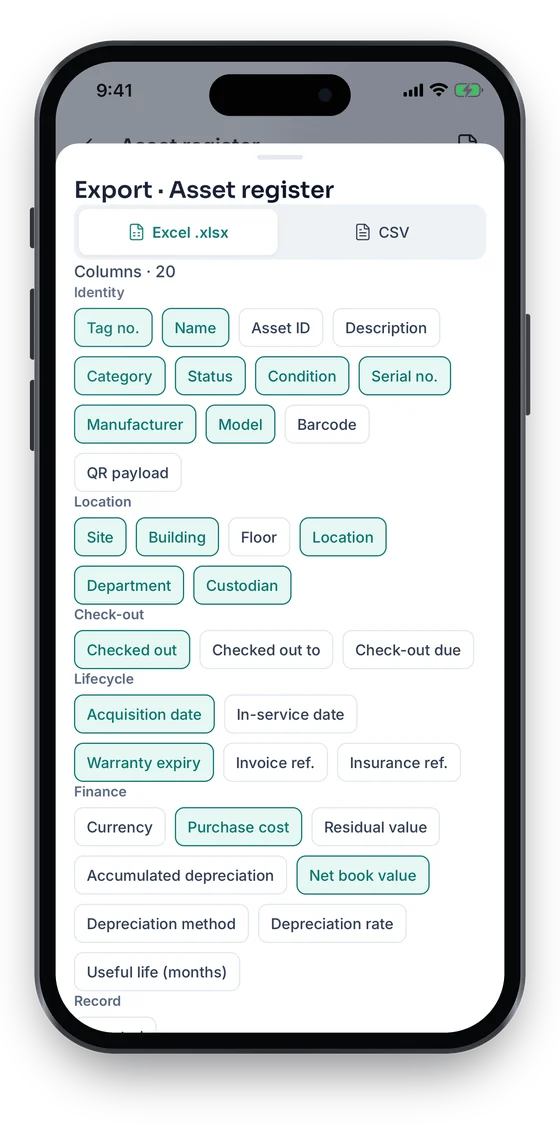
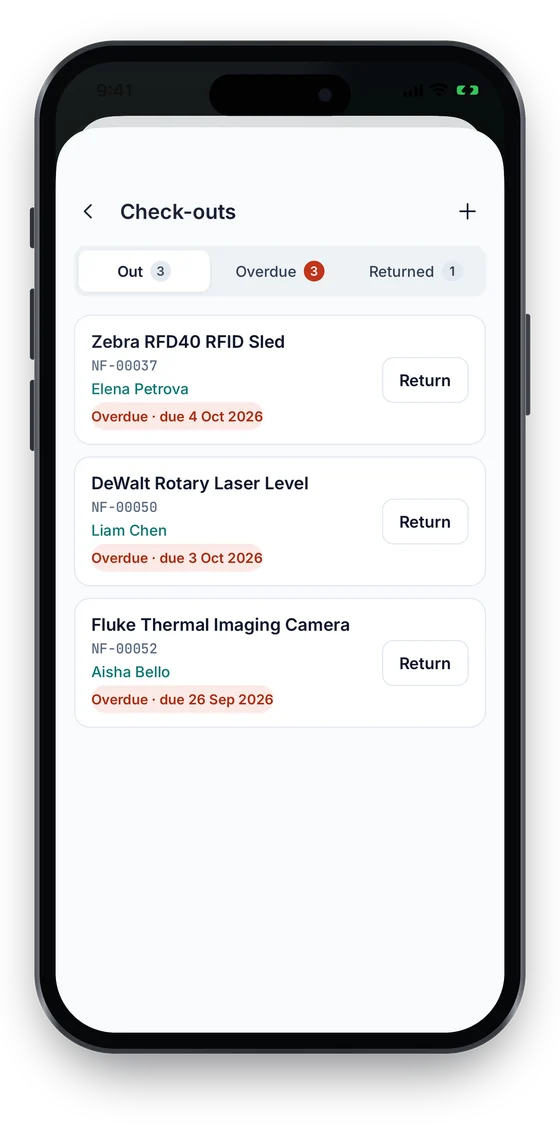
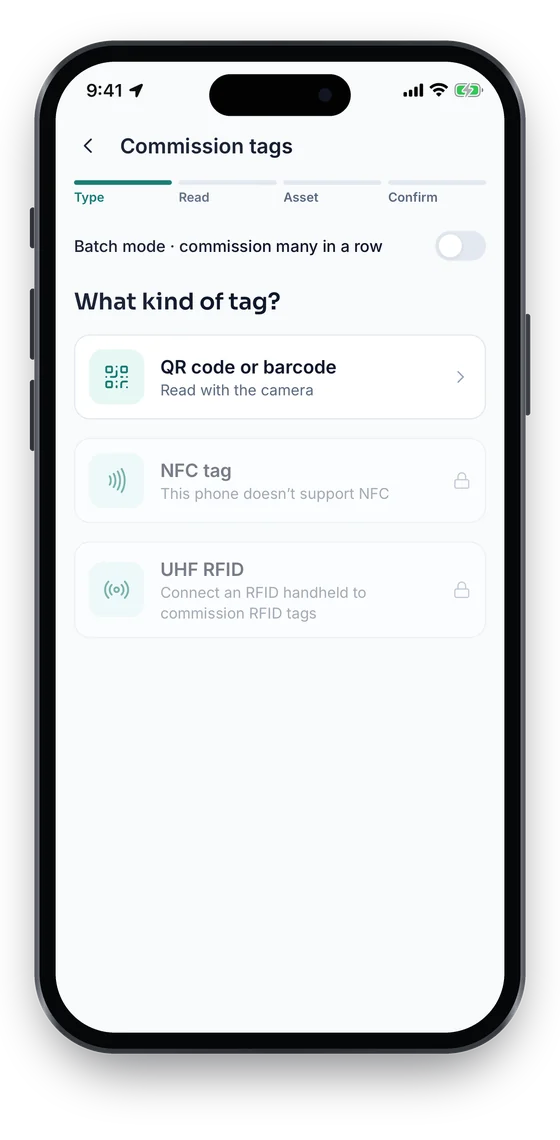
See every laptop that is out and what is overdue, and return a leaver’s kit with one tap. Bind a QR, barcode or NFC label to a new device as it is unboxed, and export the register to Excel or CSV for a renewal or an audit.

Coming soon on theApp StoreComing soon onGoogle Play
Check-outs list with overdue items and a Return button on each (sample data)
1Loaners & overdue
Commission tags screen choosing QR code or barcode, NFC tag, or UHF RFID with a handheld (sample data)
2Tag a new device
Export sheet choosing Excel or CSV and grouped columns (sample data)
3Export to Excel or CSV

Swipe to see more screens →

Real screens from the Asetavo phone app (demo workspace, fictional company). iOS and Android apps coming soon to the App Store and Google Play.
Product in action

What your team sees

An illustrative IT overview beside a real Asetavo screen.

IT hardware overviewIllustrative example
1,286
Devices in register
942
Assigned to employees
118
In IT store
57
Warranty ending in 90 days
4
Overdue loaners
Recent activity
  • Laptop #IT-LT-0847Checked out to Finance Analyst · dock + monitorAssigned
  • Laptop #IT-LT-0612Leaver return · condition: fair · to IT storeReturned
  • Switch #IT-NW-0033Comms room B1 · Rack 2 · support contract ends next monthContract expiring
  • Loaner #IT-LN-0009Due back 3 days agoOverdue
  • Laptop #IT-LT-0199Retired · wipe certificate attached · proceeds recordedDisposed
Sample data for illustration — not a customer account.
Asetavo product screen

Every asset group, in one register

Categories and custom fields keep the details each group needs — serials, warranty, custodian, room.

End-user devices

Laptops and desktops · Monitors · Docking stations · Tablets · Mobile phones

Accessories & peripherals

Keyboards and mice · Headsets and webcams · Chargers and adapters · Security keys · External drives

Network & infrastructure

Servers · Switches and routers · Firewalls · Wireless access points · UPS units and PDUs

Shared & meeting-room equipment

Projectors and displays · Conference cameras and speakers · Printers and scanners · Loaner laptops

IT store & spares

New stock awaiting issue · Returned devices awaiting wipe · Spare parts · Devices awaiting disposal

Use cases

Where IT teams put it to work

Employee → laptop → accessories

Each employee’s record shows every device checked out to them: the laptop, its dock, monitors, headset and phone. When a manager asks what a new hire needs, or HR asks what a leaver must return, the answer is one filter away.

Security incident: find the device

When a device needs to be located quickly — a lost laptop or a machine flagged by your security tooling — search by serial or asset ID to see its custodian, last recorded location and movement history. Asetavo shows the last scan or reader sighting — with the GPS position of that scan if it was made in the mobile app (Growth and up) — not a live device location.

Hardware refresh planning

Export the register with purchase date, model, condition, repair history and net book value. Sort by age to build next year’s refresh list and budget from real data rather than estimates.

Reconciling IT and finance

Because the same record carries the IT view (custodian, location, condition) and the finance view (cost, depreciation, NBV), a single stock-take gives both teams a matching list. Finance fields can be restricted so only finance users see them.

Controlling the IT store

Tag stock as it is received and keep it in an IT store location. With a UHF RFID reader at the store door, a zone rule can alert you when a tagged device leaves without an open check-out.

Maintenance

Repairs, warranties and infrastructure upkeep

Know before you ship a laptop for repair whether it is under warranty, and keep the history that tells you when a device has cost more than it is worth.

  • Work orders for repairs with assignee, status and completion time
  • Status changes such as In repair and In store recorded in history
  • Warranty, support, lease and AMC contracts with start and end dates
  • Preventive maintenance schedules for UPS, cooling and server hardware
Finance & depreciation

The finance view of your hardware

IT hardware is usually a fixed asset. Asetavo keeps its cost and depreciation on the same record IT uses day to day, so both teams work from one list.

  • Purchase cost, date, supplier and invoice reference per device
  • Depreciation methods per category with book and tax profiles
  • Net book value per device and for the whole fleet
  • Disposal with method, proceeds and gain or loss
Multi-location

Head office, branches and remote workers

Track devices across every office, comms room and IT store, and keep remote employees’ equipment on the register through check-outs.

  • Sites, buildings, floors and rooms for every office and comms room
  • A dedicated IT store location per site for spares and returns
  • Remote staff devices tracked by custodian
  • Moves between offices recorded with reason and reference
Identification

The right tag for each asset

IT hardware already carries serial numbers and often manufacturer barcodes; the job is to link each physical device to its record quickly. Most teams use QR labels on end-user devices, and add RFID where they audit racks and stores frequently.

All plans

QR

Printed label · phone camera · line of sight

Small asset labels on laptops, monitors and docks. Scan with the mobile app at issue, return and audit.

What is QR?
All plans

Barcode

1D label · any scanner · line of sight

Where devices already carry an existing asset barcode, record it as the device’s tag and scan it instead of adding a new label.

What is Barcode?
Growth and up

NFC

Tap-to-read chip · phone · a few cm

Tap-to-open asset records on shared meeting-room equipment and loaners, from any NFC-capable phone.

What is NFC?
Business and up

UHF RFID

No line of sight · readers & portals · metres

On-metal tags for servers and network gear so a whole rack or IT store can be audited in one sweep; fixed readers at the store door for zone alerts.

What is UHF RFID?

Not sure which to use? Try the tag technology selector or compare plans.

Security & access

Control who sees and changes what

Your hardware register lists who holds which device and where — useful information for an attacker. Access is deny-by-default and every change is attributed.

  • Nine permissions, so helpdesk staff can issue and return without seeing finance data
  • Audit trail of every change with user and timestamp
  • Revocable user sessions and mobile device tokens
  • TLS in transit and strict tenant isolation
  • SSO is coming soon
Security & access
Integrations

Fits the systems you already run

IT teams usually want their asset register to talk to HR, help desk, device-management and procurement systems. Asetavo provides the building blocks; there are no named, pre-built connectors today.

  • REST API (Business plan and above) using the same accounts and permissions as the web app
  • Signed webhooks from alert rules, e.g. a device leaving the IT store
  • Excel and CSV export of the register, check-outs and reports
  • HR, help desk, MDM and procurement connections built via the REST API
  • SSO is coming soon
Integrations & API
Implementation

From spreadsheet to live register

  1. 1
    Define categories and fields

    Set up hardware categories, depreciation defaults, and custom fields such as hostname, OS or cost centre. Add your offices, comms rooms and IT store as locations.

  2. 2
    Import your current inventory

    Import your existing spreadsheet or an export from another tool with the Excel/CSV import wizard.

  3. 3
    Load employees as custodians

    Add departments and employees as custodians so devices can be checked out to named people.

  4. 4
    Label and verify

    Label devices as they pass through the IT desk, then run a stock-take per floor and store to confirm who has what.

  5. 5
    Build JML into your process

    Use check-out for joiners, movements for movers and returns for leavers, and connect other systems via the REST API if you need to.

It keeps one register of IT hardware — end-user devices, peripherals and infrastructure — with custodian, location, warranty, repair history and value. Devices are issued to employees on check-out, moved with a recorded reason, returned with their condition, and retired with a disposal record.

Get every device on one list

Book a demo to see a joiner, a leaver and a warranty check on a sample IT register — or import your current hardware spreadsheet yourself in minutes.

No card required · Workspace ready in minutes · Simple USD pricing