
Asset finance

Fixed asset depreciation software with book and tax schedules

The asset you scan in the yard and the value on your balance sheet sit on one record. Set cost, life and method once, run depreciation monthly as a draft you can review, then post. Net book value (NBV) updates only when you post, and you can see where every figure came from.

Business and aboveCompare plans
Product screen · sample data
What it solves

What changes when depreciation moves into Asetavo

The way it usually works today, and the way it works once it lives in one system.

Depreciation in use on site
  1. Before: The fixed-asset register lives in a spreadsheet that finance maintains apart from the operations list, and the two drift apart every quarter.

    With Asetavo: Cost, life, method and NBV are fields on the same asset record operations scans and moves, so a disposed or missing asset is visible to finance at once.

  2. Before: Monthly depreciation is a formula someone copies down a column. One broken cell and the year-end number is wrong, with no trail showing why.

    With Asetavo: A monthly run computes one line per asset (opening NBV, charge, closing NBV, method) as a draft. Nothing changes until someone with finance access posts it.

  3. Before: Book and tax depreciation are kept in two workbooks, and it is never clear which one updated the asset value.

    With Asetavo: Each asset carries a Book profile and an optional Tax profile. Only book runs change NBV. Tax runs are a parallel schedule for reporting.

  4. Before: Disposals are recorded late or not at all, so written-off equipment keeps depreciating and gains or losses are worked out by hand.

    With Asetavo: Disposing an asset records method, proceeds and gain or loss against NBV, sets a terminal status and freezes NBV. The app blocks disposal while the asset is checked out.

Product in action

What your team actually sees

Coded from the real Asetavo screens, with sample data for a fictional company, Northfield Group.

The book schedule for the same generator: one line per posted monthly run. Each line opens at the previous closing NBV, and the 2025 subtotal and the running total to date reconcile exactly.

Depreciation schedule

  1. 1
    Line by line
    Opening NBV − charge = closing NBV. The next period opens at that closing value.
  2. 2
    Book / Tax switch
    Switch to the tax book to see its own lines. They are kept separately and never change the register.
  3. 3
    What is left
    99 periods × $187.50 = $18,562.50 still to depreciate, which takes NBV to the $2,500 residual in December 2034.
Sample data
Capabilities

Everything in Depreciation

Every card below is in the product today, on the plans shown above.

8 depreciation methods

Straight-line, reducing balance, double declining balance, sum-of-years’-digits, units of production, US MACRS, UK capital allowances and none.

Book and tax profiles

One Book and one Tax profile per asset, each with its own method, life, rate, residual, convention, MACRS class or allowance pool.

Draft-then-post monthly runs

Compute a month for a book, review opening NBV, charge, closing NBV and method per asset, then post or discard. Each period and book is computed once.

NBV that stays correct

NBV = cost − accumulated depreciation and is floored at residual value. Only posted book runs change it.

Disposals with gain or loss

Sale, scrap, donation, trade-in or write-off, with proceeds and gain or loss against NBV. Disposal sets a terminal status and freezes NBV.

Finance-only access

Cost and depreciation fields, profiles, runs and disposals need the finance permission. Other users cannot change them, even through the API.

Depreciation report and exports

A depreciation report by period, plus register cost and NBV in the register report, exportable to Excel or CSV.

Finance on the phone

People with the Finance role see book and tax schedules and can compute the monthly book run in the Asetavo app. Warranty & contracts lists what ends in the next 30, 60 or 90 days.

Not in the product yet

Everything else on this page is live today. These are the pieces we are still building.

  • RoadmapUsage input for units-of-production runs
  • RoadmapDirect GL / accounting journal posting
  • RoadmapPDF report exports

In the Asetavo app

Book and tax, on the phone

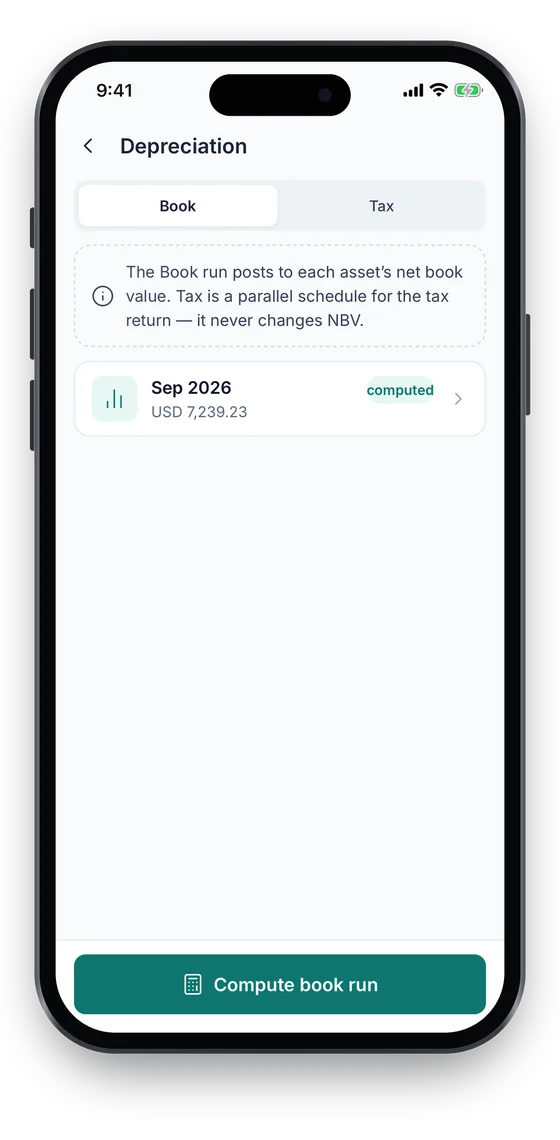
Finance staff see book and tax depreciation for an asset and can compute the monthly book run, which is reviewed before it is posted. Warranty & contracts shows what ends in the next 30, 60 or 90 days. Money appears only to the Finance role.

Coming soon on theApp StoreComing soon onGoogle Play
Depreciation screen with Book and Tax tabs and a computed September run (sample data)
1Book & tax
Warranty and contracts list with days-left badges (sample data)
2Contracts ending

Swipe to see more screens →

Real screens from the Asetavo phone app (demo workspace, fictional company). iOS and Android apps coming soon to the App Store and Google Play.
How it works

From first step to everyday use

  1. 01
    Capitalize the asset

    Enter purchase cost, residual value, in-service date and useful life on the asset. Categories can supply defaults so similar assets are set up the same way.

  2. 02
    Choose the book method

    Pick one of eight methods for the Book profile, such as straight-line or reducing balance. The book profile drives the NBV in your register.

  3. 03
    Add a tax profile (optional)

    Add a separate Tax profile, for example US MACRS or UK capital allowances. It keeps its own running total and never touches register NBV.

  4. 04
    Compute the monthly run

    Pick a month and a book. Asetavo writes a draft with one line per asset showing opening NBV, charge, closing NBV and method. No asset values change yet.

  5. 05
    Review, then post or discard

    Check the lines and totals. Post the book run to update accumulated depreciation and NBV, or discard the draft and compute it again.

  6. 06
    Dispose and report

    Record disposals with proceeds and gain or loss, then use the depreciation and register reports, or the Excel or CSV export, to reconcile with your ledger.

Workflows, end to end

Month-end close

  1. Rachel (Finance) opens Depreciation and computes September 2026 for the Book.
  2. She checks the draft: 1,174 lines, the total against last month, and any asset floored at residual.
  3. A missing in-service date on a new laptop is fixed on the asset, then the draft is discarded and recomputed.
  4. She posts the run. NBV updates on every asset and the run shows as posted by Rachel Kim.
  5. She exports the register to Excel and books the month’s journal in the ledger.

Tax schedule for the return

  1. Finance adds a Tax profile (US MACRS, 7-year, half-year) to qualifying machinery.
  2. Each month a Tax run is computed and recorded alongside the Book run.
  3. At year end the tax lines give the deduction per asset without touching register NBV.
  4. Your accountant reviews the tax schedule and prepares the return.

Selling a used forklift

  1. Operations returns the forklift from its last check-out. Disposal is blocked while it is out.
  2. Finance records the disposal: method Sale, proceeds $15,000.
  3. Asetavo computes the gain or loss against the current NBV and freezes NBV.
  4. Status becomes Disposed, the asset drops out of future runs and the history keeps who did it.
Compare

The 8 methods compared

CriteriaMonthly chargeTypical useBook or tax
Straight-line(cost − residual) ÷ life monthsFurniture, buildings fit-out, most equipmentBook (most common)
Reducing balanceopening NBV × rate ÷ 12Vehicles, plant that loses value earlyBook
Double declining balanceopening NBV × 2 ÷ life monthsIT hardware, fast-obsoleting kitBook
Sum-of-years’-digitsSYD fraction of base ÷ 12Machinery with front-loaded wearBook
Units of productionperiod units ÷ total units × baseUsage-driven machinesBook
US MACRSIRS table % of basis for the year ÷ 12US federal tax returnTax (US)
UK capital allowancespool balance × 18% or 6% ÷ 12UK corporation tax computationTax (UK)
NoneNo chargeLand, assets held for saleEither

Choose methods with your accountant. Asetavo applies the method you configure. It does not decide your accounting policy or tax position.

Deep dive

The detail behind it

Book accounting vs jurisdiction-specific tax treatment

Accounting depreciation and tax depreciation answer different questions. Asetavo keeps them apart on purpose.

Book profile
Your accounting policy: the method and life your auditors expect. It drives register NBV, the dashboard value and the register report.
Tax profile
The schedule your tax jurisdiction requires. Only assets with an active tax profile go into tax runs, and their opening balance comes from prior tax lines.
MACRS is US tax
MACRS recovery tables are US federal tax rules. Use them on the Tax profile of US assets, not as a book method.
Capital allowances are UK tax
Main and special rate pools follow UK capital allowance rules. They belong on the Tax profile of UK assets.
Not tax advice
Asetavo computes the schedule you configure. Your accountant decides which method, class, convention and pool apply.

Data captured and rules enforced

Stored per asset, per run and per disposal:

Asset
Purchase cost, residual value, currency, acquisition and in-service dates, useful life, method, rate, accumulated depreciation and NBV.
Run
Period (year and month), book, run date, status (draft / computed / posted), posted by and GL journal reference.
Run line
Asset, opening NBV, charge, closing NBV, method and book. Lines are kept as the record of each run.
Disposal
Date, method (sale, scrap, donation, trade-in, write-off), proceeds, gain or loss, note and who recorded it.
Deletion guard
An asset with depreciation lines or a disposal cannot be deleted, so the finance history cannot disappear.
FAQ

Depreciation questions

Want to see it with your assets?

Walk us through your sites and we’ll show you depreciation set up the way you’d use it.

Book a demo
Eight: straight-line, reducing balance, double declining balance, sum-of-years’-digits, units of production, US MACRS, UK capital allowances and none.

Know the value of every asset you track

Put cost, depreciation and net book value on the same record your teams scan, move and maintain.

No card required · Workspace ready in minutes · Simple USD pricing