Asetavo for Churches & Ministries

Church asset management software for everything the congregation owns

Keep one register of the sound desk, microphones, instruments, projectors, chairs, vehicles and donated items across every building and campus — who has each item, where it should be, and what it is worth when the trustees or the insurer ask.

  • AV & sound
  • Musical instruments
  • Furniture & hall equipment
  • Vehicles
The operation

Buildings, ministries and volunteers — all sharing the same equipment

A church owns more than most people realise, and very little of it is managed by one person. The sound and projection kit belongs to the media team, the instruments to the worship team, the tables and urns to whoever runs hospitality, and the minibus to the youth ministry.

The problem

What goes wrong without a system

The day-to-day failures church teams describe before they move off spreadsheets and paper registers.

01

Equipment walks between rooms, events and homes

Microphones, cables, projectors and PA speakers are borrowed for youth nights, weddings, outreach events and home groups. Without a record of who took them, items come back late, come back broken or do not come back at all.
02

Nobody holds the full list

The media team has a spreadsheet, the worship leader knows the instruments, the hall booking secretary knows the furniture, and the treasurer has a list of purchases. None of them match, and none of them includes the things that were donated.

03

Donated items have no paper trail

A keyboard given by a family, a second-hand minibus, a set of chairs from a closing congregation: gifts often arrive without a value, a date or a note of any conditions, which makes them hard to report to trustees and hard to insure.

04

Trustees and insurers ask questions you cannot answer quickly

When the insurer asks for a schedule of contents, or the trustees want to know what the church owns and what it is worth, someone spends weekends walking the buildings with a clipboard.

05

Volunteers change, knowledge leaves

The person who set up the sound system and knew where every cable lived moves on. Without a register, labels and history, the next volunteer starts from scratch.

How Asetavo helps

One platform, set up for churches

One church asset register

Record every item once — description, serial number, ministry, location, custodian, condition, photo and purchase or gift value — and filter the register by building, ministry or category.

Learn more

QR labels scanned with any phone

Print QR or barcode labels and scan them with a phone camera to open an item’s record. Labels and scanning are included on the free Starter plan for up to 100 assets.

Learn more

Volunteer check-out with due dates

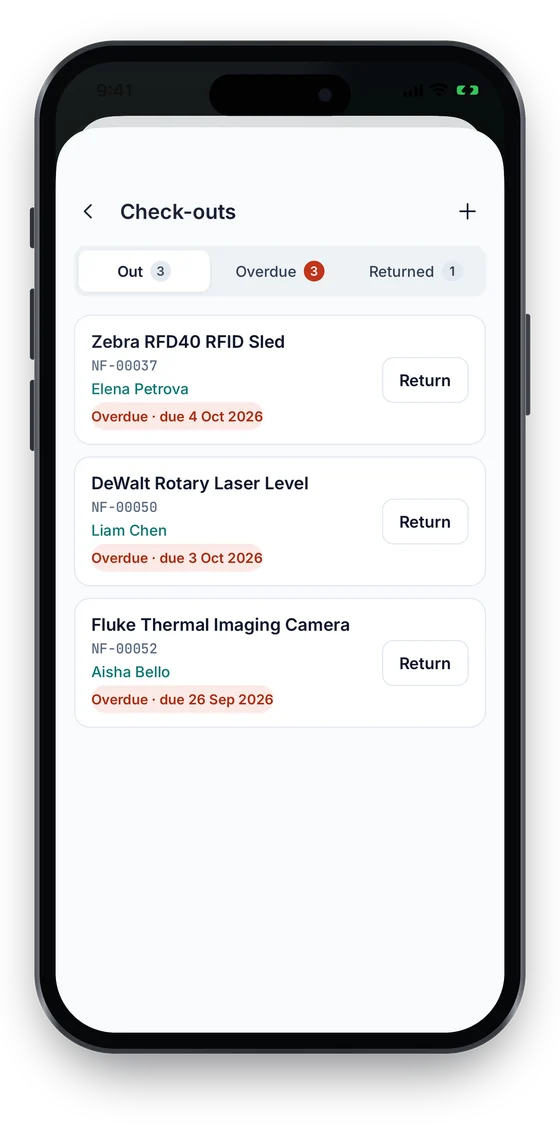
A team leader checks a mic kit, projector or PA out to a volunteer with a due date, and checks it back in with its condition. Overdue lists show what is still out. Check-in/out is on Growth and above.

Learn more

Donated items recorded properly

Add custom fields such as Donor, Gift date, Estimated value and Restrictions, and attach the gift letter or receipt, so every donated item has its story on the record.

Learn more

Audits for trustees and insurers

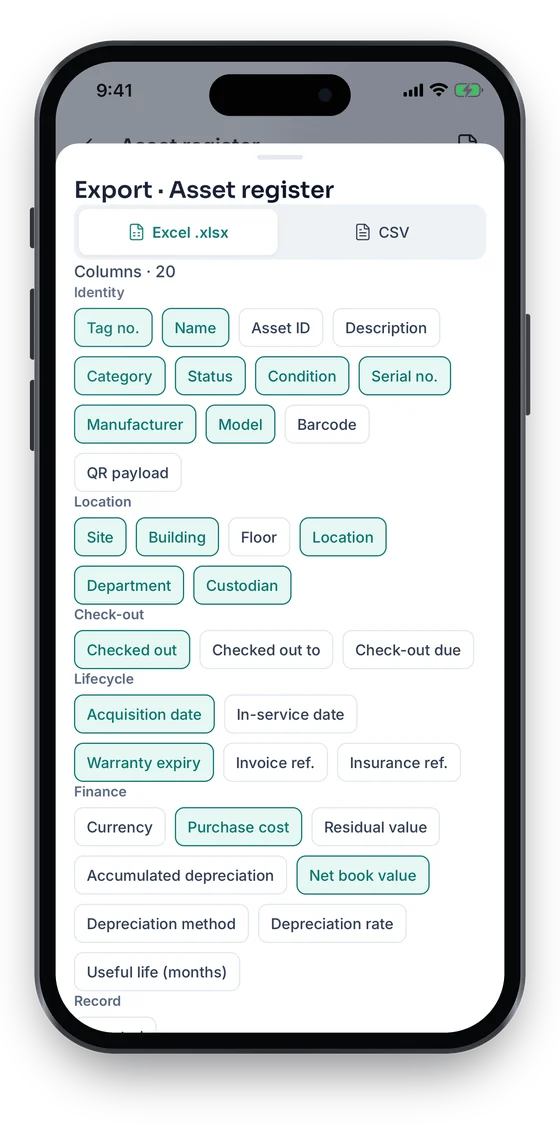
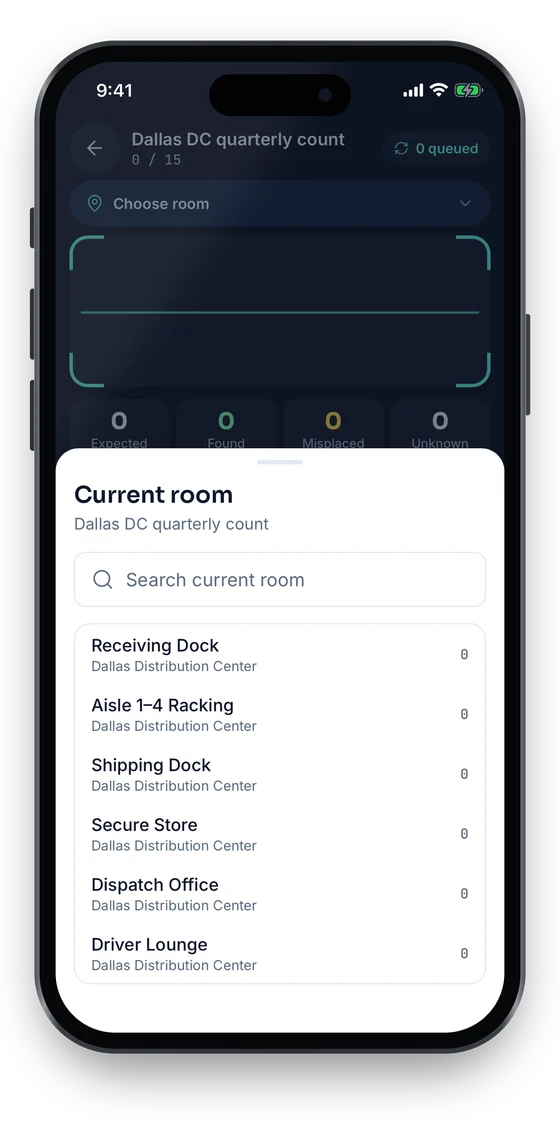
Run a stock-take room by room with phones, see what was found, missing or unregistered, and export the register with values and photos to Excel or CSV. Stock-takes start on Growth; exports are on every plan.

Learn more

Every campus in one workspace

Set up each campus, building and store cupboard as a location, so central staff see everything while each site manages its own kit. Multiple sites are on Growth and above.

Learn more

Servicing for the minibus, boiler and organ

On the Business plan, keep service schedules, work orders and contracts for vehicles, heating, PA systems and instruments on the asset itself.

Learn more
Industry workflows

The asset lifecycle, the way churches run it

  1. 01Buy or receive a gift
  2. 02Register
  3. 03Label
  4. 04Assign to ministry
  5. 05Lend to volunteers
  6. 06Count
  7. 07Service
  8. 08Sell, give away or dispose

Lending AV kit for an event

  1. Request
  2. Scan kit
  3. Check out to volunteer
  4. Event
  5. Scan back in

The media lead scans the portable PA, mics and cables, checks them out to the volunteer running the event with a due date, and scans them back in on Monday with a note of anything damaged.

Recording a donated item

  1. Gift arrives
  2. Register
  3. Donor fields
  4. Attach letter
  5. Label

When a family donates a keyboard, register it with the donor, gift date, an estimated value and any conditions, attach the gift letter and stick a QR label on it before it goes to the worship team.

Annual count for the trustees

  1. Start stock-take
  2. Count room by room
  3. Resolve variances
  4. Export

Volunteers count each building with their phones, the administrator resolves missing and unregistered items, and the register is exported with locations, values and photos for the trustees’ meeting and the insurance review.

Handover when a volunteer steps down

  1. Filter by custodian
  2. Return items
  3. Scan
  4. New custodian

Filter the register by the departing volunteer, collect everything they hold, scan each item and assign it to their successor or the store cupboard.

On the phone · Churches

Lend and count from a volunteer’s phone

Team leaders check kit out and back in by scanning its label, and volunteers count a building room by room. In the Asetavo app every action works without signal and syncs when the phone reconnects; everything also works in a phone browser today.

Coming soon on theApp StoreComing soon onGoogle Play
Check-outs list with overdue items and a Return button on each (sample data)
1Check kit out and in
Stock-take Dallas DC quarterly count, choosing the current room to count (sample data)
2Count room by room
Export sheet choosing Excel or CSV and grouped columns (sample data)
3Excel or CSV export

Swipe to see more screens →

Real screens from the Asetavo phone app (demo workspace, fictional company). iOS and Android apps coming soon to the App Store and Google Play.
Product in action

What your team sees

An illustrative church overview beside a real Asetavo screen.

Main campus — church asset overviewIllustrative example
412
Registered items
18
Checked out
3
Overdue returns
64
Donated items
27
Not counted this year
Recent activity
  • Wireless mic kit #AV-MIC-06Checked out to Youth worship team · due SundayOut
  • Digital piano #INS-014Donated · gift letter attachedIn use
  • Portable PA #AV-PA-02Returned from outreach event · cable missingChecked in
  • Projector #AV-PRJ-03Not found in hall countMissing
  • Minibus #VEH-01Service due next monthScheduled
Sample data for illustration — not a customer account.
Asetavo product screen

Every asset group, in one register

Categories and custom fields keep the details each group needs — serials, warranty, custodian, room.

AV & sound

Mixing desks and stage boxes · Microphones and in-ear monitors · Speakers and amplifiers · Projectors, screens and cameras · Streaming and recording equipment · Cables and stands (as kits)

Musical instruments

Pianos and organs · Keyboards and digital pianos · Drum kits and percussion · Guitars, basses and amps

Furniture & hall equipment

Chairs, tables and staging · Lecterns and communion furniture · Kitchen appliances and urns · Children’s ministry equipment

Vehicles

Minibuses · Vans · Trailers

Office & IT

Laptops and tablets · Printers and copiers · Routers and Wi-Fi equipment

Donated & historic items

Gifted instruments and equipment · Memorial furniture and fittings · Items with donor conditions

Use cases

Where church teams put it to work

Know what the church owns

Replace the separate lists kept by the media team, the worship team, the hall secretary and the treasurer with one register that everyone works from, filtered by ministry or building.

Lend equipment to volunteers and get it back

Check AV kit, instruments and event equipment out to named volunteers with due dates. Volunteers do not need a login; the team leader records the loan and the return, including the condition it came back in.

Insurance schedules and claims

Keep values, serial numbers and photos on each item, and export the register for your insurer’s schedule of contents. If something is stolen or damaged, the record, photos and receipts are already in one place.

Reports for trustees and annual meetings

Give trustees, elders or the parish council an up-to-date list of what the church owns, where it is, what condition it is in and what has been bought, donated or disposed of during the year.

Multi-campus churches

Each campus keeps its own buildings and store cupboards, central staff see the whole picture, and equipment moved between campuses for big events is recorded as a move with a reason.

Maintenance

Look after the things that are expensive to replace

Organs and pianos need tuning, minibuses need servicing, and PA systems and heating need checks. On the Business plan, keep schedules, work orders and contracts on each asset.

  • Service schedules for vehicles, heating, organs and pianos
  • Work orders for repairs with status and cost
  • Warranty, insurance and service contracts with end dates
  • Condition recorded at every check-out, return and count
Finance & depreciation

Purchase cost, gift value and current value

Treasurers want to know what was spent, what was given and what things are worth now. Asetavo keeps the figures on each record; your own policies and your accountant decide how they are used in the accounts.

  • Purchase cost, supplier and receipt on bought items
  • Donor, gift date and estimated value as custom fields on gifts
  • Depreciation and net book value on the Business plan
  • Disposal with method, date and proceeds
Multi-location

One church, several buildings or campuses

Model each campus, church plant or building as a site, with its rooms and store cupboards underneath. Equipment that travels between sites is moved, not re-registered.

  • Campuses, buildings, rooms and store cupboards as locations (multi-site on Growth)
  • Ministries as departments, each with its own custodians
  • Stock-takes scoped to one campus or building
  • Moves between campuses recorded with reason and date
Identification

The right tag for each asset

Churches need tags that are cheap, discreet and readable with volunteers’ own phones. For most churches that means QR labels, with tougher options for vehicles and equipment that travels.

All plans

QR

Printed label · phone camera · line of sight

The default for AV kit, instruments, furniture and IT. Print labels yourself and scan them with any phone — included on the free plan.

What is QR?
All plans

Barcode

1D label · any scanner · line of sight

Use where items already carry barcodes, or where a handheld barcode scanner is kept at the AV desk or store cupboard.

What is Barcode?
Growth and up

NFC

Tap-to-read chip · phone · a few cm

Small tap tags for flight cases, store cupboard doors and kit that is lent out often (Growth plan).

What is NFC?
Business and up

UHF RFID

No line of sight · readers & portals · metres

Rarely needed in a church. Worth considering only for very large venues that count hundreds of items often (Business plan).

What is UHF RFID?

Not sure which to use? Try the tag technology selector or compare plans.

Security & access

Control who sees and changes what

Volunteers should be able to scan and borrow without changing values or deleting records. Permissions are granted per role, and every change is recorded with who made it and when.

  • Role-based permissions, from view-only to finance
  • Finance fields hidden from users without the Finance permission
  • Audit trail of every change
  • Mobile sessions you can revoke if a phone is lost
  • Each church workspace in its own isolated database
Security & access
Integrations

Fits the systems you already run

Most churches report from spreadsheets and their accounting package. Asetavo feeds those with exports, and with the REST API where a volunteer developer or integrator can help.

  • Excel and CSV export of the register, including custom fields
  • Excel/CSV import wizard for your existing lists
  • REST API on the Business plan
  • No pre-built connectors to church management or accounting software — connections are built via the REST API
Integrations & API
Implementation

From spreadsheet to live register

  1. 1
    Gather the lists you already have

    Collect the media team’s spreadsheet, the instrument list, the hall inventory and the treasurer’s purchases, or start from the church asset register template.

  2. 2
    Set up buildings and ministries

    Create each campus, building, room and store cupboard as a location, and each ministry as a department.

  3. 3
    Import and label

    Import the combined list with the Excel/CSV wizard, print QR labels and label one room at a time with a couple of volunteers.

  4. 4
    Start lending through the system

    Ask team leaders to check equipment out and in by scan, so every loan has a name and a due date.

  5. 5
    Count once a year

    Run a stock-take before the annual meeting or insurance renewal and export the results for the trustees.

It is software that keeps a register of everything a church owns — AV and sound equipment, instruments, furniture, vehicles, IT and donated items — with where each item is, who is responsible for it, its condition and value, and a history of loans, moves and repairs.

Give your church one list of everything it owns

Start free with your first 100 items, or book a demo and we’ll show you a sample church set up with campuses, ministries and donated items.

No card required · Workspace ready in minutes · Simple USD pricing