
Asetavo for Government & Public Sector

Public asset management with a complete audit trail

One fixed asset register for every ministry, department, agency and facility — with physical verification, custodian records, depreciation and a history of every change that auditors can follow line by line.

  • Office & ICT
  • Vehicles & plant
  • Furniture & fittings
  • Facility & specialist equipment
Government team member using Asetavo
The operation

Structured the way public bodies are actually organized

A public body rarely owns its assets in one place. A laptop is bought centrally, issued to a department, used by an officer in a district facility, and appears in an annual statement prepared by a finance team that has never seen it.

Government operations on site
  1. Step 1

    Your offices and facilities

    Add each department, building and facility.

  2. Step 2

    Your public assets

    Tag furniture, IT, vehicles and equipment, and name a responsible custodian.

  3. Step 3

    Always accountable

    See where each asset is, who is responsible for it, and its value for reporting.

Verification, depreciation and disposal records all come from one register you can stand behind at audit.

The problem

What goes wrong without a system

The day-to-day failures government teams describe before they move off spreadsheets and paper registers.

01

The register and the ground disagree

Registers are often built once, at acquisition, and then drift. Assets are moved between offices without paperwork, replaced without being written off, or bought through a project and never recorded. By the time the annual verification arrives, nobody can say whether a line in the register is still a real object.
02

Verification is manual and slow

Physical verification still means printed lists, clipboards and a team walking every room, then days of re-keying ticks into a spreadsheet. Anything found that is not on the list — an unregistered asset — tends to be noted on the margin and forgotten.

03

Custody is unclear across departments

When a projector moves from one directorate to another, or an officer is posted to a new station with a laptop, the register rarely follows. Without a named custodian and a department on every record, a missing asset becomes nobody’s responsibility.

04

Finance figures can’t be traced to objects

Acquisition cost, accumulated depreciation and net book value are calculated in a separate workbook that is not linked to the physical asset. When auditors ask how a figure in the statements maps to real equipment, the trail breaks.

05

Disposals and write-offs lack evidence

Vehicles are auctioned, computers are condemned, furniture is written off — but the decision, the date, the method and the proceeds live in separate files. Reconstructing why an asset left the register years later is painful.

06

Changes are hard to attribute

In a shared spreadsheet anyone can overwrite a value, and there is no reliable record of who changed a location, a cost or a status, or when. That makes the register difficult to defend in an audit.

How Asetavo helps

One platform, set up for government

A fixed asset register with every field that matters

Each record holds identification (asset ID, serial, model, manufacturer), acquisition (supplier, invoice reference, date, cost), location down to the room, department and custodian, condition, warranty expiry and value — plus custom fields for anything your own register format requires, such as a funding vote, programme code or legacy asset number.

Learn more

Physical verification by scan, not by clipboard

Create a stock-take scoped to a facility, building, floor, room, category or department. Verification officers scan QR labels or sweep UHF RFID tags with the mobile app, and Asetavo compares every scan with what the register expected for that scope.

Learn more

Variance you can investigate

Reconciliation sorts every result into found, missing, misplaced, unregistered or duplicate. Each variance is resolved in the worklist — confirm the move, write it off, or register an unknown tag as a new asset — and the closed session is kept as the verification record rather than a separate memo.

Learn more

Custodians and departments on every asset

Assign each asset to a department and a named custodian. Transfers between departments or stations are recorded as movements with a reason and a reference number, so the register reflects postings and reorganizations as they happen.

Learn more

Depreciation and net book value on the same record

Choose from eight depreciation methods with separate book and tax profiles, set defaults per category, and see accumulated depreciation and net book value on each asset. Valuation reports export to Excel or CSV for your finance team.

Learn more

Disposals recorded properly

Dispose of an asset with its date, method and proceeds. Asetavo records the gain or loss against net book value, freezes the book value and keeps the asset in history — and it blocks disposal while an asset is still checked out.

Learn more

Roles, permissions and an audit trail

Nine granular permissions separate who can view, create, edit, delete, manage structure, see finance fields, run stock-takes, manage devices and handle alerts. Every change is written to an audit trail with who made it and when.

Learn more
Industry workflows

The asset lifecycle, the way government runs it

  1. 01Requisition
  2. 02Acquire
  3. 03Register
  4. 04Tag
  5. 05Assign custodian
  6. 06Verify
  7. 07Transfer
  8. 08Dispose

Annual physical verification

  1. Register
  2. Physical verification
  3. Variance
  4. Investigation
  5. Correction
  6. Audit trail

Start from the register as it stands. Verification teams scan each facility room by room. Asetavo produces the variance — missing and unregistered items — which officers investigate and correct in the system. Every correction is attributed and timestamped, so the audit trail shows not just the final register but how it got there.

Inter-departmental transfer

  1. Request
  2. Approve (your process)
  3. Record movement
  4. New custodian
  5. Confirm on scan

When an asset moves to another department or station, record the movement with the destination room, the new custodian, a reason and your transfer form number. The next scan at the new location confirms it arrived. Approval itself follows your own procedure — Asetavo keeps the evidence.

Board of survey and disposal

  1. Identify
  2. Condition & NBV
  3. Decision
  4. Dispose
  5. Gain / loss

List assets marked damaged, obsolete or written off, review their condition and net book value, attach the committee decision, then record the disposal with method and proceeds. The asset leaves the active register but its full history remains.

Pool vehicle and equipment loans

  1. Officer
  2. Vehicle / projector
  3. Due date
  4. Return & condition

Shared items such as pool vehicles, cameras or projectors are checked out to an officer with a due date and condition, and checked back in. Overdue items are flagged automatically.

On the phone · Government

Physical verification, office by office

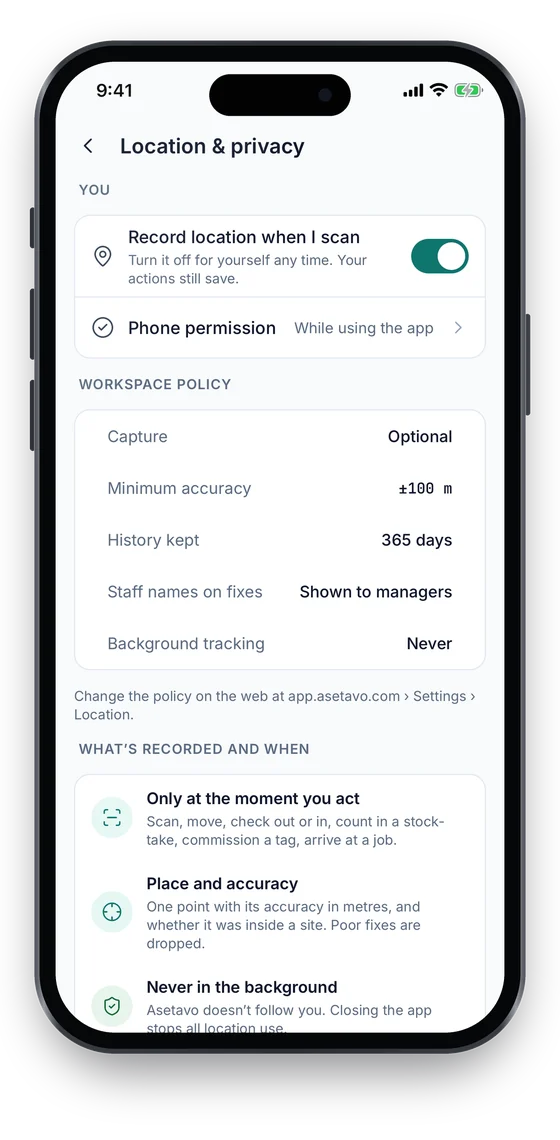
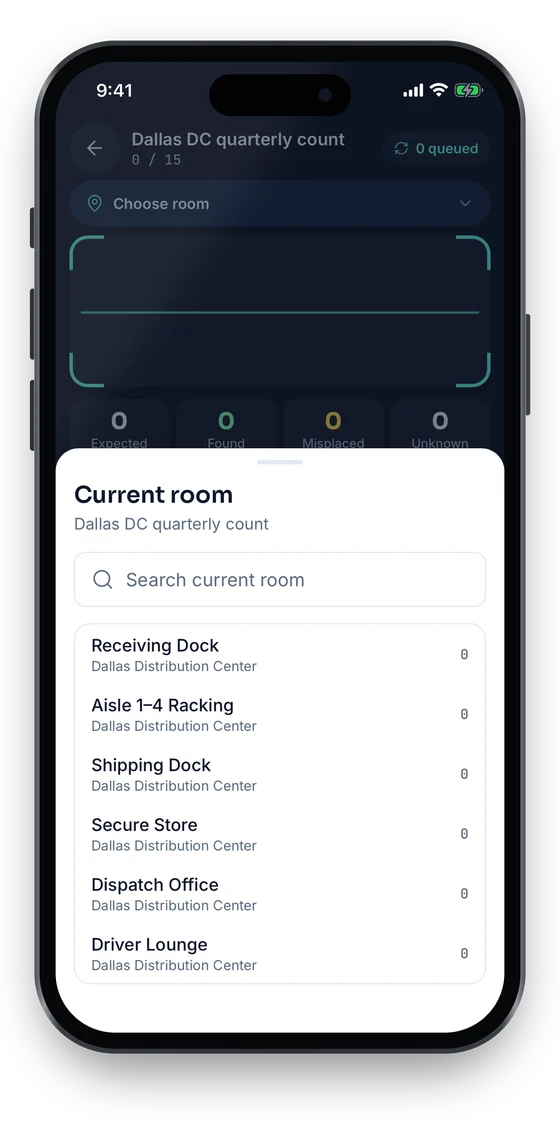
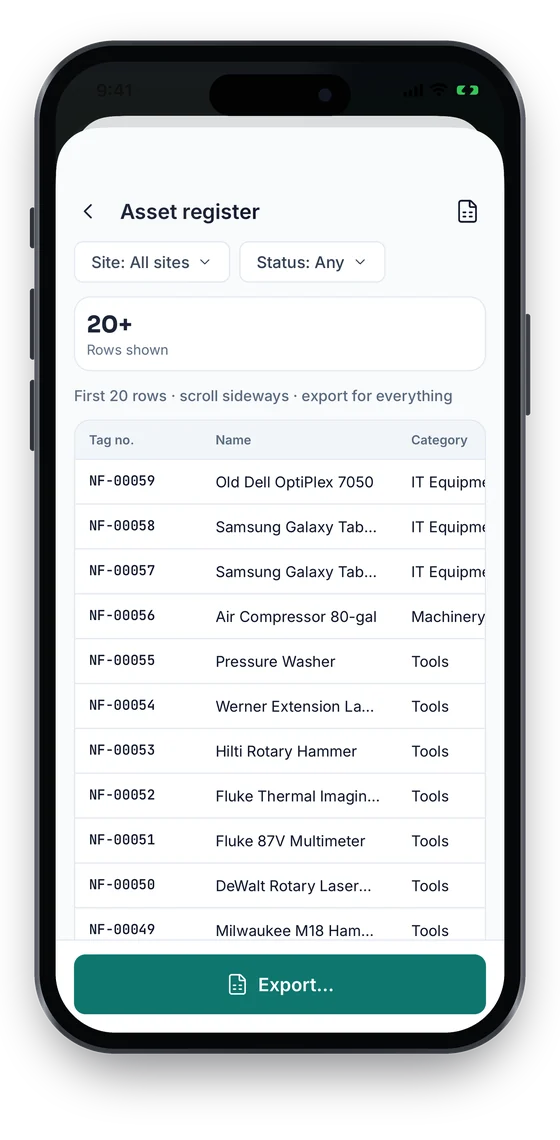
Officers count each room on the phone, then review variances with Found it, Still searching or Write off, on the phone or the web. The register report previews on the phone and exports to Excel or CSV. Your workspace decides whether location is off, optional or required; it is never collected in the background.

Coming soon on theApp StoreComing soon onGoogle Play
Stock-take Dallas DC quarterly count, choosing the current room to count (sample data)
1Verify by room
Asset register report preview table filtered by site and status (sample data)
2Register report
Location and privacy settings: workspace policy, minimum accuracy, history kept and background tracking Never (sample data)
3Location policy

Swipe to see more screens →

Real screens from the Asetavo phone app (demo workspace, fictional company). iOS and Android apps coming soon to the App Store and Google Play.
Product in action

What your team sees

An illustrative government overview beside a real Asetavo screen.

Verification overview — Regional OfficeIllustrative example
3,214
Assets in scope
2,987
Verified
41
Missing
63
Unregistered found
TZS 4.8bn
Net book value
Recent activity
  • Laptop #GOV-ICT-1187Found in Block A · Floor 2 — registered to Floor 1Location corrected
  • Vehicle #GOV-MOH-0412Transport Yard · custodian: Fleet OfficerVerified
  • Projector #GOV-ICT-0633Not seen in Conference Room 3Under investigation
  • Untagged generatorPlant Shed · added to registerRegistered
  • Desk set #GOV-FUR-2210Board of survey — disposed, proceeds recordedDisposed
Sample data for illustration — not a customer account.
Asetavo product screen

Every asset group, in one register

Categories and custom fields keep the details each group needs — serials, warranty, custodian, room.

Office & ICT

Desktops and laptops · Printers and copiers · Servers and network switches · Projectors and screens · Phones and radios

Vehicles & plant

Pool and field vehicles · Motorcycles · Road plant and graders · Generators · Water pumps

Furniture & fittings

Desks and chairs · Filing cabinets and safes · Conference furniture · Air conditioners · Shelving and lockers

Facility & specialist equipment

Medical and laboratory equipment · Survey instruments · Workshop tools · Security and CCTV equipment · Kitchen and laundry equipment

Stores & controlled items

Items in central stores · Keys and access cards · Items issued on loan · Donated or project-funded equipment

Use cases

Where government teams put it to work

Building the first reliable register

Many public bodies start with several partial lists — one from finance, one from ICT, one from each facility. You import your existing spreadsheets with the Excel/CSV import wizard, you tag assets facility by facility, and the first full verification turns those lists into one register with every asset tied to a room, a department and a custodian.

Year-end verification for the financial statements

Run the verification as a scoped stock-take per facility, resolve the variance, then export the register with acquisition cost, accumulated depreciation and net book value. Finance works from figures that are tied to objects someone has actually scanned.

Handover when an officer is transferred or retires

Filter the register by custodian to see everything an officer holds, verify each item physically, and move it to their successor or back to stores. The movement history shows the handover date and who recorded it.

Responding to an audit query

When an auditor asks about a specific asset, open its record: acquisition details and documents, every location and custodian it has had, every verification it was seen in, depreciation to date and, if applicable, its disposal. The answer is one screen rather than a week of searching.

Controlling shared and high-risk items

Pool vehicles, cameras, survey instruments and keys are issued on check-out with due dates. For stores or ICT rooms with UHF RFID readers at the door, zone rules can raise an alert when a tagged item leaves without an open check-out.

Maintenance

Keep facility equipment serviced and documented

Generators, air conditioners, lifts, vehicles and medical equipment need planned servicing, and the service record is part of the asset’s story. Asetavo keeps work orders, preventive maintenance schedules and service contracts on the same record as the asset.

  • Preventive maintenance schedules by date or interval
  • Work orders with assignee, status and completion time
  • Service, AMC, insurance and lease contracts with start and end dates
  • Calibration records for laboratory and survey instruments
Finance & depreciation

From acquisition cost to disposal, on one record

The finance view of an asset sits on the same record as its location and custodian, so the figures in your statements trace back to physical objects. Configure asset records and workflows to support your organization’s applicable accounting, audit and public-sector requirements — Asetavo keeps the records; your policies decide how they are used.

  • Acquisition cost, date, supplier and invoice reference
  • Eight depreciation methods with book and tax profiles, defaults per category
  • Accumulated depreciation and net book value per asset
  • Disposal with date, method, proceeds and recorded gain or loss
Multi-location

Headquarters, regions and districts in one workspace

Set up each facility — headquarters, regional offices, district stations, depots — as a site with its own buildings and rooms. Head office sees everything; verification teams work one facility at a time.

  • Location hierarchy: site → building → floor → room
  • Departments and custodians independent of location
  • Stock-takes scoped to a site, building, room, category or department
  • Movements between facilities recorded with reason and reference
Municipalities & local councils

Asset management software for municipalities and local councils

A council runs offices, depots, libraries, clinics, parks and community halls, each full of equipment bought from different budgets. Asetavo gives the council one asset register across all of them, with the department that owns each asset, the site and room it lives in and the officer responsible for it — ready for the annual verification and the auditors.

  • Asset register by directorate or department and by site: civic offices, depots, libraries, parks, markets, halls
  • Condition recorded on every asset and at every verification, so you can see what needs replacing
  • Fleet, plant and grounds equipment checked out to crews with due dates (Growth and above)
  • Planned servicing and repair work orders for generators, pumps, HVAC and plant (Business plan)
  • Scoped physical verifications by site or department, with a variance report for internal and external audit
  • Depreciation and net book value for the annual accounts, with eight methods and book and tax profiles (Business plan)
Water utilities

Asset management software for water utilities

Water and sanitation utilities depend on pumps, motors, generators, dosing equipment, laboratory instruments and vehicles spread across treatment works, pumping stations and depots. Asetavo keeps that equipment in one register with its location, condition and full maintenance history. Buried networks such as pipes and mains stay in your GIS; Asetavo covers the plant, equipment, vehicles and tools that move, wear out and need servicing.

  • Treatment works, pumping stations, reservoirs and depots as sites, with each pump, motor and panel recorded in place
  • Durable metal or on-metal RFID tags for plant in wet, outdoor and industrial areas
  • Preventive maintenance schedules, work orders, parts and labour cost and downtime per asset (Business plan)
  • Calibration records for flow meters, analysers and laboratory instruments (Business plan)
  • Condition and service history in one place when you plan renewals and replacements
  • Physical verification of every site, with found, missing and unregistered assets reconciled to the register
Identification

The right tag for each asset

Most public bodies start with printed QR labels on everything, because they are cheap, work with any phone and survive office conditions. RFID is worth adding where verification volume is high or where you want to know when assets leave a controlled room.

All plans

QR

Printed label · phone camera · line of sight

Default for furniture, ICT and office equipment. Print asset-numbered labels, scan with the mobile app during verification and when recording moves.

What is QR?
All plans

Barcode

1D label · any scanner · line of sight

Works where an existing government tag or legacy barcode is already fixed to assets — scan it instead of re-labelling.

What is Barcode?
Growth and up

NFC

Tap-to-read chip · phone · a few cm

Durable tags for vehicles, safes and specialist equipment where a printed label would wear off, and for tap-to-open asset records.

What is NFC?
Business and up

UHF RFID

No line of sight · readers & portals · metres

For stores, ICT rooms and large offices: a handheld reader verifies a whole room in one sweep, and fixed readers at doors can raise zone alerts.

What is UHF RFID?

Not sure which to use? Try the tag technology selector or compare plans.

Security & access

Control who sees and changes what

A public asset register holds values, locations and names. Access in Asetavo is deny-by-default: each user gets only the permissions their role needs, and every change is attributed in the audit trail.

  • Nine permissions: view, create, edit, delete, manage, finance, audit, devices, alerts
  • Finance fields hidden from users without the Finance permission
  • Audit trail of who changed what and when
  • Revocable user sessions and device tokens
  • TLS in transit and strict tenant isolation
  • Data residency options are coming soon for Enterprise
Security & access
Integrations

Fits the systems you already run

Asetavo is designed to sit alongside your financial management and procurement systems rather than replace them. Today that connection is through exports and the REST API.

  • Excel and CSV export of the register, valuation and verification results
  • REST API (Business plan and above) to read and update assets from your own systems
  • Signed webhooks from alert rules, e.g. zone exits from a secure store
  • Connections to financial, ERP or procurement systems are built via the REST API — there are no pre-built connectors
Integrations & API
Implementation

From spreadsheet to live register

  1. 1
    Agree the structure

    Map ministries, departments and agencies to departments, and facilities to the location hierarchy. Decide the asset categories, depreciation defaults and any custom fields your register format requires.

  2. 2
    Import what you already have

    Import your existing registers from Excel or CSV with the import wizard, keeping legacy asset numbers in a custom field.

  3. 3
    Tag a pilot facility

    Label one facility end to end with QR (or RFID where it makes sense), assign custodians and correct locations as you go. Use it to refine the process before rolling out.

  4. 4
    Run the first full verification

    Verify each facility with scoped stock-takes, investigate the variance and record corrections. This becomes the baseline register.

  5. 5
    Set roles and hand over

    Grant permissions by role — verification officers, custodians, finance, administrators — and train each group on the actions they will actually use.

It is a system for keeping a public body’s fixed asset register accurate: recording each asset’s identification, acquisition, location, department, custodian and value, verifying it physically, and keeping a trail of every change. Asetavo does this in one register with tagging, scan-based verification, depreciation and an audit trail.

See your register the way auditors will

Book a demo and we’ll walk through a verification, a variance investigation and a disposal on a sample public-sector register — or send us your current spreadsheet and we’ll show it in Asetavo.

No card required · Workspace ready in minutes · Simple USD pricing