Readers & Portals

RFID asset tracking software that turns every read into a record.

Register your handheld and fixed-portal readers, give each one its own signed identity, and let every read land as a trusted event — resolved to an asset, stamped with a zone and checked against your alert rules.

Business and aboveCompare plans
app.asetavo.com/readersSample data
Tracking
Readers
7 readers · 5 active · 1 disabled · 1 revoked
+ Add reader
AllActiveDisabledRevoked
ReaderZone · locationHealthLast event
Dallas DC — Exit gate portal
Fixed portalactive
Dallas Warehouse · WH-DAL
Dallas Distribution Center › Warehouse › Exit gate
Reporting · 6 s ago
203.0.113.24
OUT · NF-00412
Generator G-102
Dallas DC — Dock 3 portal
Fixed portalactive
Dallas Warehouse · WH-DAL
Dallas Distribution Center › Warehouse › Dock 3
Reporting · 11 s ago
203.0.113.25
IN · NF-01877
Pallet jack PJ-07
HQ — IT secure store door
Fixed portalactive
IT Secure Store · IT-SEC
Northfield HQ Chicago › Floor 4 › Room 4.12
Reporting · 2 min ago
198.51.100.8
OUT · NF-00042
Dell Latitude 7440
Denver Depot — Yard gate
Fixed portalactive
Denver Yard · DEN-YD
Denver Field Services Depot › Yard › Gate 1
Silent · 42 min
192.0.2.61
IN · NF-02210
Hilti TE 60 drill
Handheld C72 — Priya Shah
Handheld sledactive
—
Mobile — no fixed location
Reporting · 1 h ago
172.58.14.201
PRESENT · 148 reads
Stock-take sweep, Dock 1–4
Liam Chen — phone
Phonedisabled
—
Mobile — no fixed location
Disabled · 9 days
—
—
Disabled by Rachel Kim
Old dock reader
Fixed portalrevoked
—
Dallas Distribution Center › Warehouse › Dock 1
Revoked · secret destroyed
—
—
Revoked by Daniel Okafor
Readers are machines with their own signed credential. People’s browser and phone sessions live under Devices.
Product screen · sample data
What it solves

What changes when rfid readers & portals moves into Asetavo

The way it usually works today, and the way it works once it lives in one system.

RFID Readers & Portals in use on site
  1. Before: RFID readers beep at the door, but the reads end up in a vendor console nobody checks — or nowhere at all.

    With Asetavo: Every read is posted to Asetavo, resolved to the asset it belongs to and linked to the reader and zone that saw it.

  2. Before: Any device that knows the URL can post “reads”, so you can’t trust what the system tells you.

    With Asetavo: Each reader has its own identity and secret. Unsigned, stale, replayed or tampered requests are refused before anything is stored.

  3. Before: A lost handheld or a decommissioned portal keeps working credentials forever.

    With Asetavo: Revoke a reader in one click, or rotate its secret — the old one stops working immediately.

  4. Before: A portal loses power or network and nobody notices for a week.

    With Asetavo: Last seen and last IP are on every reader, so a gate that stops reporting stands out on the Readers list.

Product in action

What your team actually sees

Coded from the real Asetavo screens, with sample data for a fictional company, Northfield Group.

Edit where a reader sits, rotate its secret or revoke it. A new secret appears once in a copy-once panel and is never retrievable again.

app.asetavo.com/readers/12Sample data
Tracking › Readers
Dallas DC — Exit gate portal
Fixed portal · Dallas Warehouse (WH-DAL)
active
Dallas DC — Exit gate portal
Reporting · 6 s ago
Dallas DC — Dock 3 portal
Reporting · 11 s ago
HQ — IT secure store door
Reporting · 2 min ago
Denver Depot — Yard gate
Silent · 42 min
Handheld C72 — Priya Shah
Reporting · 1 h ago
Edit reader
Device ID
12
Last seen
29 Sep 2026, 14:02:17 · 203.0.113.24
Created
3 Aug 2026 by Daniel Okafor
Kind
Fixed portal ▾
Zone
Dallas Warehouse ▾
Location
Dallas Distribution Center › Warehouse › Exit gate ▾
⚠ Reader secret — rotated, shown once
4f9c2e71b08a3d65c1f7e294ab0d83c56e21f9a47b3c0d8e5f16a2b97c4e03d1Copy

Load it into the reader now. It is encrypted at rest and can’t be shown again — the old secret stopped working the moment you rotated.

I’ve saved it
SaveRotate secretRevoke

Reader detail, secret and rotation

  1. 1
    Device ID
    The identity the reader sends in its X-Device-Id header. One reader, one credential.
  2. 2
    Shown-once secret
    Generated server-side, encrypted at rest with AES-256-GCM using a key kept outside your workspace database.
  3. 3
    Rotate
    Issues a new secret and invalidates the old one immediately — the reader stops ingesting until it’s updated.
  4. 4
    Revoke
    Destroys the credential permanently. Any further request from that reader is refused.
Sample data
Capabilities

Everything in RFID Readers & Portals

Every card below is in the product today, on the plans shown above.

Bring your own readers

No proprietary hardware lock-in: any reader, handheld app or gateway that can send a signed HTTPS request can feed Asetavo.

Handheld, portal and phone kinds

Register fixed portals for doors and docks, handheld sleds for audits and search, and phones for lighter duty.

Per-reader identity

Every reader gets its own device ID and secret — separate from people’s logins, so one leaked credential never exposes another.

HMAC-signed, replay-proof ingest

Signature over the body, ±60 s timestamp window and one-time nonces per reader. Replays and tampered payloads are refused.

Rate and size limits

Per-reader events-per-minute limit, request body cap and batch-size cap protect your workspace from a misbehaving reader.

Encrypted secrets, shown once

Secrets are stored AES-256-GCM encrypted with a key held outside the workspace database and displayed exactly once.

Revoke and rotate

Cut off a lost handheld or retire a portal instantly, or rotate a secret on a schedule that suits your security policy.

Reader health

Last seen and last IP on every reader, updated on every accepted request.

Not in the product yet

Everything else on this page is live today. These are the pieces we are still building.

  • Coming soonReader-silent alerts
  • RoadmapReader telemetry (temperature, antenna status, battery)

In the Asetavo app

The phone as a reader

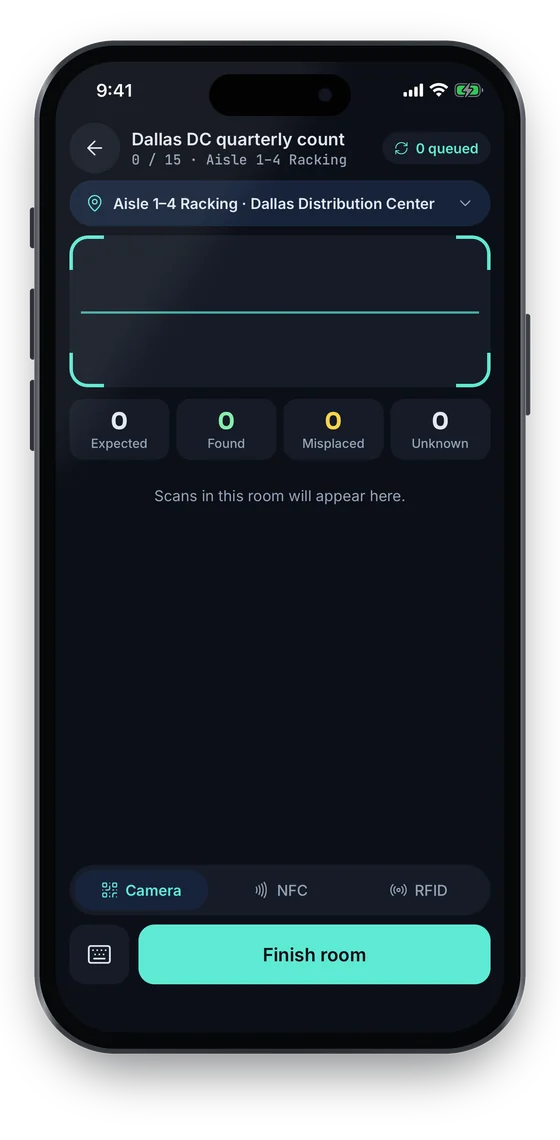
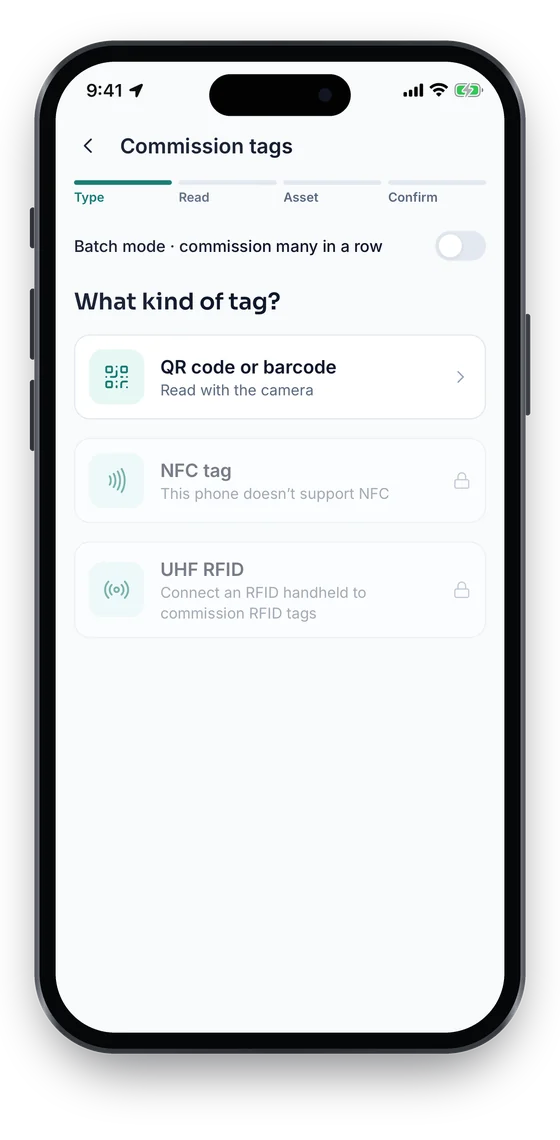
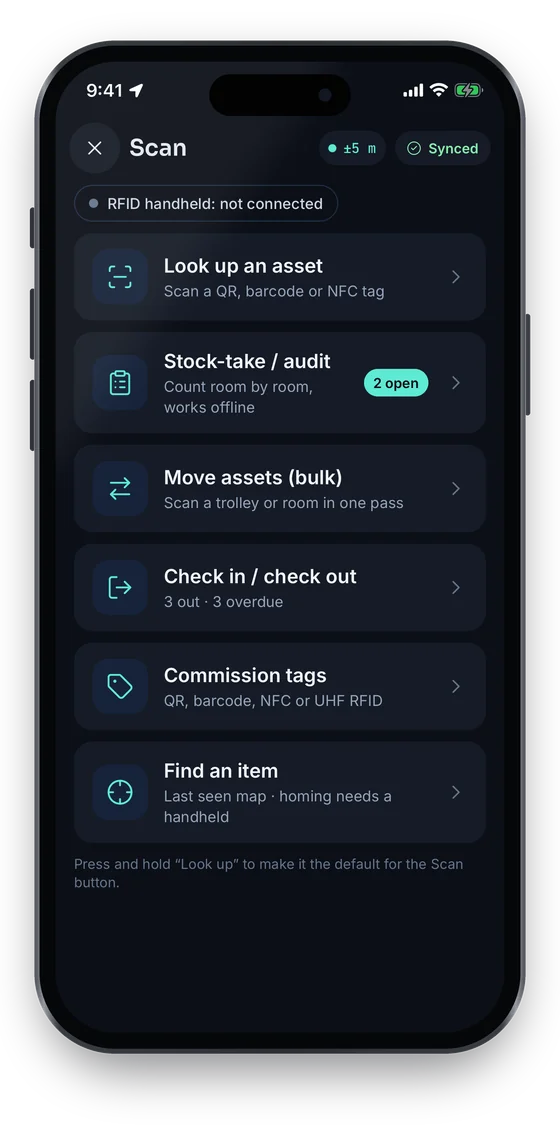
The phone reads QR codes, barcodes and NFC tags itself. For UHF RFID it pairs with a Bluetooth handheld; until one is connected the app shows the handheld as not connected and keeps that option locked. Stock-take counts switch between Camera, NFC and RFID.

Coming soon on theApp StoreComing soon onGoogle Play
Scan hub: look up an asset, stock-take, bulk move, check in or out, commission tags and find an item (sample data)
1Handheld status
Counting Aisle 1–4 Racking with expected, found, misplaced and unknown counters and a queued-scans badge (sample data)
2Camera, NFC or RFID
Commission tags screen choosing QR code or barcode, NFC tag, or UHF RFID with a handheld (sample data)
3UHF with a handheld

Swipe to see more screens →

Real screens from the Asetavo phone app (demo workspace, fictional company). iOS and Android apps coming soon to the App Store and Google Play.
How it works

From first step to everyday use

  1. 01
    Register the reader

    Add it under Tracking → Readers: a name, its kind (fixed portal, handheld sled or phone) and, for fixed readers, the zone and location it covers.

  2. 02
    Copy the secret once

    Asetavo generates a 32-byte secret and shows it exactly once. Load it into the reader or its gateway; it is stored encrypted and never shown again.

  3. 03
    Reader posts signed events

    Each batch of reads goes to the ingest endpoint over HTTPS with a device ID, timestamp, one-time nonce and HMAC-SHA256 signature over the body.

  4. 04
    Asetavo verifies and stores

    Size, reader status, ±60 s clock window, signature, nonce, rate and batch limits are checked. Passing reads are appended to the event log.

  5. 05
    Reads become context

    Each EPC or code is resolved to an asset, the reader’s zone is stamped on the event, and unknown tags are kept as unregistered reads.

  6. 06
    Rules fire alerts

    Active alert rules are evaluated against the new events — left zone, entered zone, unregistered tag, exit without a check-out.

Workflows, end to end

Commission a dock-door portal

  1. Create the zone “Dallas Warehouse” and map the warehouse rooms to it.
  2. Add reader “Dallas DC — Exit gate portal”, kind Fixed portal, zone Dallas Warehouse.
  3. Copy the one-time secret into the reader or gateway configuration.
  4. Walk a tagged test asset through the gate and confirm “Reporting” and the last event on the Readers list.
  5. Add a left-zone alert rule scoped to the zone.

A handheld goes missing

  1. Priya reports her handheld lost at the Denver depot.
  2. An admin opens Readers → Handheld C72 → Revoke.
  3. The credential is destroyed; any request from that device is refused.
  4. When a replacement arrives, register it as a new reader with a fresh secret.

A gate reader goes quiet

  1. The Denver yard gate stops reporting after a network change.
  2. The Readers list shows the gate’s last-seen time drifting.
  3. Facilities sees “Silent · 42 min” on the Readers list and checks the switch port.
  4. Once the port is fixed, the next accepted request updates last seen and the gate shows Reporting again.

Scheduled secret rotation

  1. Security policy requires quarterly credential rotation.
  2. For each portal: Rotate secret → copy the new value → update the reader or gateway.
  3. The old secret stops working at once, so rotate during a quiet window.
Compare

Handheld vs fixed portal readers

CriteriaHandheld sled / phoneFixed portal
Best forAudits, stock-takes, search, spot checksDoors, gates, docks, secure-store entrances
Who triggers the readA person sweeping or scanningAutomatic — assets pass the antennas
Zone in AsetavoUsually none (mobile)Pinned to a zone and location
Typical eventspresent — bulk reads during a sweepin / out as assets cross the threshold
Drives alertsUnregistered-tag readsLeft zone, entered zone, exit without check-out, unregistered
ConnectionApp or device sends signed HTTPSReader sends signed HTTPS directly
Example hardwareRugged Android UHF sledFixed UHF reader with 2–4 antennas
Setup effortMinutes — register and load the secretSite survey, mounting, antenna tuning, network

Most sites start with one or two handhelds for audits, then add portals at the few doors that matter. Hardware is purchased separately; we’ll advise on models.

Deep dive

The detail behind it

Built for trusted reader events

A reader event can trigger an alert that sends someone running to a loading dock, so Asetavo treats every read as untrusted until it proves where it came from. These are the controls on the ingest path.

Device identity
Each reader is its own principal with an ID and secret, distinct from user accounts and user device sessions. A reader credential can call the ingest endpoint and nothing else; a user login cannot call ingest at all.
Signed events
X-Signature = HMAC-SHA256(secret, device ID · timestamp · nonce · SHA-256(body)). Changing a single byte of the body invalidates the signature. Comparison is constant-time.
±60 second window
Requests whose X-Timestamp differs from server time by more than 60 seconds are refused, so captured traffic goes stale quickly. Keep reader clocks on NTP.
Nonces and replay protection
Every request carries a nonce that must be unique for that reader. A repeated nonce is rejected with REPLAYED_NONCE and nothing is stored.
Rate and size limits
Defaults: 600 events per minute per reader, 500 events per request, 256 KB request body. Over-limit requests are refused with 429 or 413.
Secrets encrypted at rest
The raw secret is encrypted with AES-256-GCM using an application key that lives outside your workspace database, so a database copy alone can’t be used to forge reads.

What each read records

Reads are appended to an event log and never edited. Each record carries enough context to answer “who saw what, where and when”.

Reader
Which reader reported it — and therefore which zone and location.
EPC or code
The UHF EPC, or the barcode / QR / NFC code, exactly as read.
Direction
in, out or present, as reported by the reader or gateway (portals with directional antennas or paired read points).
RSSI
Signal strength, when the reader provides it.
Observed and received time
When the reader saw the tag and when Asetavo accepted it.
Resolved asset and zone
The asset the tag is assigned to (or none — an unregistered read) and the zone stamped from the reader.
FAQ

RFID Readers & Portals questions

Want to see it with your assets?

Walk us through your sites and we’ll show you rfid readers & portals set up the way you’d use it.

Book a demo
Any fixed or handheld reader, or handheld app, that can send an HMAC-signed HTTPS request to the ingest endpoint. Asetavo does not require its own hardware. Readers need to send signed HTTPS events, so check your reader’s network and output options before buying, or ask us which models fit.

Connect your RFID readers

Tell us which doors matter and what hardware you have. We’ll help you register readers, sign events and turn reads into alerts.

No card required · Workspace ready in minutes · Simple USD pricing