
Asetavo for NGOs & Development Programs

Account for every donor-funded asset

Know which project paid for each vehicle, laptop and solar kit, which field office holds it, who is responsible for it — and what happens to it when the project ends.

  • Vehicles
  • IT & communications
  • Medical & program equipment
  • Solar & power
NGOs team member using Asetavo
The operation

Programs, countries and field offices — each with its own funding story

An NGO’s assets are shaped by its funding. The same organization may run a health project, a water project and an education project, each funded by different donors, each with its own end date and its own rules about what happens to equipment afterwards.

NGOs operations on site
  1. Step 1

    Your offices and projects

    Add each country office, field site and project.

  2. Step 2

    Your donor-funded assets

    Tag vehicles, laptops, generators and equipment, and link them to a project.

  3. Step 3

    Always ready for donors

    See who holds each asset, where it is, and produce verification reports quickly.

When a donor asks where their funds went, you can show them — asset by asset.

The problem

What goes wrong without a system

The day-to-day failures NGO teams describe before they move off spreadsheets and paper registers.

01

Donors ask where their money went — in equipment

Donor reports and end-of-grant reviews often ask for a list of assets bought with the grant, where they are and what condition they are in. If purchases were logged only in the finance system, that list has to be rebuilt by emailing every field office.
02

Assets are spread across remote field offices

Vehicles, laptops and solar equipment sit in offices that head office rarely visits, sometimes with poor connectivity. Verification happens once a year if at all, and the list that comes back is whatever the office manager remembered.

03

Staff turnover breaks custody

Program officers and drivers move on at the end of contracts. Without a clear record of what each person holds, equipment leaves with them, is passed informally to a colleague or ends up unaccounted for in a store room.

04

Projects end, assets don’t

When a project closes, its equipment may need to be transferred to another project, handed to a partner or government body, sold or disposed of — often according to the donor’s agreement. Without a register that knows which assets belong to which project, closeout is a scramble.

05

Mixed funding in one office

A single field office may hold assets from three projects and core funds side by side. A shared spreadsheet rarely distinguishes them reliably, so the same laptop can be claimed by two budgets or by none.

How Asetavo helps

One platform, set up for NGOs

Project and donor on every asset — via custom fields

Define custom fields such as Project, Donor / grant reference, Budget line and Project end date, as selects, text, dates or currency. Make them required so no donor-funded purchase is registered without them. Filter and export the register by any of these fields.

Learn more

Field offices as locations

Set up each country program and field office as a site, with its buildings, rooms and stores beneath. Every asset has a place, and head office can filter the whole register by country or office.

Learn more

Named custodians who sign for equipment

Assign each asset to a custodian — a program officer, driver or office manager — and a department. Issue shared equipment on check-out with a due date and condition, and record the return when it comes back.

Learn more

Verification from a phone in the field

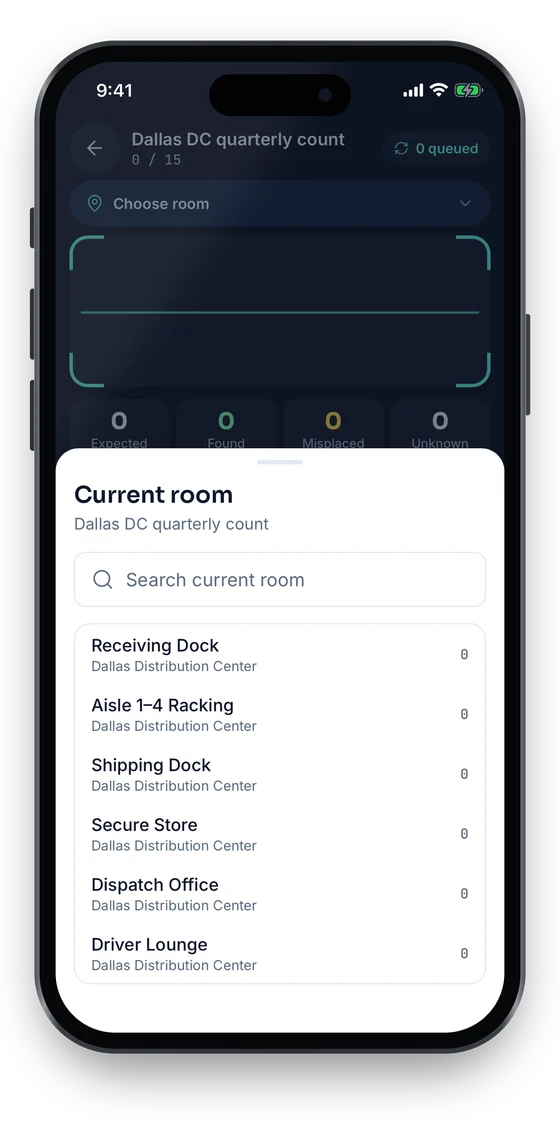
Field staff run stock-takes with the mobile app, scanning QR labels office by office. Scanning works offline and syncs when the connection returns; the reconciliation shows what was found, missing or unregistered.

Learn more

Evidence attached to the asset

Attach invoices, delivery notes, photos and handover forms to each record, so the proof a donor might ask for sits with the asset rather than in someone’s inbox.

Learn more

Transfers and disposal at project close

Filter by project and end date to see what must be decided. Record transfers to another project or partner as movements with a reason and reference, and record disposals with method, date and proceeds.

Learn more

Current value alongside purchase value

Depreciation by category gives each asset a current net book value next to its purchase cost, useful for donor reports, insurance and deciding whether equipment is worth transferring.

Learn more
Industry workflows

The asset lifecycle, the way NGOs run it

  1. 01Procure on grant
  2. 02Register with project & donor
  3. 03Tag
  4. 04Assign to field office
  5. 05Assign custodian
  6. 06Verify
  7. 07Report to donor
  8. 08Transfer or dispose at close

Registering a donor-funded purchase

  1. Purchase
  2. Register
  3. Project & donor fields
  4. Tag
  5. Custodian

When equipment arrives, register it with its purchase cost, supplier and invoice, fill in the required Project and Donor fields, attach the invoice, print a QR label and assign it to the field office and custodian who will use it.

Donor asset report

  1. Filter by donor
  2. Check locations
  3. Verify
  4. Export

Filter the register by the Donor or Project field, confirm recent verification for each field office, and export to Excel or CSV with location, custodian, condition, purchase value and current value.

Staff departure handover

  1. Departing officer
  2. Their assets
  3. Return / scan
  4. New custodian

Filter by custodian to list everything the departing officer holds, return any open check-outs, scan each item and move it to their replacement or the field store. The history keeps the handover date and who recorded it.

Project closeout

  1. Project end date
  2. Asset list
  3. Donor decision
  4. Transfer / dispose
  5. Closed

As the end date approaches, list the project’s assets and their condition. Once the disposition is agreed, update the Project field for assets moving to a new project, record movements for items handed to partners, and record disposals for items sold or written off.

On the phone · NGOs

Field offices, even without a connection

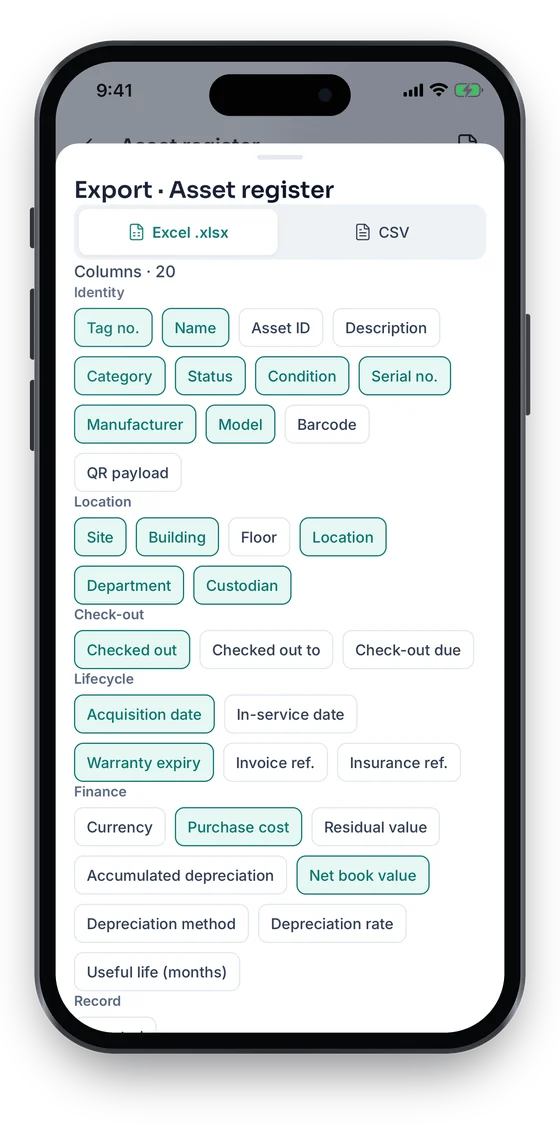
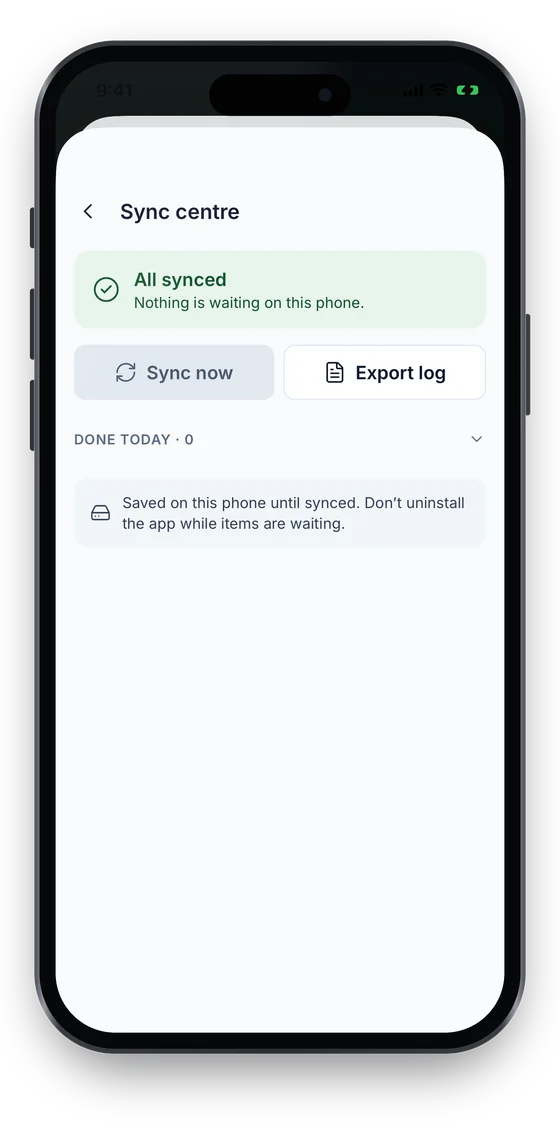
Field staff count an office or a warehouse with the phone wherever they are. Scans, moves and check-outs wait on the phone until there is signal, and the Sync centre shows what is still to send. Back at base, export the register by project or donor to Excel or CSV.

Coming soon on theApp StoreComing soon onGoogle Play
Stock-take Dallas DC quarterly count, choosing the current room to count (sample data)
1Count a field office
Sync centre showing All synced, with Sync now and Export log (sample data)
2Sync centre
Export sheet choosing Excel or CSV and grouped columns (sample data)
3Excel or CSV export

Swipe to see more screens →

Real screens from the Asetavo phone app (demo workspace, fictional company). iOS and Android apps coming soon to the App Store and Google Play.
Product in action

What your team sees

An illustrative NGO overview beside a real Asetavo screen.

Global Health Project — donor asset viewIllustrative example
486
Project assets
$612,400
Purchase value
$398,150
Current value
22
Not verified this year
37
Due for closeout decision
Recent activity
  • Motorcycle #NGO-TZ-MWZ-014Mwanza field office · custodian: Outreach OfficerVerified
  • Laptop #NGO-TZ-IT-0231Program Officer left — returned to field storeHanded over
  • Solar kit #NGO-TZ-SOL-008Transferred to Clean Water ProjectTransferred
  • Cold-chain fridge #NGO-TZ-MED-045Not seen in last field verificationMissing
  • Satellite phone #NGO-TZ-COM-003Checked out to field team · due FridayOut
Sample data for illustration — not a customer account.
Asetavo product screen

Every asset group, in one register

Categories and custom fields keep the details each group needs — serials, warranty, custodian, room.

Vehicles

4x4 field vehicles · Motorcycles · Boats and outboard engines · Bicycles for community workers

IT & communications

Laptops and tablets · Mobile phones · Satellite phones and radios · Routers and VSAT kits · Printers and projectors

Medical & program equipment

Clinic and diagnostic equipment · Cold-chain fridges · Water testing kits · Survey and measurement equipment · Training equipment

Solar & power

Solar panels and inverters · Batteries · Generators · Solar pumps and lighting kits

Office & field furniture

Desks and chairs · Tents and field shelters · Filing cabinets and safes · Storage containers

Warehouse stock

Items held in field stores before distribution · Spare parts · Equipment awaiting transfer or disposal

Use cases

Where NGO teams put it to work

Know where donor-funded assets are

For any donor or project, list every asset with its project, funding source, custodian, location, purchase value, current value, project end date and disposal status. Project, funding source and end date are custom fields you define; location, custodian, values and status come from the register. It is one filtered view and one export rather than a round of emails to field offices.

Annual verification without flying everyone in

Each field office runs its own stock-take with the mobile app, scoped to its site. Head office watches reconciliation results come in and follows up only on the variances — missing, misplaced or unregistered items — instead of travelling to count everything.

Moving equipment between projects

When a project ends and its vehicles or laptops move to a new project, update the Project field and record a movement with the donor approval reference. The asset keeps its full history, including which project originally paid for it.

Handing assets to a partner or government body

For equipment donated to a local partner at project close, record the movement or disposal with the handover date, recipient and signed handover form attached, so the transfer is documented if a donor asks later.

Shared field equipment

Satellite phones, GPS units, cameras and survey kits shared by field teams are checked out with due dates. Overdue items are flagged, and each return records the condition the equipment came back in.

Maintenance

Keep vehicles and generators running between donor visits

Breakdowns in the field are expensive. Keep service schedules and repair history on the asset itself, so a vehicle’s condition can be shown at any point in the project.

  • Preventive maintenance schedules for vehicles, generators and cold-chain equipment
  • Work orders for repairs with status and completion time
  • Warranty, insurance and service contracts with end dates
  • Condition recorded at every check-out, return and verification
Finance & depreciation

Purchase value, current value and what happened at the end

Donors and auditors often want both what was spent and what is left. Asetavo keeps purchase cost, depreciation and disposal on the same record, and your own policies decide how those figures are used in reports.

  • Purchase cost, date, supplier and invoice reference on each asset
  • Depreciation methods set by category to give current net book value
  • Currency custom fields for amounts in the donor’s reporting currency
  • Disposal with method, date, proceeds and recorded gain or loss
Multi-location

Head office, country programs and field offices

Run one workspace for the whole organization, with each country program and field office as its own site, so head office sees the full picture and each office manages its own assets.

  • Country programs and field offices as sites, with buildings, rooms and stores
  • Stock-takes scoped to one office, category or department
  • Movements between offices and projects recorded with reason and reference
  • Filter and export by office, custodian or any custom field
Identification

The right tag for each asset

Field offices need tags that are cheap, work with any smartphone and do not depend on installed infrastructure. For most NGOs that means QR labels, with more durable options for vehicles and outdoor equipment.

All plans

QR

Printed label · phone camera · line of sight

The default for laptops, furniture, medical and program equipment. Printed labels, scanned with the mobile app — including offline in the field.

What is QR?
All plans

Barcode

1D label · any scanner · line of sight

Useful where suppliers or a partner already applied barcodes to equipment; scan those instead of re-labelling.

What is Barcode?
Growth and up

NFC

Tap-to-read chip · phone · a few cm

Durable tags for vehicles, motorcycles, generators and solar equipment exposed to weather, where printed labels fade.

What is NFC?
Business and up

UHF RFID

No line of sight · readers & portals · metres

Worth it only in larger central warehouses or country offices where many items are counted often; most field offices won’t need it.

What is UHF RFID?

Not sure which to use? Try the tag technology selector or compare plans.

Security & access

Control who sees and changes what

Field staff should be able to scan and verify without seeing budgets, and finance should be able to report without editing locations. Permissions in Asetavo are granted per role, and every change is recorded.

  • Nine permissions, from view-only to finance and audit
  • Finance fields hidden from field users without the Finance permission
  • Audit trail of every change with who and when
  • Mobile device sessions you can revoke if a phone is lost
  • TLS in transit and strict tenant isolation
Security & access
Integrations

Fits the systems you already run

Most NGOs report to donors from spreadsheets and their finance system. Asetavo feeds those with exports today, and with the REST API where you have a developer or integrator.

  • Excel and CSV export of the register, including custom fields
  • REST API (Business plan and above) to connect finance or grant systems you already use
  • Signed webhooks from alert rules
  • No pre-built connectors to accounting or grant-management products — connections are built via the REST API
Integrations & API
Implementation

From spreadsheet to live register

  1. 1
    Design your custom fields

    Agree the funding fields your donors need — typically Project, Donor / grant reference and Project end date — and which are required.

  2. 2
    Set up offices and custodians

    Create country programs and field offices as sites, and add departments and custodians for each office.

  3. 3
    Import existing asset lists

    Import the current lists from each office with the Excel/CSV import wizard, mapping project and donor columns to your custom fields.

  4. 4
    Label and verify office by office

    Ship QR labels to each field office, have staff tag and verify with the mobile app, and resolve the variances from head office.

  5. 5
    Make it part of project routine

    Register every new purchase at delivery, verify before each donor report, and review assets against project end dates as closeout approaches.

You define custom fields such as Project, Donor / grant reference and Project end date, and make them required on every asset. Combined with field-office locations, custodians, purchase and current value and status, that lets you filter and export the assets for any donor or project.

Be ready for the next donor asset review

Book a demo and we’ll set up a sample organization with projects, donor fields and field offices — or send us one office’s asset list and we’ll show it in Asetavo.

No card required · Workspace ready in minutes · Simple USD pricing