Alerts

Know the moment something needs attention.

Alerts are Asetavo’s event engine: signed reader events are checked against your rules, and anything that matches lands in a shared inbox with its full provenance — then gets acknowledged and resolved.

Business and aboveCompare plans
app.asetavo.com/alertsSample data
Tracking
Alerts
4 open · 1 acknowledged · 23 resolved
↻ Refresh
OpenAcknowledgedResolvedAll
TypeZoneReaderDate rangeSearch
openLeft zone2 min ago
Asset left authorized zone
Generator G-102 · Warehouse → Exit gate
Dallas WarehouseExit gate portal
AcknowledgeView asset →
openCheckout exit18 min ago
Exited without a check-out
Hilti TE 60 drill · NF-02210
Denver YardYard gate portal
openUnregistered41 min ago
Unregistered tag read
EPC E2801160600002FF00913C22
Dallas WarehouseExit gate portal
openReader silent27 min ago
Reader stopped reporting
Denver Depot — Yard gate · 42 min
Denver YardYard gate portal
openLeft zone
Generator G-102 left Dallas Warehouse
NF-00412 Generator G-102 · Generac 20 kW
Provenance
Raised from reader event #48213
Dallas DC — Exit gate portal
direction out · EPC E2801160600002A4C1F3B702
2026-09-29 14:02:11
Server-derived from an authenticated, replay-protected reader event — a client can never assert an alert.
Acknowledge
Product screen · sample data
What it solves

What changes when alerts moves into Asetavo

The way it usually works today, and the way it works once it lives in one system.

Alerts in use on site
  1. Before: You find out a generator is gone when someone needs it — days later, with no idea when it left or through which door.

    With Asetavo: A left-zone alert is raised as the exit portal reads it, naming the asset, reader, tag EPC and time.

  2. Before: Alerts from a “smart” system can’t be trusted — anyone could have posted them, and nobody can say where they came from.

    With Asetavo: Alerts are derived server-side from authenticated, replay-protected reader events only. Every one shows the rule and the event behind it.

  3. Before: Notifications go to one person’s inbox and nobody knows whether they were handled.

    With Asetavo: A shared inbox with Open, Acknowledged and Resolved — each step stamped with who did it and when.

  4. Before: Connecting alerts to your ops tools means screen-scraping or a custom integration project.

    With Asetavo: Any rule can deliver to an HTTPS webhook, signed with a per-rule secret so your endpoint can verify it.

Product in action

What your team actually sees

Coded from the real Asetavo screens, with sample data for a fictional company, Northfield Group.

Everything you need to act or investigate: the asset, the rule that fired, the reader and zone, the raw tag EPC, direction and times — plus the acknowledge / resolve history.

app.asetavo.com/alerts/9127Sample data
Tracking › Alerts › #9127
Generator G-102 left Dallas Warehouse
ack Left zone · raised 14:02:12 today
View assetResolve
Asset
NF-00412 · Generator G-102 · In use
Rule
Warehouse generators stay on site
Condition
Left zone · scope Zone: Dallas Warehouse
Channel
Email → ops-dallas@northfield.example
Reader
Dallas DC — Exit gate portal (Fixed portal)
Zone
Dallas Warehouse · WH-DAL
Tag EPC
E2801160600002A4C1F3B702
Direction
out · RSSI −51 dBm
Observed
29 Sep 2026, 14:02:11 (reader clock)
Event
#48213 · signed, nonce verified
Lifecycle
  • Event received14:02:12 · exit gate portal, 3 reads in batch
  • Rule matched → alert raised14:02:12 · “Warehouse generators stay on site”
  • Acknowledged by Daniel Okafor14:05:40 · 3 min after raise
  • ResolvePending — generator located on trailer T-31
Alerts are append-only: firing creates a record, and only Acknowledge and Resolve change it — each stamped with the signed-in user.

Alert detail and provenance

  1. 1
    Rule
    Which rule matched, its scope and its channel.
  2. 2
    Reader and tag
    The reader that saw it and the exact EPC read, so you can rule out a mis-tag.
  3. 3
    Lifecycle
    Raised → acknowledged → resolved, each with the user and timestamp.
Sample data
Capabilities

Everything in Alerts

Every card below is in the product today, on the plans shown above.

Left zone and entered zone

Raised when a registered asset is read going out of — or into — a zone covered by a reader.

Exit without check-out

Raised when an asset is read leaving and has no active check-out.

Unregistered tags

Raised when a read doesn’t resolve to any asset in the register — foreign, untagged or mis-commissioned items.

Scoped rules

Scope any rule to everything, a zone, a property, a location, a category or one asset.

In-app, email and signed webhooks

Every alert lands in the inbox; rules can also email a person or POST to an HTTPS endpoint with an HMAC-SHA256 signature.

Full provenance

Rule, reader, zone, EPC, direction and event ID on every alert. Alerts can only be derived from authenticated events.

Acknowledge and resolve

A shared workflow with who-and-when on each step, gated by the Alerts permission.

Not in the product yet

Everything else on this page is live today. These are the pieces we are still building.

  • Coming soonReader-silent alerts
  • Coming soonPush alerts for overdue check-outs
  • Coming soonPush alerts for maintenance due and warranty expiry
  • RoadmapWhatsApp delivery
  • RoadmapTeam and site routing

In the Asetavo app

One alerts inbox on the phone

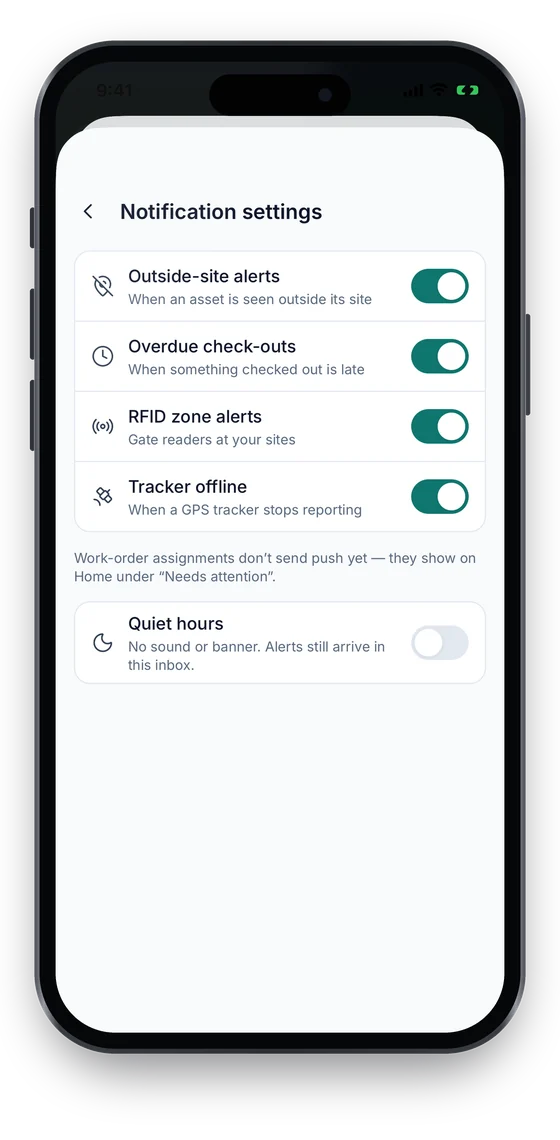
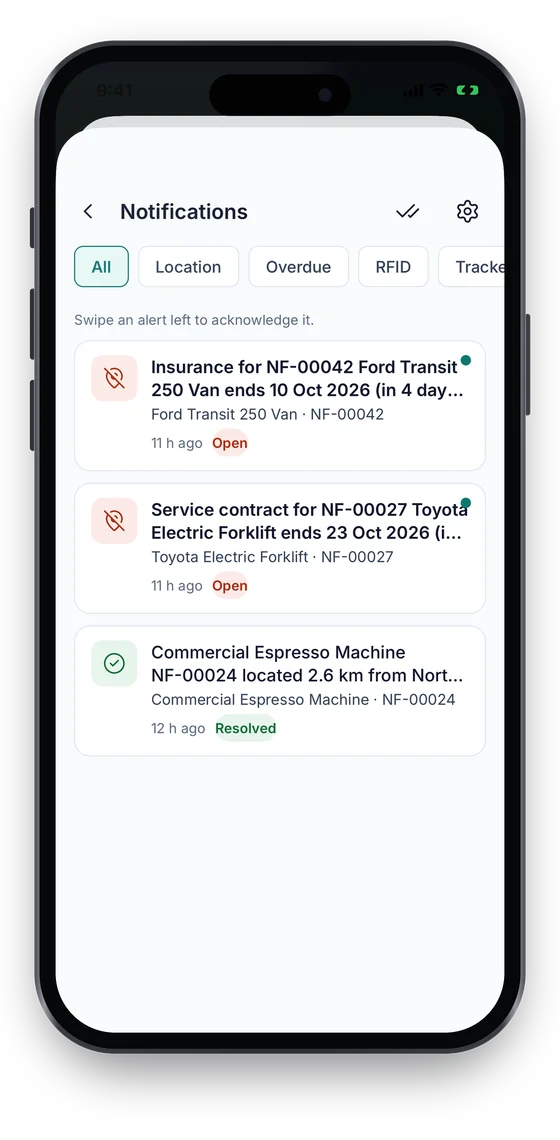
Alerts land in one inbox, filtered by type: assets seen outside their site, overdue check-outs, RFID zone events and contracts about to end. Swipe to acknowledge, pick the alert types you want and set quiet hours. Push notifications are not live yet.

Coming soon on theApp StoreComing soon onGoogle Play
Notifications inbox with contract-ending and location alerts, filtered by type (sample data)
1Alerts inbox
Notification settings with alert types and quiet hours (sample data)
2Types & quiet hours

Swipe to see more screens →

Real screens from the Asetavo phone app (demo workspace, fictional company). iOS and Android apps coming soon to the App Store and Google Play.
How it works

From first step to everyday use

  1. 01
    Event

    A reader posts a signed batch of reads. Asetavo verifies it, resolves each tag to an asset and stamps the reader’s zone.

  2. 02
    Rule

    Every active rule is checked: does the condition match (left zone, entered zone, unregistered, checkout exit) and is the event inside its scope?

  3. 03
    Alert

    A match appends an alert — at most one per rule per event — with the asset, reader, zone and event attached.

  4. 04
    Delivery

    The alert appears in the in-app inbox, and is also sent by email or signed webhook if the rule says so.

  5. 05
    Acknowledge

    Someone with the Alerts permission acknowledges it, so the team knows it’s being handled.

  6. 06
    Resolve

    Once dealt with, it is resolved. Both steps record the signed-in user and time.

Workflows, end to end

Generator leaves the warehouse

  1. Generator G-102 is wheeled through the Dallas exit gate.
  2. The portal posts a signed read, direction out.
  3. “Warehouse generators stay on site” (left zone, Zone: Dallas Warehouse) matches.
  4. Alert “Asset left authorized zone — Generator G-102 · Warehouse → Exit gate” appears in the inbox and is emailed to the ops lead.
  5. Daniel Okafor acknowledges, finds it on trailer T-31 and resolves the alert.

Tool walks out of the depot

  1. A drill is carried past the Denver yard gate with no check-out.
  2. The checkout-exit rule for Denver Yard fires.
  3. The depot supervisor sees it in the inbox, calls the crew and records the check-out retroactively.
  4. The alert is resolved; next time the tool is issued at the counter first.

Push alerts into your ops tool

  1. Create a rule with channel Webhook and your HTTPS endpoint.
  2. Copy the secret shown once into your receiver.
  3. Your endpoint verifies the HMAC signature on each delivery and opens a ticket.
  4. The team still acknowledges and resolves in Asetavo so the history stays in one place.
Deep dive

The detail behind it

Rule conditions

Four conditions are evaluated on every accepted reader event, each limited by the rule’s scope.

left_zone
Direction out at a zoned reader, resolved to a registered asset, inside the rule’s scope.
entered_zone
Direction in at a zoned reader, resolved to a registered asset, inside the rule’s scope.
unregistered
A read whose EPC or code matches no asset. The raw EPC is kept on the event.
checkout_exit
Direction out for an asset with no active check-out — the removal nobody recorded.
Scope
Everything, one zone, a property, a location, a category or a single asset — so a rule fires only where it should.

Why you can trust an alert

An alert that sends someone to a loading dock has to be real. These properties are built into the engine.

Server-derived only
There is no “create alert” endpoint. Alerts come only from events that passed signed, replay-protected ingest.
Append-only
Firing appends a record. Acknowledge and resolve are the only changes allowed, each stamped with the verified signed-in user.
One per rule per event
Each event is evaluated once, so a rule can’t fire twice for the same read.
Provenance
Rule, asset, reader, zone and reader event are linked on the alert; EPC, direction and observed time come from that event.
Permissioned
Anyone with View can see alerts; acknowledging, resolving and managing rules needs the Alerts permission.
FAQ

Alerts questions

Want to see it with your assets?

Walk us through your sites and we’ll show you alerts set up the way you’d use it.

Book a demo
An active alert rule matching an authenticated reader event: an asset leaving or entering a zone, an unregistered tag, or an exit without a check-out. Each rule can be scoped to a zone, property, location, category or single asset.

Start monitoring asset movement

Choose the door and the assets that matter. We’ll help you connect a reader, set up your first rules and get alerts to the right people.

No card required · Workspace ready in minutes · Simple USD pricing