
Asetavo for Hospitality

Hotel asset management that follows your property

Register every TV, minibar, AC unit, bed frame and kitchen range against the exact room or outlet it lives in. Engineering keeps preventive maintenance on schedule, housekeeping scans from a phone, and finance gets depreciation per property — all from one register shaped like your hotel.

  • Guest room
  • Engineering
  • Food & beverage
  • Operations
Hospitality team member using Asetavo
The operation

Your property, room by room

A hotel is a stack of very different operations sharing one roof: guest rooms that must look identical, an engineering team keeping chillers and lifts alive, a kitchen with its own equipment and hygiene schedule, a restaurant and bar, a pool deck and a back-of-house store full of spares. Asetavo models all of it as one location tree — property, building, floor, room or outlet — so a minibar is never just “somewhere in the hotel”.

Hospitality operations on site
  1. Step 1

    Your properties and rooms

    Add each hotel, floor, room, kitchen and back-of-house store.

  2. Step 2

    Your equipment

    Tag TVs, minibars, linen trolleys and kitchen kit, room by room.

  3. Step 3

    Always know what’s where

    See what belongs in each room, what has moved and what needs servicing.

From one boutique hotel to a portfolio of properties, every room’s assets stay accounted for.

The problem

What goes wrong without a system

The day-to-day failures hospitality teams describe before they move off spreadsheets and paper registers.

01

Room inventories drift from what is actually in the room

A kettle replaced after a guest complaint, a bedside lamp swapped from a room under renovation, a TV moved to a suite for a VIP — none of it gets written down. Six months later the room inventory sheet and the room itself no longer agree, and nobody knows which one is right.
02

Small, valuable items walk out of the building

Hair dryers, irons, remote controls, portable speakers, bathrobes and banqueting AV are easy to carry and hard to miss until the next guest asks for one. Without a record of where each item should be, loss is only noticed as a rising replacement bill.

03

Engineering maintenance lives in a notebook

Filter changes on 200 AC units, descaling on kitchen combi ovens, quarterly checks on pool pumps and generators — scheduled in a spreadsheet or in someone’s head. When the chief engineer is off, the schedule is too, and guests find out first.

04

Room transfers and refurbishments break the register

During a soft refurbishment, furniture and fittings shuffle between floors, go to storage or get written off. If those movements aren’t recorded as they happen, the fixed asset register finance relies on is wrong the day the rooms reopen.

05

Finance can’t see value by property

Owners and management companies want to know what each property’s FF&E and equipment is worth and when it will need replacing. A single group-level spreadsheet can’t answer that per property, per outlet or per category.

Industry workflows

The asset lifecycle, the way hospitality runs it

  1. 01Purchase
  2. 02Tag
  3. 03Install
  4. 04Assign room
  5. 05Maintain
  6. 06Audit
  7. 07Transfer
  8. 08Dispose

New room fit-out

  1. Delivery
  2. Tag & register
  3. Install in room
  4. Photo on record

When a batch of TVs or safes arrives, engineering tags each unit, assigns it to its room and attaches the installation photo and invoice. The room now has a verified inventory from day one.

Housekeeping room check

  1. Open room
  2. Scan items
  3. Flag missing
  4. Engineering notified

During a checkout inspection the attendant scans the room tags. A missing remote or damaged kettle is flagged against the room, so the front office can act before the next arrival.

Engineering preventive maintenance

  1. PM due
  2. Work order
  3. Technician scans unit
  4. Close with notes

The AC in Room 207 is due its filter clean. A work order is raised automatically, the technician scans the unit on arrival and closes the job with parts and time, building a service history per unit.

Refurbishment move

  1. Room out of order
  2. Items to store
  3. Re-assign or dispose
  4. Register updated

Furniture and fittings leaving a floor under refurbishment are scanned into the maintenance store, then either re-assigned to another room or disposed of with a record finance can use.

On the phone · Hospitality

Room checks and engineering jobs, on the phone

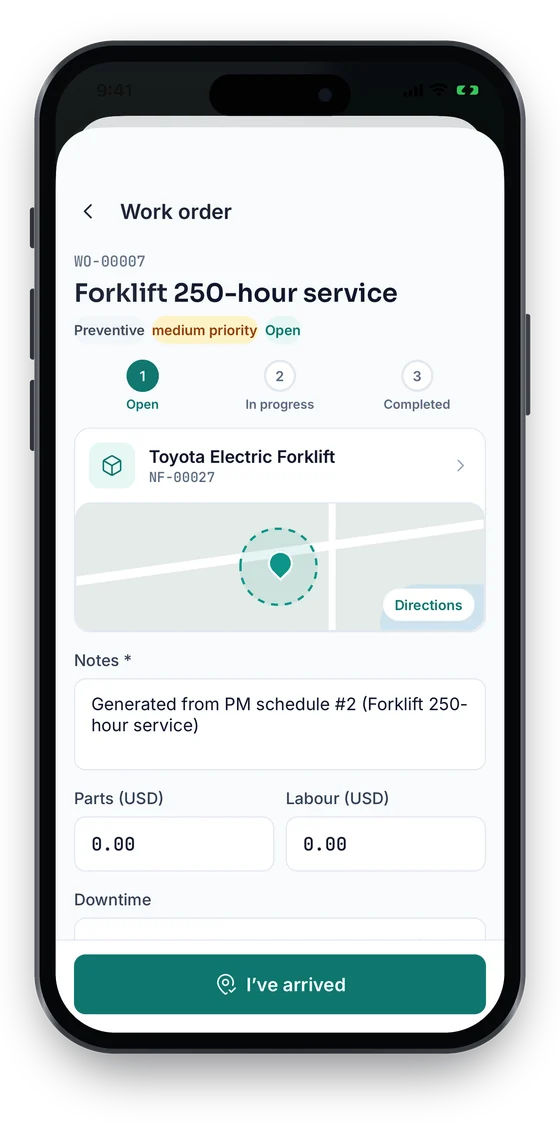
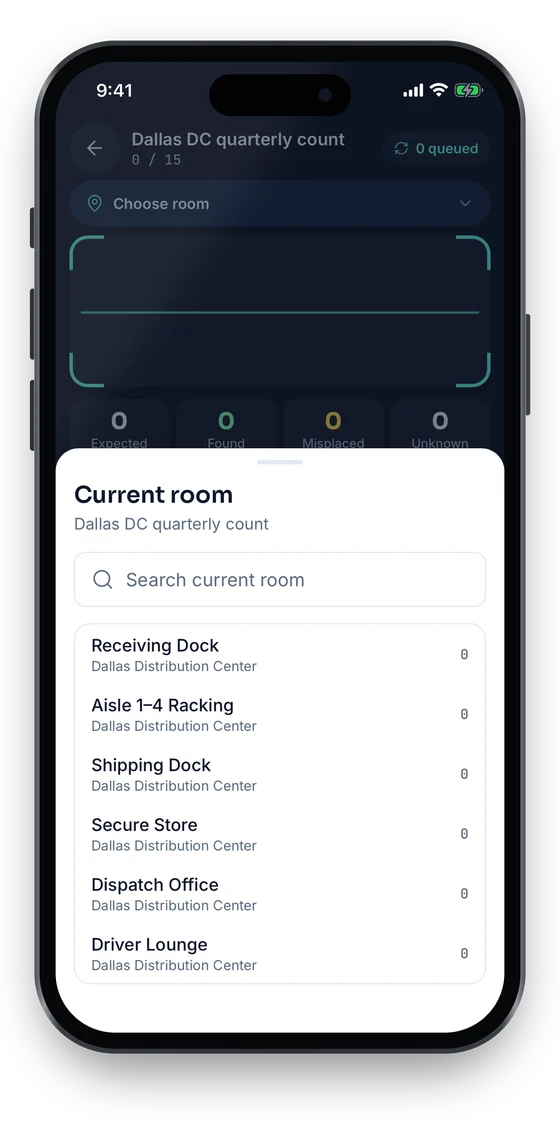
Housekeeping counts a floor room by room and flags anything missing; engineering opens the work order at the unit and taps I’ve arrived. Everything saves on the phone in plant rooms and basements with no signal, and syncs once you reconnect.

Coming soon on theApp StoreComing soon onGoogle Play
Stock-take Dallas DC quarterly count, choosing the current room to count (sample data)
1Room-by-room check
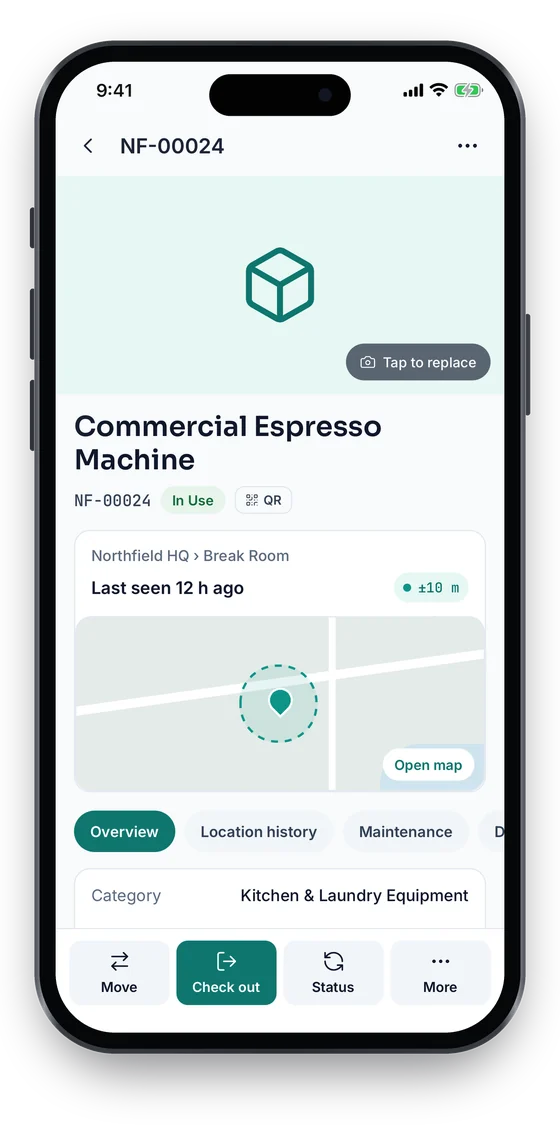
Asset 360 for a Commercial Espresso Machine, In Use, last seen at Northfield HQ with a ±10 m GPS fix on a map (sample data)
2The item, in its room
Work order WO-00007 Forklift 250-hour service with an Open, In progress, Completed stepper, notes, parts and labour (sample data)
3Engineering job

Swipe to see more screens →

Real screens from the Asetavo phone app (demo workspace, fictional company). iOS and Android apps coming soon to the App Store and Google Play.
Product in action

What your team sees

An illustrative hospitality overview beside a real Asetavo screen.

Property overview — Coastal ResortIllustrative example
3,482
Registered assets
37
PM due this week
9
Items flagged by housekeeping
98%
Floor 3 audit complete
Recent activity
  • AC unit #AC-207Room 207 · filter clean completedPM done
  • Hair dryer #HD-0419Room 419 · missing at checkout inspectionMissing
  • Portable projector #AV-012Left banqueting store zoneZone exit
  • Smart TV #TV-3114Transferred Room 402 → Room 314Moved
  • Combi oven #K-003Main kitchen · descale due FridayDue
Sample data for illustration — not a customer account.
Asetavo product screen

Every asset group, in one register

Categories and custom fields keep the details each group needs — serials, warranty, custodian, room.

Guest room

Smart TVs · Minibars & fridges · In-room safes · AC & fan-coil units · Kettles & coffee machines · Hair dryers & irons · Beds & furniture · Artwork

Engineering

Chillers & AHUs · Generators · Pool pumps & dosing · Boilers & water heaters · Lifts (service records) · Power tools · Ladders & access kit

Food & beverage

Combi ovens & ranges · Cold rooms & freezers · Dishwashers · Coffee machines · Bar equipment · Banqueting furniture · Chafing dishes

Operations

Master & sub-master keys · Linen trolleys · Laundry equipment · Conference AV & projectors · Radios · Front-office IT · Pool loungers

Use cases

Where hospitality teams put it to work

Room inventory you can trust

Each room carries its own list of tagged items. When quality or brand standards teams inspect a room, they compare what the register says with what is there in a single scan — and differences are recorded, not argued about.

Engineering that runs on a schedule, not on complaints

Every AC unit, pump and kitchen appliance gets a PM schedule and a service history. The chief engineer sees what is due, overdue and done this week, and a replacement decision is based on the unit’s repair record rather than a guess.

Banqueting and conference equipment

Projectors, screens, microphones and staging move between function rooms daily. Check them out to an event with a due-back time, and use zone alerts on the AV store so equipment leaving without being booked out gets noticed the same day.

Key custody for engineering and housekeeping

Master keys, plant-room keys and store keys are checked out to named staff at the start of a shift and back in at the end. Overdue keys are visible to the duty manager, and the history shows who held which key on any date.

Pre-opening and refurbishment projects

Tag FF&E as it arrives for a new wing or a soft refurbishment, assign it to rooms as they are fitted out, and hand finance a complete, located register on opening day instead of reconstructing it from delivery notes.

Owner and management-company reporting

Produce per-property reports of asset counts, net book value, disposals and maintenance spend for owners, asset managers and year-end auditors — exported to Excel or CSV for whatever reporting pack they use.

Maintenance

Engineering maintenance, tied to the room

Hotel engineering is reactive by default: a guest reports a noisy AC, a technician goes up. Asetavo lets the engineering team build preventive schedules per asset, raise work orders against the exact room and unit, and see the full service history before deciding to repair or replace.

  • PM schedules by asset or category — AC filters monthly, pool pumps quarterly, generators by run hours
  • Work orders linked to the room so front office knows when it is back in service
  • Service history, parts and labour notes on every unit
  • Warranty and service-contract dates tracked per asset
Finance & depreciation

FF&E value, property by property

Furniture, fixtures and equipment are a large part of a hotel’s balance sheet and the basis for replacement reserves. Asetavo keeps cost, useful life and depreciation on every item, so finance can report net book value by property, outlet or category and plan replacement cycles with real data.

  • Eight depreciation methods, with separate book and tax schedules
  • Net book value by property, building, outlet or category
  • Disposal records with reason, date and value for write-offs
  • Replacement planning from asset age and repair history
Multi-location

One register for every property in the group

Groups and management companies can run several hotels in one Asetavo account. Each property has its own location tree and team, while group engineering and finance see consolidated reports across all of them.

  • Separate location trees per property, one shared asset catalogue
  • Property-level roles so each hotel team sees only its own assets
  • Inter-property transfers recorded with dates and approvers
  • Group-wide reports on asset counts, PM compliance and NBV
Identification

The right tag for each asset

Guest-facing items need tags that are discreet and durable; back-of-house plant and AV stores benefit from tags you can read without opening every cupboard.

All plans

QR

Printed label · phone camera · line of sight

Discreet labels on the back of TVs, minibars and safes for housekeeping phone scans and room inspections. Works on every plan.

What is QR?
All plans

Barcode

1D label · any scanner · line of sight

Useful where the hotel already prints barcoded labels for stores or banqueting stock and wants to keep its existing scanners.

What is Barcode?
Growth and up

NFC

Tap-to-read chip · phone · a few cm

Tap-to-identify tags on engineering plant and kitchen equipment where a printed label would wear off. The same NFC links can also power an optional guest “tap to review” touchpoint.

What is NFC?
Business and up

UHF RFID

No line of sight · readers & portals · metres

Read a whole AV store, linen cage or maintenance store in seconds, and power readers at stores and staff exits for zone-exit alerts. Use on-metal tags on appliances and trolleys.

What is UHF RFID?

Not sure which to use? Try the tag technology selector or compare plans.

Security & access

Control who sees and changes what

Hotel teams are large and shift-based, so access needs to match the job. Housekeeping can scan and flag; engineering can manage work orders; only finance and administrators can change values or dispose of assets.

  • Role-based access with nine permission areas
  • Restrict users to a property, building or department
  • Full audit trail of who created, moved, edited or disposed of an asset
  • Encrypted in transit and at rest, with tenant isolation
Security & access
Integrations

Fits the systems you already run

Asetavo does not replace your property management system or your accounting package; it keeps the asset records they don’t. Data moves out through Excel and CSV exports and a REST API, and alert webhooks can notify other tools when something happens.

  • Excel and CSV export of registers, depreciation schedules and audit results
  • REST API to connect a PMS, accounting or helpdesk system
  • Signed webhooks for zone-exit and other alert rules
  • Import your existing room inventories from Excel or CSV
Integrations & API
Implementation

From spreadsheet to live register

  1. 1
    Map the property

    Build your location tree — buildings, floors, rooms, outlets and stores.

  2. 2
    Import what you have

    Bring existing room inventories and FF&E lists in with the Excel/CSV import wizard.

  3. 3
    Tag floor by floor

    Label rooms one floor at a time, often while rooms are out of order for cleaning.

  4. 4
    Switch on schedules

    Engineering sets PM schedules for plant, AC and kitchen equipment.

  5. 5
    First full audit

    Run a floor-by-floor stock-take to confirm the register matches the rooms.

Yes. Rooms are locations in the Property → Building → Floor → Room hierarchy, so every TV, safe or minibar is assigned to a specific room. Moving an item to another room is a scan, and its history keeps every previous location.

See your property in Asetavo

Bring your room list and your FF&E spreadsheet — we’ll show you what the register, PM schedules and floor audits look like for your hotel.

No card required · Workspace ready in minutes · Simple USD pricing