Asset tagging · QR · Barcode · NFC · UHF RFID

An asset tagging system for every tag type

Choose the right tag for each asset (QR, barcode, NFC or UHF RFID), keep track of the tags you’ve bought, and commission each one against the register so every scan lands on exactly one asset. A copied tag gets caught.

QR & barcode on all plans · NFC from Growth · UHF RFID from BusinessCompare plans
Product screen · sample data
What it solves

What changes when tagging moves into Asetavo

The way it usually works today, and the way it works once it lives in one system.

Tagging in use on site
  1. Before: Hand-written asset numbers and stickers that fade, peel or get duplicated.

    With Asetavo: Printed QR or barcode labels generated from the register, with the tag number, name and location on each.

  2. Before: Boxes of RFID tags in a drawer, with no record of which EPCs were bought or used.

    With Asetavo: Tag orders with EPC ranges become tag stock — available, allocated, activated or void.

  3. Before: Anyone can encode a tag with any number, so two assets can end up answering to the same EPC.

    With Asetavo: UHF tags must come from your stock and are bound to their factory TID when activated. Duplicates are rejected.

  4. Before: One technology forced onto everything — RFID on cheap chairs, or barcodes on assets you need to count fast.

    With Asetavo: Mix tag types per asset: QR where a phone scan is enough, UHF RFID where you need bulk counts and readers.

Product in action

What your team actually sees

Coded from the real Asetavo screens, with sample data for a fictional company, Northfield Group.

If a tag is read with an EPC that is already active on another asset, or with a chip TID that doesn’t match the one bound at activation, the assignment is refused and the event is written to the asset’s history.

Clone suspected: the same EPC twice

  1. 1
    EPC already activated
    Each stock EPC can be activated once. A second activation is rejected.
  2. 2
    TID mismatch
    The factory TID is bound to the EPC on first activation; a different chip carrying the same EPC is refused.
  3. 3
    Logged for review
    A tag_clone_suspected event is recorded on the asset history, so you can find out where the copy came from.
  4. 4
    Nothing changes
    The register is left untouched — the genuine tag keeps working.
Sample data
Capabilities

Everything in Tagging

Every card below is in the product today, on the plans shown above.

QR codes and barcodes

Generate and print labels straight from the register; scan with any phone camera.

NFC tags

Tap-to-identify tags for keys, fobs and kit people handle up close. Growth plan and above.

NFC tap-to-read in the app

On phones with NFC, tap an NFC tag to open the asset, or commission a fresh NFC tag to an asset, in the Asetavo app for iOS and Android (coming soon to the stores).

UHF RFID tags

EPC tags read at a distance and in bulk by handheld sleds and fixed readers. Business plan and above.

Tag orders

Record what you bought: type, quantity, EPC range, supplier, cost and status.

Tag stock

One row per tag — available, allocated, activated or void — traceable to its order.

Commission against stock

When stock exists, UHF tags can only be activated from it, bound to their factory TID.

Clone detection

Duplicate EPCs and TID mismatches are rejected and logged as clone suspected.

Label printing

Print queue, three templates and optional name, location and logo — printed from the browser.

Multiple tags per asset

An asset can carry, say, a QR label for people and a UHF tag for readers.

Not in the product yet

Everything else on this page is live today. These are the pieces we are still building.

  • Coming sooniOS app on the App Store and Android app on Google Play

In the Asetavo app

Commission tags where the assets are

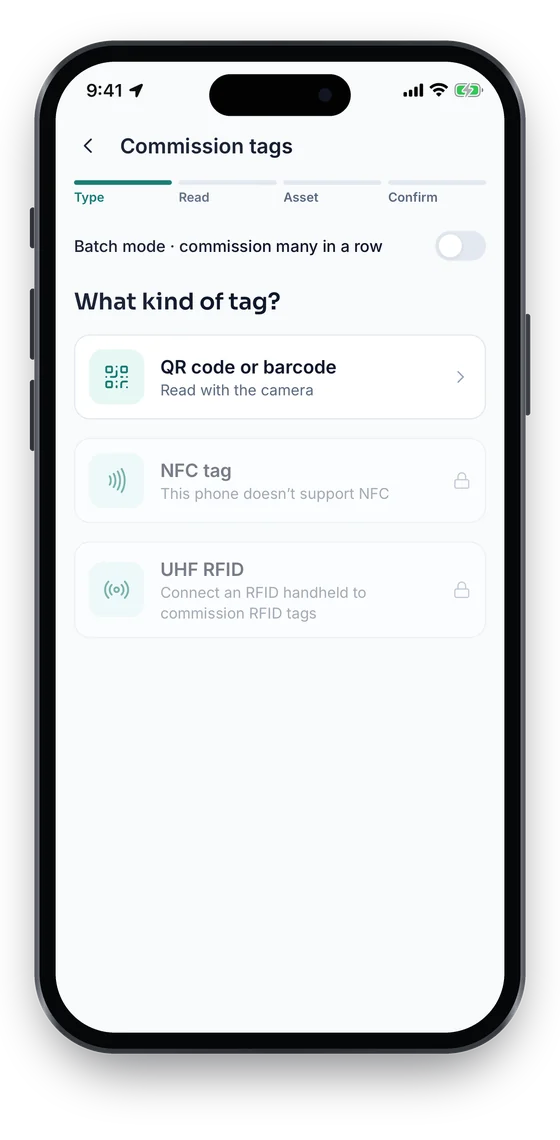
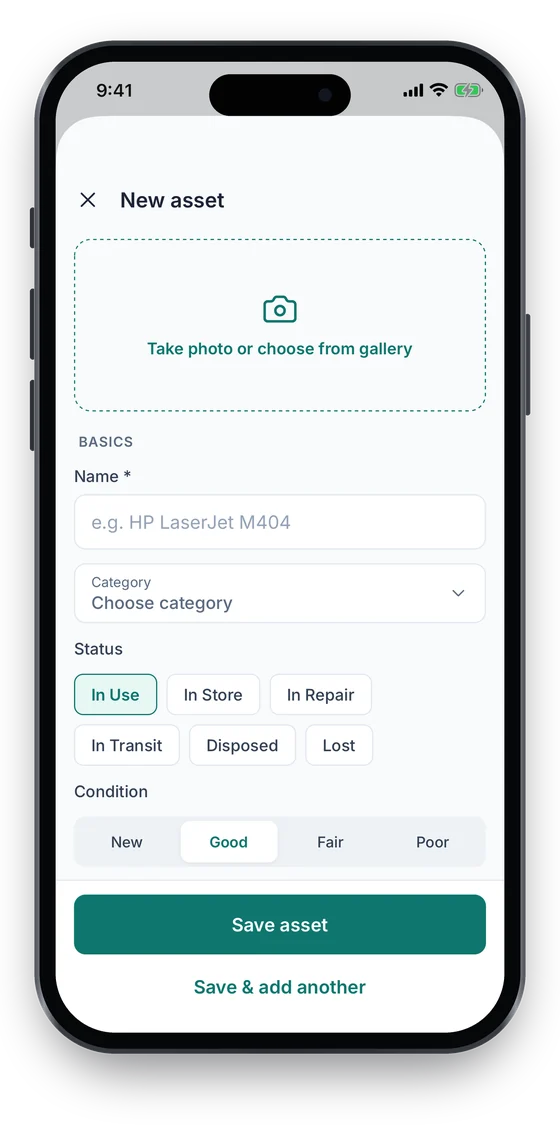
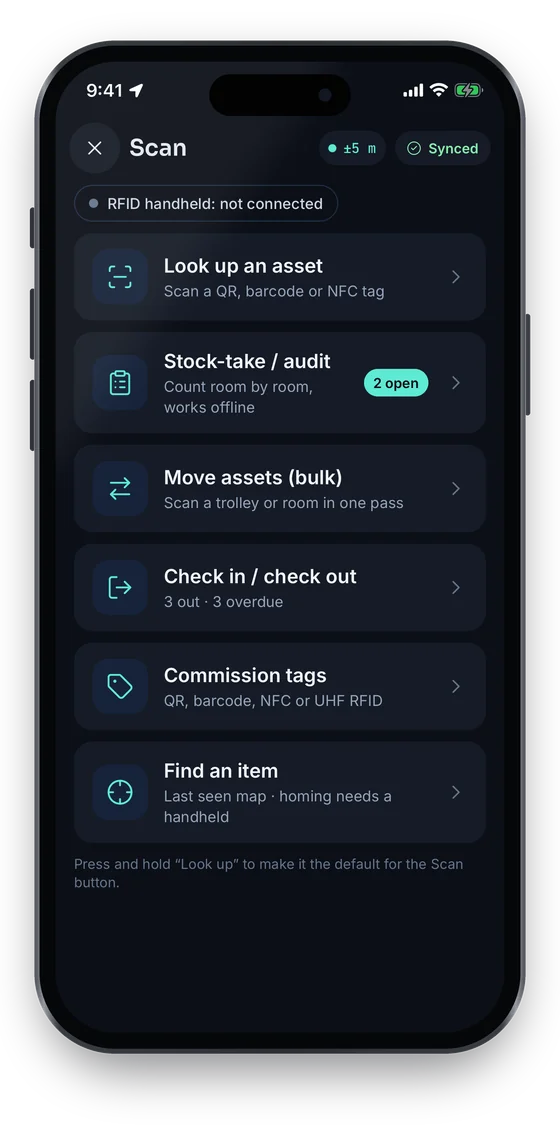
The Scan hub reads QR codes, barcodes and NFC tags (on phones with NFC). Commission tags binds a new label to an asset, and an unknown item can be added on the spot with a photo. UHF RFID works with a paired Bluetooth handheld.

Coming soon on theApp StoreComing soon onGoogle Play
Scan hub: look up an asset, stock-take, bulk move, check in or out, commission tags and find an item (sample data)
1Scan hub
Commission tags screen choosing QR code or barcode, NFC tag, or UHF RFID with a handheld (sample data)
2Commission tags
New asset form with photo, name, category, status and condition (sample data)
3Add a new asset

Swipe to see more screens →

Real screens from the Asetavo phone app (demo workspace, fictional company). iOS and Android apps coming soon to the App Store and Google Play.
How it works

From first step to everyday use

  1. 01
    Purchase

    Create a tag order: type, quantity, EPC range for RFID, supplier and cost.

  2. 02
    Receive

    Mark the order received — Asetavo creates one stock row per tag across the range.

  3. 03
    Tag stock

    See what is available, allocated to a batch, activated on an asset or voided.

  4. 04
    Commission

    Read the tag, check EPC and TID against stock, and activate it on one asset.

  5. 05
    Attach

    Stick or fix the tag in a consistent place — on-metal tags for metal surfaces.

  6. 06
    Scan or read

    Phone cameras scan QR codes and barcodes; NFC is read with a tap; UHF RFID readers count many tags at once.

  7. 07
    Audit

    Stock-takes and reader sightings confirm what is where, and flag what is missing.

  8. 08
    Replace or retire

    Remove and void a damaged tag and commission a new one; retire tags when an asset is disposed.

Workflows, end to end

Tagging a new site

  1. Order 2,000 UHF tags
  2. Receive → stock
  3. Read tag with sled
  4. Commission to asset
  5. Attach on-metal tag

QR roll-out

  1. Filter register by room
  2. Queue labels
  3. 50×30 mm template
  4. Print sheet
  5. Stick and scan to confirm

Damaged tag

  1. Scan fails
  2. Remove old tag
  3. Void in stock
  4. Commission new tag
  5. History updated

Copied tag found

  1. Read duplicate EPC
  2. Rejected
  3. tag_clone_suspected logged
  4. Investigate source
Barcode scanners

Asset tracking software with a barcode scanner

Barcode and QR tags are the cheapest way into a tagging system, and you can scan them with the hardware you already have. They are included on every plan, including the free Starter plan.

Scan with a phone camera

Any phone browser at app.asetavo.com reads QR codes and Code 128 barcodes with the camera, so every member of staff already carries a scanner.

Or with a handheld barcode scanner

Handheld barcode scanners scan Asetavo labels directly — useful at a tool crib, an IT counter or a store where many items are issued and returned every day.

Add NFC and RFID later

Start with barcodes on everything, then add NFC (Growth) or UHF RFID (Business) to the same assets when you need tap-to-identify or bulk reads. Nothing is re-registered.

QR code & barcode tracking
Compare

Which tag for which asset: QR vs barcode vs NFC vs UHF RFID

CriteriaQR codeBarcodeNFCUHF RFID
Typical assetsFurniture, IT equipment, office and classroom kitItems that already carry a barcode; tool-store itemsKeys, fobs, shared tools and devicesHigh-value plant, medical and warehouse equipment, returnables
Best forMost assets; anyone can scan with a phoneAssets already carrying barcodes; simple labelsUp-close tap for shared kit, keys and equipmentBulk counts, fast audits, reader-based zones
Read methodPhone camera or scannerBarcode scanner or phone cameraTap with a phone in the Asetavo appHandheld sled or fixed reader / portal
Typical rangeLine of sight, up closeLine of sight, up closeA few centimetresSeveral metres, no line of sight
Bulk readingOne at a timeOne at a timeOne at a timeMany tags per second
Typical tag costLowest — printed labelLowest — printed labelLow — per-tag chipLow for inlays; higher for on-metal and rugged tags
Extra hardwareNoneOptional scannerNFC readerRFID reader required
PlanAll plansAll plansGrowth and aboveBusiness and above

There is no universal winner. Most organisations mix: QR on furniture and low-value items, UHF RFID on high-value or frequently audited assets, NFC where people tap to check out. Costs vary by supplier, volume and surface — metal needs on-metal RFID tags. Not sure? Try the tag technology selector in the resources below.

Deep dive

The detail behind it

NFC asset tags (tap to identify)

NFC sits between a printed QR label and UHF RFID: a small chip read by tapping, one tag at a time.

How it reads
An NFC tag is read by holding a reader a few centimetres away. There is no code to aim a camera at, so the tag can sit under a cover or on a key fob.
Where it fits
Keys and fobs, shared kit signed in and out at a counter, and equipment people handle up close.
Plan
NFC tags are on Growth and above. QR and barcode stay on every plan; UHF RFID is on Business.
Reading with a phone
Tap a phone on the tag in the Asetavo iOS or Android app to open the asset. The apps are coming soon to the App Store and Google Play; until then, pair an NFC tag with a QR label so the phone browser can scan it too.
NFC vs UHF RFID
NFC reads one tag at a few centimetres. UHF RFID reads many tags at once from several metres, which is what bulk counts and doorway readers need.
One asset, several tags
An asset can carry an NFC tag, a QR label and a UHF tag at the same time. Each is bound to the same record.

Tag integrity rules

These are enforced by the server on every tag assignment, not just in the app.

Unique active code
No two active tags may share the same code or EPC — a duplicate is rejected.
Stock-gated UHF
Once you use tag stock, a UHF EPC must be an available or allocated stock row to be activated. It is then marked activated and linked to the tag.
Single activation
An EPC that is already activated cannot be activated again; the attempt is logged as tag_clone_suspected.
TID binding
The chip’s factory TID is bound to the EPC on activation. The same EPC arriving with a different TID is rejected and logged.
Void
Voided stock is permanently out of circulation.
History
Tag assigned, tag removed and clone-suspected events are written to the asset’s history timeline.
FAQ

Tagging questions

Want to see it with your assets?

Walk us through your sites and we’ll show you tagging set up the way you’d use it.

Book a demo
It depends on the asset. QR labels suit most items and need only a phone camera; QR code and barcode tracking is on every plan, including the free one. Barcodes suit assets that already carry them. NFC suits keys and kit people handle up close. UHF RFID suits high-value or frequently counted assets because readers can count many at once without line of sight. Most organisations mix them.

Start tagging your assets

Print QR labels on any plan today, and add NFC or UHF RFID when you need faster counts.

No card required · Workspace ready in minutes · Simple USD pricing