Asset Register

Fixed asset register software: one living record for every asset

Every asset gets one profile: identity, where it sits from property down to room, who holds it, what it cost and what it is worth today, which tags it carries, and every change since the day it was registered.

All plans · custom fields from GrowthCompare plans
Product screen · sample data
What it solves

What changes when asset register moves into Asetavo

The way it usually works today, and the way it works once it lives in one system.

Asset Register in use on site
  1. Before: A spreadsheet per site, emailed around, with three versions of the truth and nobody sure which is current.

    With Asetavo: One register for every property, searchable by tag, name or serial, that everyone with access reads from.

  2. Before: “Where is it?” means walking the floors or calling whoever used it last.

    With Asetavo: Each asset shows its Property → Building → Floor → Room path, and the last recorded move or scan.

  3. Before: When someone leaves, nobody knows which laptops, tools or keys they were holding.

    With Asetavo: Custodian and department sit on every asset, so filtering by person lists everything they are accountable for.

  4. Before: Invoices, warranties and handover forms are buried in inboxes and shared drives.

    With Asetavo: Documents and photos attach to the asset itself — PDF, images and Office files up to 10 MB each.

Product in action

What your team actually sees

Coded from the real Asetavo screens, with sample data for a fictional company, Northfield Group.

The Assets list is the everyday view — every asset with its tag, location, custodian, status and value, filtered down in a couple of clicks.

The register: search, filter, act in bulk

  1. 1
    Search and five filters
    Search by tag, name or serial, then narrow by status, category, property, custodian or location.
  2. 2
    Active filter chips
    Every filter shows as a removable chip, so you always know what you are looking at.
  3. 3
    Status at a glance
    In use, In store, In repair, In transit and Disposed are colour-coded across the register.
  4. 4
    Finance columns by permission
    Cost and net book value only appear for users who hold the finance permission.
Sample data
Capabilities

Everything in Asset Register

Every card below is in the product today, on the plans shown above.

Asset 360 profile

Overview, finance, tags, movements, maintenance, documents, warranty & contracts and history on one page.

Location hierarchy

Property → Building → Floor → Room with codes, and counts at every level.

Custodians and departments

Every asset has an accountable person and team, with reassignments recorded.

Custom fields

Eight field types, scoped to all assets or one category, optional or required.

Documents and photos

Invoices, manuals, warranties and certificates on the asset — verified file types, 10 MB each.

Append-only history

Every field change, move, tag and status change, with user and timestamp.

Search, filters and bulk actions

Filter by status, category, property, custodian or location; act on many assets at once.

Excel and CSV export

Export the whole register or a filtered selection for finance, insurers or auditors.

Excel & CSV import

Upload your register, map columns, review problem rows and import — missing categories and locations are created for you.

Add, edit and bulk on the phone

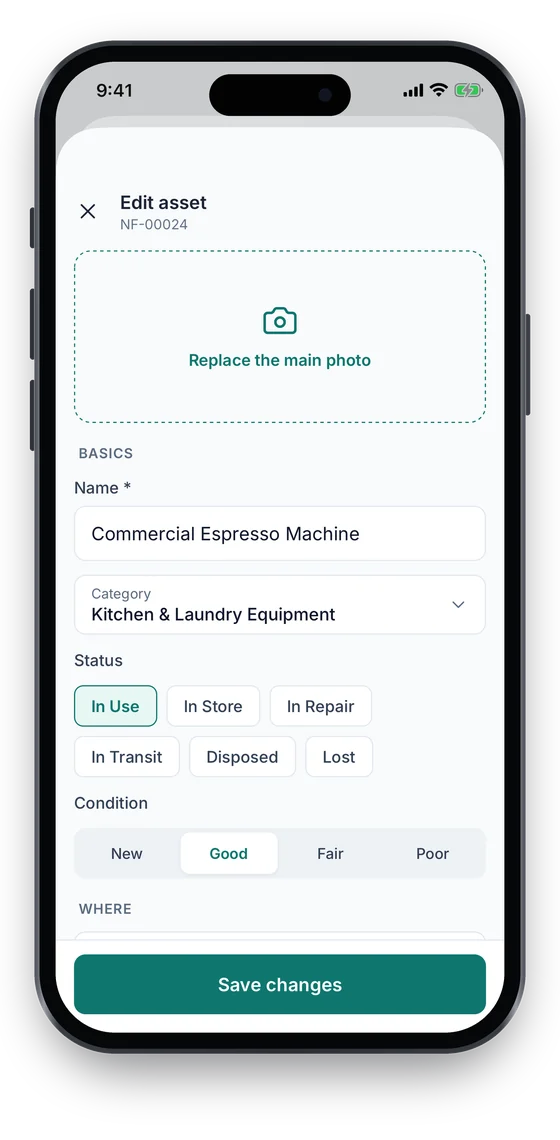
In the Asetavo app, add an asset with a photo in the field, edit details, change status in two taps, or bulk-scan a room to move, check in, change status or assign a custodian. Works offline and syncs once.

Not in the product yet

Everything else on this page is live today. These are the pieces we are still building.

  • RoadmapPDF register exports

In the Asetavo app

The register, in your pocket

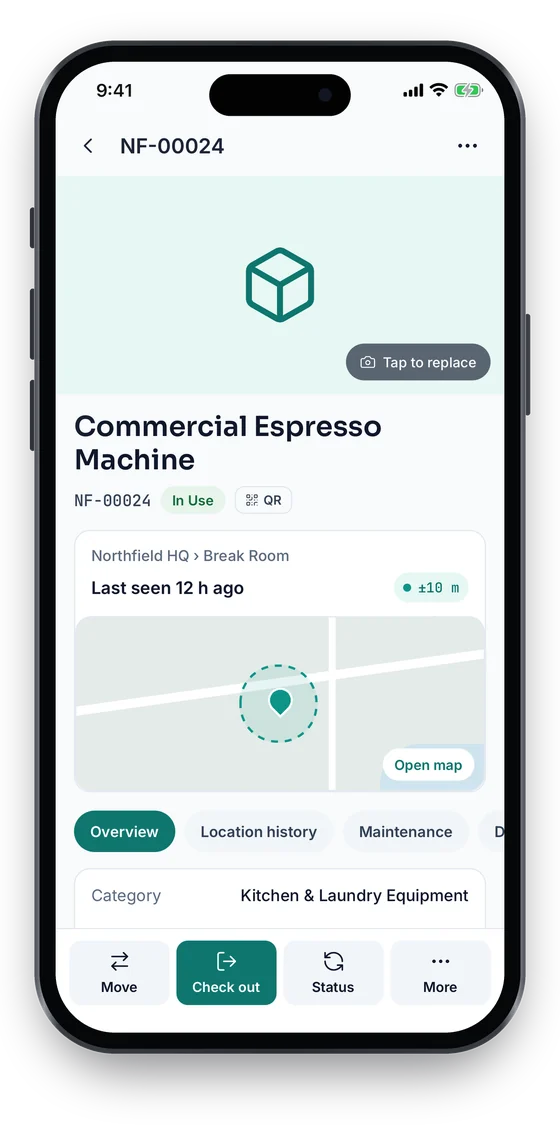
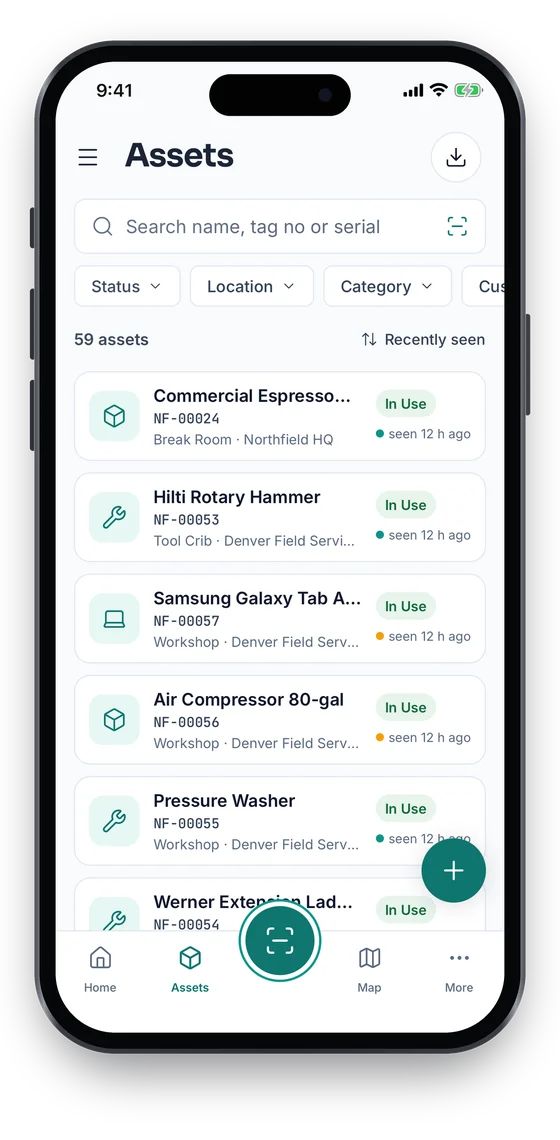
Search the register by name, tag number or serial and filter by status, location or category. Open any asset for its Asset 360 (status, tag, room and where it was last seen), and fix its details on the spot.

Coming soon on theApp StoreComing soon onGoogle Play
Asset list with search, status filters and last-seen times for each asset (sample data)
1Search & filter
Asset 360 for a Commercial Espresso Machine, In Use, last seen at Northfield HQ with a ±10 m GPS fix on a map (sample data)
2Asset 360
Edit asset form with photo, name, category, status and condition (sample data)
3Edit on the spot

Swipe to see more screens →

Real screens from the Asetavo phone app (demo workspace, fictional company). iOS and Android apps coming soon to the App Store and Google Play.
How it works

From first step to everyday use

  1. 01
    Set up your locations

    Build the tree once: properties, buildings, floors and rooms, each with a code.

  2. 02
    Define categories and fields

    Add categories and the custom fields each one needs — registration for vehicles, IP for network gear.

  3. 03
    Register assets

    Add assets one by one, or import your Excel or CSV register with the import wizard.

  4. 04
    Tag and assign

    Attach a QR, barcode, NFC or UHF RFID tag and give each asset a custodian and department.

  5. 05
    Operate from one record

    Moves, check-outs, maintenance, audits and depreciation all write back to the same asset profile.

  6. 06
    Report and audit

    Filter, export the register to Excel or CSV, and show the full history whenever it is asked for.

Workflows, end to end

New laptop arrives

  1. Register asset
  2. Attach invoice
  3. Print QR label
  4. Assign to Rachel Kim
  5. Room 2.14

Office relocation

  1. Filter by Floor 1
  2. Select 38 assets
  3. Bulk move
  4. Floor 2 rooms
  5. History logged

Employee leaves

  1. Filter by custodian
  2. Review held assets
  3. Return and inspect
  4. Reassign or store

Truck retired

  1. Final service
  2. Transfer to Dallas
  3. Dispose: sold
  4. NBV frozen
  5. Export to finance
Fixed asset register software

What is a fixed asset register?

A fixed asset register is the list of every long-term physical asset an organisation owns, with what it cost, where it is, who is responsible for it, how it is depreciated and when it was disposed of. Finance uses it for the books; operations uses it to find things. In Asetavo it is one register for both.

Register

One record per asset with cost, purchase date, category, location, custodian, tags, documents and history.

Depreciate

Book and tax depreciation with 8 methods, run monthly as a draft before posting (Business plan).

Depreciation

Verify

Scoped stock-takes check the register against what is physically there and list every variance (Growth and above).

Asset audit software

Dispose

Record sale, scrap, donation or write-off; gain or loss is calculated against net book value.

Fixed asset management
Moving from Excel

Import your Excel asset register in four steps

Most registers start life as a spreadsheet. The import wizard is on every plan, including the free one, so you never re-key it.

1. Upload

Upload your Excel (.xlsx) or CSV file under Import, or start from the free asset register template.

Asset register template

2. Match columns

Map each column to an Asetavo field: name, tag, category, location, custodian, cost, purchase date and more.

3. Review problem rows

Rows that cannot be imported are listed with the reason, so you can fix them and import again.

4. Import and label

Assets are created with any missing categories, locations and custodians. Then print labels and start scanning.

Asset label generator
Deep dive

The detail behind it

What the register records

Each asset carries a fixed identity plus the custom fields you define for its category.

Identity
Asset ID / tag number, name, serial, model, manufacturer, barcode and QR payload, parent asset.
Classification
Category, status (In use, In store, In repair, In transit, Disposed) and condition.
Place and people
Location path from property to room, custodian and department.
Acquisition and value
Acquisition date, supplier, purchase cost, residual value, accumulated depreciation and net book value — finance fields are hidden from users without the finance permission.
Attachments
Photo, manual, warranty, invoice, certificate or receipt — PDF, JPG, PNG, WebP, GIF, Word and Excel, checked by real file type, 10 MB per file.

Custody and movement rules

The register changes only through recorded actions, so the trail always explains the current state.

Move
A move records from/to location, optional new custodian, a reason and a note — singly or in bulk.
Status change
Every status change is logged with an optional note explaining why.
Check-out
Loans record due date and condition out and in; an asset that is checked out cannot be disposed.
Disposal
Sold, scrapped, donated and similar methods with date and proceeds. Terminal: it freezes net book value and cannot be undone.
History
Append-only. Entries are added by the system on every change and are not edited after the fact.
FAQ

Asset Register questions

Want to see it with your assets?

Walk us through your sites and we’ll show you asset register set up the way you’d use it.

Book a demo
It is a single digital record of every physical asset you own — what it is, where it is, who holds it, what it cost and is worth, which tags it carries and everything that has happened to it — replacing spreadsheets that drift out of date.

Build your asset register

Start free with your first site, then import your Excel or CSV register with the import wizard — no re-keying.

No card required · Workspace ready in minutes · Simple USD pricing