Asetavo for Construction

Construction tool and equipment tracking, jobsite by jobsite

One register for every drill, generator, compactor and scaffold set your company owns. Check tools out to crews, move plant between sites with a record of every transfer, keep machines serviced, and count a site store in minutes with rugged QR and on-metal RFID tags.

  • Power and hand tools
  • Plant and machinery
  • Access and lifting equipment
  • Survey and site instruments
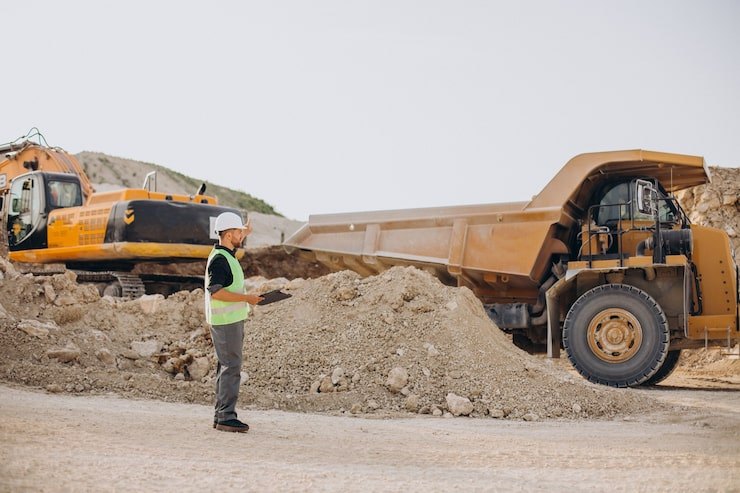
Construction team member using Asetavo
The operation

Built around how a contractor actually runs

A contractor is not one building with one storeroom. Equipment starts in a central warehouse, gets issued to a site store, is handed to a crew, travels to the next project in the back of a pickup and sometimes comes home months later.

Construction operations on site
  1. Step 1

    Your jobsites and yards

    Add each jobsite, site store and your central warehouse.

  2. Step 2

    Your tools and plant

    Tag every drill, generator and scaffold set, and issue it to a crew.

  3. Step 3

    Always know which crew has it

    See where each tool was last scanned, who has it and when it’s due back.

When a project closes, you can see exactly what is still on site before the hoarding comes down.

The problem

What goes wrong without a system

The day-to-day failures construction teams describe before they move off spreadsheets and paper registers.

01

Tools disappear between sites

A breaker goes out to Site A for a week, is borrowed by another crew, rides to Site B and is never logged anywhere. By the time someone needs it back, nobody can say whether it is on a site, in a van or gone. The usual response is to buy another one.
02

Nobody knows who is holding what

Paper sign-out sheets at the site store get skipped on busy mornings, go missing, or are illegible by Friday. When a laser level comes back damaged or does not come back at all, there is no reliable record of the last person responsible for it.

03

You keep buying tools you already own

Without a live picture of what is on each site, procurement orders against requests rather than stock. Duplicate grinders, generators and survey instruments pile up across projects while the warehouse has spares on a shelf.

04

Plant servicing slips on busy projects

Compactors, mixers, generators and lifting gear need regular servicing and inspection. On a tight programme, the service date lives in a mechanic's head or a whiteboard, and a missed service shows up as a breakdown in the middle of a pour.

05

Theft from open, changing jobsites

Sites have temporary fencing, many subcontractors and equipment that is easy to carry. Losses are usually discovered days later during a hunt for a specific tool, long after anything useful could be done about it.

06

Stock counts take a whole weekend

Counting a site store or the central warehouse by hand means clipboards, spreadsheets and arguments about which list is right. Because it is painful, it happens once a year, and the register drifts further from reality every month in between.

How Asetavo helps

One platform, set up for construction

Jobsite-by-jobsite location tree

Model every site, yard, store and workshop as a location. Each tool shows its current site and holder, and you can filter the register to see everything on a single project in one screen.

Learn more

Check-out to crews, people and projects

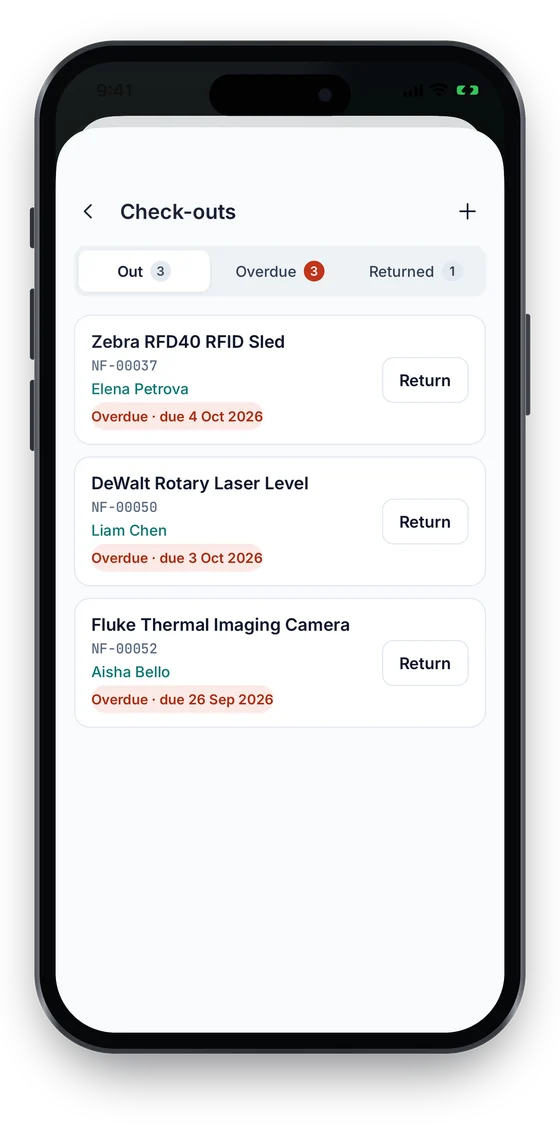
Issue a tool to a named person, a crew, a project or a site with a due date by scanning its tag. Bulk check-out kits a crew in one action, and overdue loans stand out instead of being forgotten.

Learn more

Transfers with a full movement trail

Moving a generator from Site A to Site B updates its location and custodian and adds a line to its movement history, so you can reconstruct where it has been across every project.

Learn more

Rugged QR and on-metal RFID tags

Use durable QR labels for low-cost tools and on-metal UHF RFID tags for steel plant, gas bottles and toolboxes that live outdoors. Scan with a phone or read a whole box of tools at once with a handheld reader.

Learn more

Zone alerts at yard gates

Put a fixed RFID reader at the equipment yard gate and set a rule so a tagged asset that leaves its zone, or passes the gate without being checked out, raises an alert in the inbox and by email.

Learn more

Plant maintenance and inspections

Set preventive-maintenance schedules for plant and lifting equipment, see what is coming due, raise work orders for the workshop and keep service and inspection records attached to each machine.

Learn more

Fast site audits

Open a stock-take for one site store, scan what is on the shelf and let Asetavo reconcile found, missing and unregistered items against the register instead of comparing lists by hand.

Learn more

Buy-vs-rent and depreciation reporting

Check-out history shows which tools are constantly in use and which sit idle in the crib. Combine it with purchase cost and depreciation to decide what to own, what to hire and what to sell.

Learn more
Industry workflows

The asset lifecycle, the way construction runs it

  1. 01Purchase
  2. 02Tag
  3. 03Store
  4. 04Issue to crew
  5. 05Transfer between sites
  6. 06Service
  7. 07Audit
  8. 08Retire or sell

Tool checkout

  1. Employee
  2. Tool
  3. Jobsite
  4. Return

At the site store or tool crib, the storeperson scans the worker's tool out against their name and the project, with a due date. The tool now shows as checked out on that jobsite. On return it is scanned back in with a condition note, so a damaged tool goes to the workshop instead of the next crew.

Equipment transfer between sites

  1. Site A
  2. Loaded for transfer
  3. Site B
  4. Received

When a plate compactor moves from Site A to Site B, the site manager records the transfer from the mobile app. Its location and custodian change, the move lands in the movement history and the receiving site can confirm arrival with a scan. Pair it with the downloadable asset transfer form if your process needs a signature.

Plant maintenance

  1. Machine
  2. Service due
  3. Work order
  4. Completed

Each machine carries a preventive-maintenance schedule. The due list shows what needs servicing next; the workshop generates a work order, records parts, labour and cost against the machine, and closes it with notes. The next due date rolls forward and the history stays on the asset for good.

Theft and loss response

  1. Zone
  2. Movement
  3. Alert
  4. Investigation

A tagged generator passes the equipment-yard gate reader outside of a check-out. The reader event triggers a zone-exit alert with the asset, reader and time. The yard supervisor acknowledges it, checks the movement history and the last custodian, and resolves the alert with a note of what was found.

Utilization and buy-vs-rent

  1. Check-out history
  2. Usage report
  3. Idle vs busy
  4. Buy, hire or sell

Check-out records show how often each tool type is issued and for how long. Tools out on almost every project are candidates to buy more of; tools that sit idle in the crib for months are candidates to sell or stop buying, and short one-off needs are better hired.

On the phone · Construction

Moves between jobsites, stamped on the spot

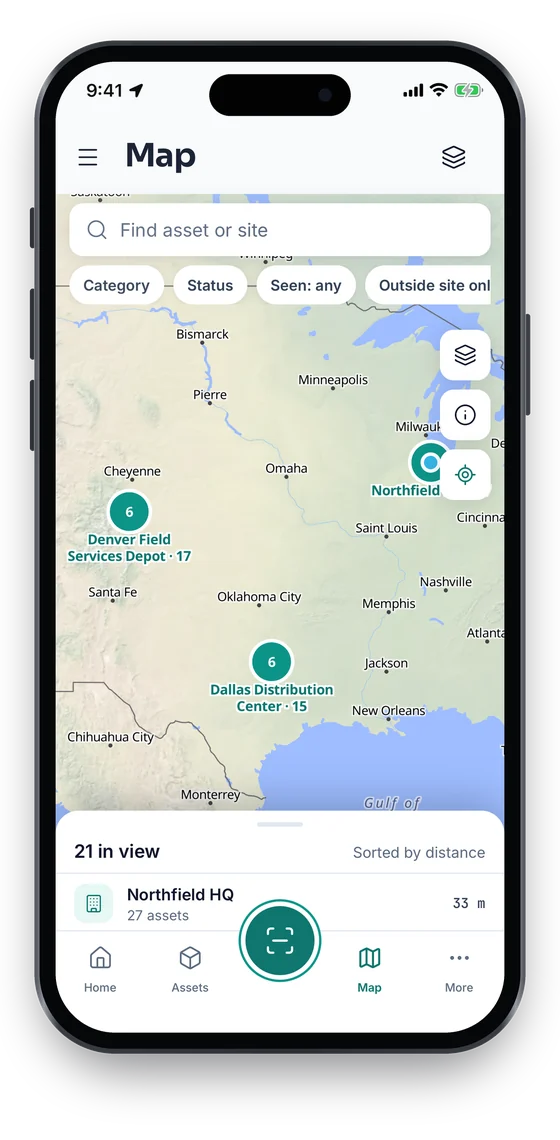
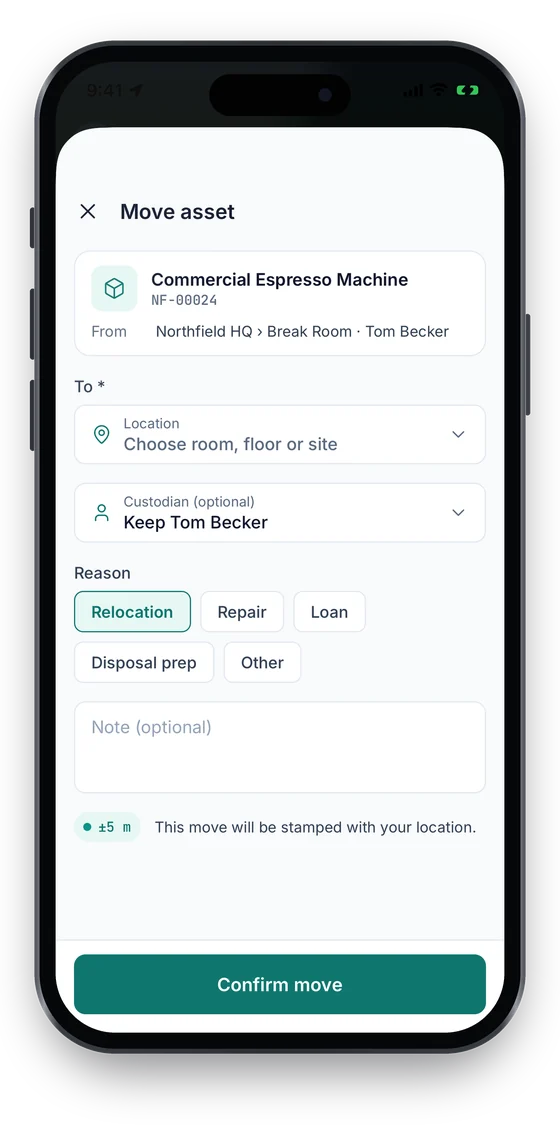
When a crew moves a generator or hands out a tool, the app records the destination, the person and a GPS fix with its accuracy (Growth and up). The Map tab shows where each item was last seen. Location is captured only when someone acts in the app, never in the background.

Coming soon on theApp StoreComing soon onGoogle Play
Map of Chicago, Dallas and Denver sites with asset clusters (sample data)
1Last seen on the map
Move asset sheet with destination, custodian, reason chips and a ±5 m location stamp (sample data)
2Move with GPS
Check-outs list with overdue items and a Return button on each (sample data)
3Tools out & overdue

Swipe to see more screens →

Real screens from the Asetavo phone app (demo workspace, fictional company). iOS and Android apps coming soon to the App Store and Google Play.
Product in action

What your team sees

An illustrative construction overview beside a real Asetavo screen.

Tools & equipment overviewIllustrative example
1,284
Tools & equipment
37
Active sites
92
Checked out to crews
14
Missing after last audit
28
Maintenance due
Recent activity
  • Generator 20 kVA #PL-112Moved Site A → Site BTransferred
  • Rotary Hammer #TL-0417Crew 2 · Site A · due FriChecked out
  • Plate Compactor #PL-058Quarterly service on PM scheduleService due
  • Laser Level #SV-021Left equipment yard zone 18:42Alert
  • Scaffold Set #AC-306Returned to central warehouseAvailable
Sample data for illustration — not a customer account.
Asetavo product screen

Every asset group, in one register

Categories and custom fields keep the details each group needs — serials, warranty, custodian, room.

Power and hand tools

Rotary hammers and breakers · Grinders and saws · Cordless tool kits · Laser levels · Torque wrenches · Welding sets

Plant and machinery

Generators · Plate compactors and rollers · Concrete mixers and vibrators · Water pumps · Light towers · Mini excavators and skid steers

Access and lifting equipment

Scaffolding sets · Ladders and podiums · Chain blocks and slings · Harnesses and lanyards · Mobile elevating platforms

Survey and site instruments

Total stations · Auto levels · Gas detectors · Moisture and concrete testers · Measuring wheels

Vehicles and site IT

Pickups and site vans · Trailers · Site office laptops · Rugged tablets · Radios and cameras

Use cases

Where construction teams put it to work

Close out a project without leaving tools behind

Before demobilizing a site, filter the register to that jobsite and see every tool and machine still assigned there. Walk the site store with a phone or handheld, check items back into the central warehouse or transfer them to the next project, and chase anything still checked out to an individual before the crew moves on.

Kit out a new crew in minutes

A new electrical crew starts on Monday. The storeperson scans a standard kit — drills, testers, ladders, a cable reel — to the crew lead in one bulk check-out with a due date tied to the project programme. Every item is traceable to the crew from the first hour, and partial returns are handled item by item.

Share plant across projects instead of buying more

Site B asks for a light tower. Before raising a purchase order, the plant manager searches the register, sees two sitting idle at the central warehouse and one on a site that finished last week, and transfers one across. The request is met from stock you already own.

Keep lifting and access gear inspected

Harnesses, chain blocks and slings need periodic inspection. Each item carries a schedule and an inspection history, with certificates attached to the work order that recorded the check. When a site manager or client asks for evidence, it is on the asset rather than in a filing cabinet.

Catch equipment leaving the yard

Tag high-value, portable plant with on-metal UHF RFID and install a fixed reader at the equipment yard exit. Anything that passes the gate outside of an open check-out triggers an alert, so the yard supervisor knows the same evening rather than at the next audit.

Settle recharges between projects and clients

When equipment is checked out to a project, the check-out history shows which project held which asset and for how long. Export it to Excel or CSV and use it as the basis for internal plant recharges or client variations in your own accounting process.

Maintenance

Keep plant serviced between pours

Breakdowns on site are expensive because they stop a crew, not just a machine. Asetavo keeps preventive-maintenance schedules, work orders and service history on the same record as the plant's location and custodian, so the workshop can see which machine is due and which site it is sitting on before sending a mechanic.

  • PM schedules per machine or per category, with a due list of upcoming services
  • Work orders generated from the due list, with parts, labour, cost and notes
  • Inspection and certificate attachments on lifting and access equipment
  • Condition captured on check-in so damaged tools go to the workshop, not the next crew
Finance & depreciation

Stop buying tools you already own

Most contractors do not have a tool shortage; they have a visibility problem that looks like a shortage. When every site can see what is idle elsewhere, purchase requests turn into transfers. Asetavo also keeps the finance side of plant in the same place — cost, depreciation and disposal — so the register the site uses is the register finance reports from.

  • Search the whole company before approving a new tool purchase
  • Utilization from check-out history to support buy, hire or sell decisions
  • Eight depreciation methods with separate book and tax profiles
  • Net book value per asset, category or site, exported to Excel or CSV
Multi-location

Every jobsite, yard and store in one view

Sites open and close with each project. Add a new jobsite as a location in minutes, move equipment onto it and archive it when the job is done — its history stays. Head office sees the whole company; site managers work within their own sites.

  • Location hierarchy for jobsites, yards, stores and workshops
  • Assignments to people, crews, projects or sites
  • Movement history that follows each asset across projects
  • Per-site stock-takes that roll up to a company-wide view
Identification

The right tag for each asset

Construction tags take a beating — rain, dust, concrete splash, pressure washers and being thrown in the back of a truck. Most contractors use more than one tag type: cheap, tough QR labels on the long tail of hand tools, and on-metal UHF RFID where you want hands-free reads at a gate or bulk counts in a store.

All plans

QR

Printed label · phone camera · line of sight

Default for power tools, ladders and site IT. Any phone scans them, they print on durable polyester or aluminium labels, and they work on every plan. Place them on a flat, protected face away from grip areas.

What is QR?
All plans

Barcode

1D label · any scanner · line of sight

Useful if your tool crib already runs on linear barcodes and handheld scanners. Keep them for existing stock and move new tags to QR, which scans at more angles and holds the asset ID reliably.

What is Barcode?
Growth and up

NFC

Tap-to-read chip · phone · a few cm

Good for small, high-value instruments like laser levels and gas detectors where a label is hard to fit. A tap with a phone opens the asset record, including in poor light. Available from the Growth plan.

What is NFC?
Business and up

UHF RFID

No line of sight · readers & portals · metres

Use on-metal hard tags on generators, compactors, scaffold stillages and toolboxes. A handheld reads a whole box of tools during a stock-take, and a fixed reader at the yard gate powers zone-exit alerts. Available from the Business plan.

What is UHF RFID?

Not sure which to use? Try the tag technology selector or compare plans.

Security & access

Control who sees and changes what

Tool registers attract edits from a lot of people — storepersons, site managers, mechanics and head-office finance. Role-based permissions keep each of them to the actions they need, and every change is recorded so disputes about who moved or changed what can be answered from the audit trail.

  • Nine granular permissions, including separate audit, finance and devices rights
  • Storepersons can issue and return without seeing purchase cost
  • Audit trail of every check-out, transfer, edit and disposal
  • Signed, replay-protected events from yard readers
  • Revocable device sessions for shared site phones and tablets
Security & access
Integrations

Fits the systems you already run

Asetavo sits alongside your project, accounting and fleet systems rather than replacing them. It exposes a documented REST API and signed alert webhooks, and every list can be exported to Excel or CSV. Connections to an ERP, job-costing, telematics or fleet platform are built via the REST API by your team or integrator — there are no pre-built named connectors.

  • REST API for assets, locations, movements, check-outs and work orders
  • HMAC-signed alert webhooks, for example to post yard-gate alerts into your own tools
  • Excel and CSV export of the register, check-out history and depreciation schedules
  • ERP, job-costing or telematics sync via the REST API
Integrations & API
Implementation

From spreadsheet to live register

  1. 1
    Map your sites and crews

    List your active jobsites, yards, stores and workshops, plus the crews and projects that hold equipment. These become your location tree and custodians.

  2. 2
    Import your tool list

    Import your existing spreadsheet of tools and plant with the Excel/CSV import wizard — categories, serial numbers and purchase cost come across where you have them.

  3. 3
    Tag the central warehouse first

    Start where the most equipment is. Apply QR labels to tools and on-metal RFID tags to plant as items are checked, then tag site stores as equipment comes back through the warehouse.

  4. 4
    Switch the site store to scan-out

    Replace the paper sign-out sheet with scan-to-issue on a phone. Agree default due dates by category and make scanning the only way a tool leaves the store.

  5. 5
    Add yard readers and PM schedules

    Once check-out is routine, add a fixed reader at the equipment yard gate with zone rules, and load service schedules for generators, compactors and lifting gear.

  6. 6
    Run the first site audit

    Pick one site store, run a stock-take, and resolve the missing and unregistered items. Repeat per site on a regular cycle so the register stays true.

Each tool and machine gets a QR, NFC or RFID tag and a record in the register. Your jobsites, yards and stores are set up as locations, and crews, people and projects as custodians. Tools are scanned out to whoever takes them, with a due date, and scanned back in on return, so you always see which site and which person holds each item.

See every tool on every jobsite

Book a walkthrough with your own site list and a handful of tools. We will show check-out, transfers, plant servicing and a site audit on your data.

No card required · Workspace ready in minutes · Simple USD pricing