Maintenance · CMMS

Preventive maintenance software built into your asset register

Plan preventive maintenance, run every job as a work order, and keep the cost, downtime and calibration record on the asset it belongs to. One system for the register and the workshop, so the history is never in someone’s notebook.

Business and aboveCompare plans
Asset Manager
Maintenance overview
Northfield Group · all sites · next 30 days
+ New work order
Due next 30 days149 PM · 3 inspection · 2 calibration
Overdue3oldest 3 days
Open work orders112 urgent · $4,860 open cost
Completed this month27$12,340 parts + labour
Due & overdueWindow: 30 days
NF-00731 Toyota 8FGU25 forklift #3
Forklift PM – monthly
Overdue 3 daysGenerate WO
NF-00655 Atlas Copco GA30 compressor
Compressor 2,000 h service
Overdue 1 dayGenerate WO
NF-00902 Fluke 719Pro pressure calibrator
Annual calibration
4 days leftGenerate WO
NF-00118 Carrier rooftop HVAC unit 2
HVAC quarterly inspection
6 days leftGenerate WO
Work orders completed6 months
Preventive / inspectionCorrective
Open by status
Open 3Assigned 4In progress 3On hold 1
Product screen · sample data
What it solves

What changes when maintenance moves into Asetavo

The way it usually works today, and the way it works once it lives in one system.

Maintenance in use on site
  1. Before: Servicing lives in a wall calendar and a technician’s memory, so the compressor gets serviced when it breaks.

    With Asetavo: PM schedules by days, weeks or months with a Due & overdue list that shows exactly what needs attention and when.

  2. Before: Jobs are requested by phone, done, and forgotten — no record of who did what or what it cost.

    With Asetavo: Every job is a numbered work order with type, priority, technician, vendor, parts and labour cost and downtime.

  3. Before: Calibration certificates sit in a shared drive and nobody knows which instrument is out of date.

    With Asetavo: Calibration records with result, standard, certificate reference and next due date, written automatically when a calibration work order is completed.

  4. Before: Nobody can say how much a forklift has cost to keep running this year.

    With Asetavo: The asset’s Maintenance tab lists every work order with parts, labour and total cost and the downtime it caused.

Product in action

What your team actually sees

Coded from the real Asetavo screens, with sample data for a fictional company, Northfield Group.

PM & Calibration: what is due and overdue now, with a manual Generate work order action, and every schedule with its interval, last completed and next due date.

Asset Manager
PM & calibration
14 due in the next 30 days · 3 overdue · 23 active schedules
+ New schedule
PM schedulesCalibration
Auto-generation is off — review this list and generate jobs manually. Scheduled recurrence is coming.
Due & overdue
Asset / scopeScheduleTypeStatus
NF-00731 Toyota 8FGU25 forklift #3
Dallas DC
Forklift PM – monthlyPreventiveOverdue 3 daysGenerate work order
NF-00655 Atlas Copco GA30 compressor
Dallas DC
Compressor 2,000 h servicePreventiveOverdue 1 dayGenerate work order
NF-00902 Fluke 719Pro pressure calibrator
Denver Depot
Annual calibrationCalibration4 days leftGenerate work order
NF-00118 Carrier rooftop HVAC unit 2
Chicago HQ
HVAC quarterly inspectionInspection6 days leftGenerate work order
NF-00740 Toyota 8FGU25 forklift #4
Dallas DC
Forklift PM – monthlyPreventive12 days leftGenerate work order
All schedules
NameScopeIntervalLast completedNext dueActive
Forklift PM – monthly
Preventive
Category · ForkliftsEvery 1 monthAug 26, 2026Sep 26, 2026
Compressor 2,000 h service
Preventive
NF-00655Every 3 monthsJun 28, 2026Sep 28, 2026
HVAC quarterly inspection
Inspection
Category · HVACEvery 3 monthsJul 05, 2026Oct 05, 2026
Annual calibration
Calibration
Category · Test instrumentsEvery 12 monthsOct 03, 2025Oct 03, 2026
Generator load test
Inspection
NF-00188Every 6 weeksAug 30, 2026Oct 11, 2026

PM schedules and the due list

  1. 1
    Due & overdue
    Schedules inside the window or past due, colour-coded by days left or days overdue.
  2. 2
    Generate work order
    One click creates a work order linked to the schedule, when a planner decides the job should go ahead.
  3. 3
    Interval and scope
    Every N days, weeks or months, for a single asset or every asset in a category.
  4. 4
    Next due
    Recalculated when the linked work order is completed, so the plan stays honest.
Sample data
Capabilities

Everything in Maintenance

Every card below is in the product today, on the plans shown above.

Work orders

Corrective, preventive, inspection and calibration jobs, auto-numbered (WO-00001), with low to urgent priority.

Status workflow

Open, Assigned, In progress, On hold, Completed, Cancelled — on a board or a list, with server-stamped start and completion times.

Parts, labour, downtime, vendor

Capture parts cost, labour cost, downtime minutes and the external vendor on every job.

PM schedules

Preventive, inspection and calibration schedules for an asset or a category, every N days, weeks or months, with lead days.

Due & overdue list

A pull list of schedules due inside your window or already overdue, ready to turn into work orders.

Generate work order from a schedule

One click on a due schedule creates a linked work order. Completing it rolls the schedule’s next due date forward.

Calibration records

Result (pass, fail, adjusted), standard, certificate reference, technician and next due — written on completion of a calibration job or recorded directly.

Warranty and service contracts

Warranty, service, AMC, insurance and lease contracts on the asset, with an expiring-soon list.

Report an issue from anywhere

Anyone can report an issue from an asset or from Home in the Asetavo app, with a photo; it creates a work order.

Not in the product yet

Everything else on this page is live today. These are the pieces we are still building.

  • Coming soonAutomatic work-order generation from schedules
  • Coming soonMaintenance-due and contract-expiry push reminders
  • RoadmapMeter readings that advance usage-based schedules
  • RoadmapMaintenance KPI and cost reports

In the Asetavo app

Work orders, worked on site

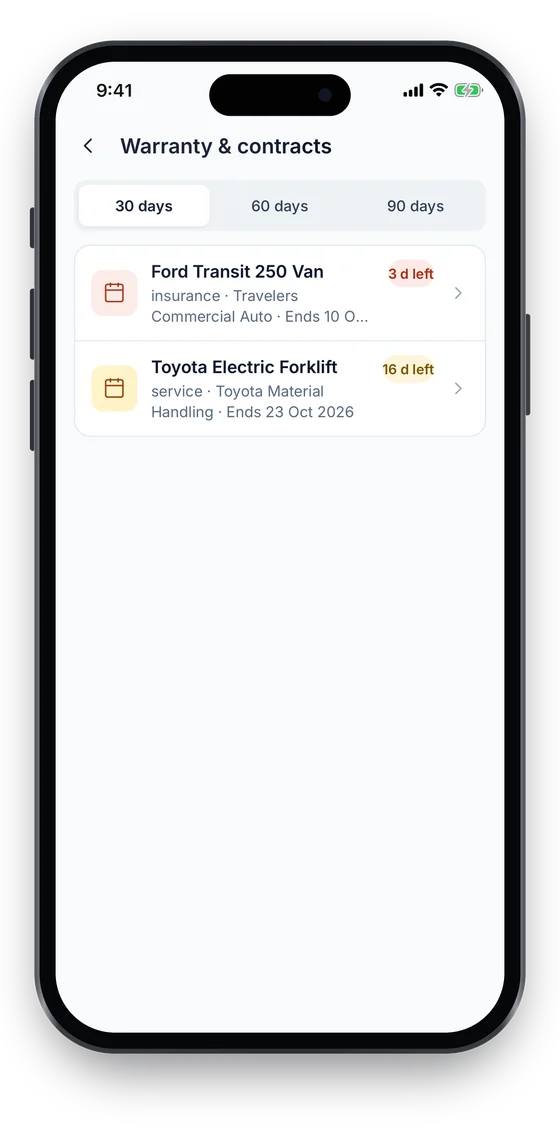
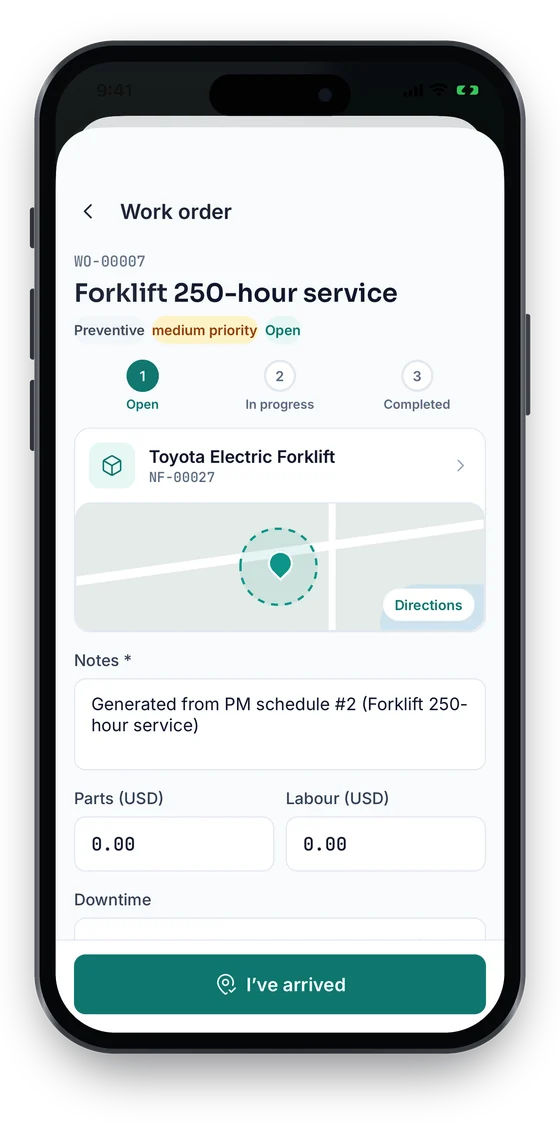
Technicians move each job from Open through In progress to Completed, add notes and photos, and tap I’ve arrived to log attendance with a GPS fix taken at that moment. Parts and labour costs show only to the Finance role. Warranty & contracts lists what ends in the next 30, 60 or 90 days.

Coming soon on theApp StoreComing soon onGoogle Play
Work order WO-00007 Forklift 250-hour service with an Open, In progress, Completed stepper, notes, parts and labour (sample data)
1Work order
Warranty and contracts list with days-left badges (sample data)
2Warranty & contracts

Swipe to see more screens →

Real screens from the Asetavo phone app (demo workspace, fictional company). iOS and Android apps coming soon to the App Store and Google Play.
How it works

From first step to everyday use

  1. 01
    Asset in the register

    Maintenance hangs off the asset: category, location, custodian, contracts and documents are already there.

  2. 02
    PM schedule

    Create a preventive, inspection or calibration schedule for one asset or a whole category — every N days, weeks or months — with lead days.

  3. 03
    Due list

    The Due & overdue list shows schedules coming due inside your window, and anything already late.

  4. 04
    Work order

    Click Generate work order on a due item, or raise a corrective one from a breakdown.

  5. 05
    Technician does the work

    Assign it, move it through Assigned, In progress, On hold. Start and completion times are stamped by the server.

  6. 06
    Cost, downtime, vendor

    Record parts and labour cost, downtime minutes and the outside vendor if one was used.

  7. 07
    Completed → history

    Completion rolls the PM schedule forward, writes a calibration record for calibration jobs and lands in the asset’s maintenance history.

Workflows, end to end

Monthly forklift PM at the distribution center

  1. Schedule "Forklift PM – monthly" covers the Forklifts category at Dallas Distribution Center
  2. Seven lead days bring it onto the Due & overdue list
  3. Maintenance lead clicks Generate work order for each truck
  4. Technician Liam Chen moves the jobs to In progress, logs parts and labour
  5. Completed: next due date rolls forward one month

Breakdown to repair (corrective)

  1. Conveyor motor fails — a corrective, urgent work order is raised on the asset
  2. Assigned to an outside vendor, status On hold while parts ship
  3. Parts cost, labour and 390 downtime minutes recorded
  4. Completed job appears on the asset’s Maintenance tab with its cost

Instrument calibration

  1. Calibration schedule on pressure gauges, every 12 months
  2. Due list shows gauges coming due; calibration work orders generated
  3. Lab result recorded: pass, adjusted or fail, standard and certificate reference
  4. Completing the job writes the calibration record and sets the next due date

Damaged return to repair

  1. A tool comes back from check-out marked Damaged
  2. Store keeper raises a corrective work order on the same asset
  3. Repair cost and downtime land on the tool’s history
  4. Tool returns to service and is available to issue again
CMMS by sector

CMMS for schools, hotels, facilities and small businesses

The same work orders, PM schedules and service history, set up around how each kind of organisation runs. Maintenance and CMMS are part of the Business plan; the asset register, QR and barcode tags start on the free plan.

CMMS for schools

Plan inspections and servicing for boilers, fire equipment, kitchen and lab equipment and classroom projectors as PM schedules, raise a work order when a teacher reports a fault, and keep the service history and contracts on each asset for governors and auditors.

Asset management for schools

CMMS for hotels

Log room faults such as air-conditioning, TVs and minibars as work orders against the asset in that room, schedule preventive work on kitchens, laundry, pumps and generators, and see what each room’s equipment has cost to keep running.

Asset management for hotels

CMMS for facility & property management

Organise every property, building, floor and room, attach HVAC, lifts, generators and fire systems to the right place, and track the service contracts and warranties that cover them alongside the work orders, parts and labour cost.

Facility maintenance use case

CMMS for small business

Keep the register and the maintenance log in one place instead of a spreadsheet and a notebook: due and overdue lists from PM schedules, a work order for every repair, and a cost history per machine or vehicle. Start free for the register, then move to Business when you need maintenance.

Asset tracking for small business
Compare

Preventive vs corrective vs inspection vs calibration

CriteriaPreventiveCorrectiveInspectionCalibration
Why it happensPlanned, before failureSomething broke or degradedPlanned check of condition or safetyPlanned check against a reference standard
How it starts in AsetavoPM schedule → due list → Generate work orderRaise a work order from the asset or the boardInspection schedule → due list → GenerateCalibration schedule → due list → Generate
Typical priorityLow / mediumHigh / urgentMediumMedium / high
What it recordsParts, labour, downtimeParts, labour, downtime, vendorFindings in notes; follow-up job if neededPass / fail / adjusted, standard, certificate
Effect on completionSchedule rolls forwardAdded to asset historySchedule rolls forwardCalibration record written; schedule rolls forward
ExampleForklift 250-hour serviceReplace failed conveyor motorMonthly fire-door checkAnnual torque-wrench calibration

All four are the same work-order object with a different type, so they share the board, costs and history.

Deep dive

The detail behind it

What a work order captures

The fields on every job, as they appear in the app and the API.

Code and type
Auto-numbered on creation (WO-00128); corrective, preventive, inspection or calibration.
Priority and status
Low to urgent. Open, assigned, in progress, on hold, completed or cancelled — moved only through the status action.
People
The technician doing the work and the person who asked for it.
Dates
The scheduled date drives days-left and overdue labels; started and completed are stamped by the server.
Cost and downtime
Parts and labour cost, totalled into the asset’s maintenance cost, and minutes out of service.
Vendor and schedule link
The outside contractor, if any, and the PM schedule the job came from — completing it rolls that schedule forward.

How schedules, due lists and calibration fit together

Preventive maintenance in Asetavo is deliberate: the plan tells you what is due, a person decides to raise the job.

Scope
A schedule covers one asset or all assets in a category.
Interval
Every N days, weeks or months.
Due list
Everything due inside the chosen window, overdue, or inside the schedule’s own lead days (set per schedule to surface work early).
Generate
Manual action that creates exactly one work order linked to the schedule.
Roll forward
Completing the linked work order sets last completed and recomputes next due.
Calibration record
Completing a calibration work order writes one calibration record (once per job). Records can also be entered directly.
FAQ

Maintenance questions

Want to see it with your assets?

Walk us through your sites and we’ll show you maintenance set up the way you’d use it.

Book a demo
A computerized maintenance management system organises maintenance around your assets: work orders for every job, preventive-maintenance schedules, calibration records and a service history with cost and downtime. In Asetavo it is part of the same system as your asset register.

Start managing maintenance

Put your critical assets on a schedule, run every job as a work order and build the history that tells you when to repair and when to replace.

No card required · Workspace ready in minutes · Simple USD pricing