
Asetavo for Education

School and university asset management across every campus

A school asset management system for laptops, labs and AV rooms: issue devices to students and staff with due dates, keep equipment accounted for room by room, and finish the year-end inventory in days instead of weeks. One register for IT, facilities and the finance office — across every faculty, building and campus.

  • IT & student devices
  • Labs & teaching
  • AV & classrooms
  • Facilities & campus
Education team member using Asetavo
The operation

Structured like your institution

A university or school group is a set of campuses, each with faculties, departments, libraries, labs and admin offices — and every one of them owns equipment. Asetavo gives each campus its own branch of the location tree, and each building and room its place underneath.

Education operations on site
  1. Step 1

    Your campuses and classrooms

    Add each school, building, lab and classroom.

  2. Step 2

    Your devices and equipment

    Tag laptops, tablets, projectors and lab kit.

  3. Step 3

    Always know who has it

    Lend devices to staff and students with due dates, and see what’s overdue.

Year-end counts become a quick check instead of a week of spreadsheets.

The problem

What goes wrong without a system

The day-to-day failures education teams describe before they move off spreadsheets and paper registers.

01

Student devices go out and don’t come back

Laptops and tablets are issued at the start of term on a paper form or a shared spreadsheet. By the end of the year, some students have left, some devices are broken and some were swapped between siblings — and the IT team has no reliable list of who has what.
02

Year-end inventory takes weeks

Auditors and governing bodies want a confirmed asset count. Staff walk every classroom with a printed list, tick boxes, and then spend weeks reconciling what they found with a register that was already out of date.

03

Lab and AV equipment is shared and scattered

Microscopes, data loggers, oscilloscopes, projectors and portable speakers move between rooms and departments. When something is missing before a practical or an exam, it is found by asking around.

04

Each campus keeps its own spreadsheet

IT, facilities, departments and each campus maintain separate lists in different formats. Nobody has a complete picture, and the finance office can’t reconcile any of them with the fixed asset register.

05

Replacement budgets are guesswork

Without purchase dates, repair history and depreciation in one place, it is hard to show which devices are due for replacement next year — or to justify the budget request that pays for them.

Industry workflows

The asset lifecycle, the way education runs it

  1. 01Purchase
  2. 02Tag
  3. 03Image & register
  4. 04Assign
  5. 05Checked out
  6. 06Returned
  7. 07Inspected
  8. 08Reissue or retire

Student device lifecycle

  1. Assigned
  2. Checked out
  3. Returned
  4. Inspected

At the start of term, each laptop is checked out to a student with a return date. At the end of the year it is checked back in, inspected for damage and either reassigned or sent for repair — with the condition recorded against the device.

Staff laptop handover

  1. New starter
  2. Device issued
  3. Handover form
  4. Leaver returns

Staff devices are issued against the employee record with an attached handover form. When the person leaves, HR and IT can see exactly what needs to come back.

Lab equipment booking

  1. Technician checks out
  2. Practical session
  3. Return to prep room
  4. Condition noted

Portable lab kit is checked out to a teacher or class for a practical and returned to the prep room afterwards, so technicians know what is in use and what needs attention.

Year-end inventory

  1. Scope by campus
  2. Scan rooms
  3. Reconcile
  4. Report to finance

The annual count is split into audit sessions by campus or building. Staff scan each room, and the variance report of missing and unregistered items goes straight to the finance office.

On the phone · Education

Year-end counts and student devices, from a phone

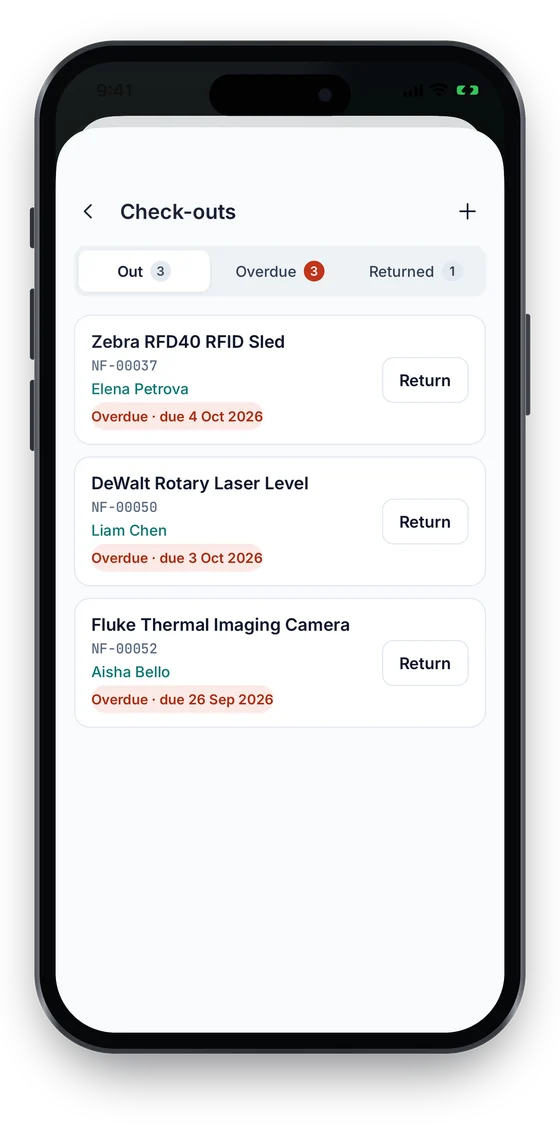
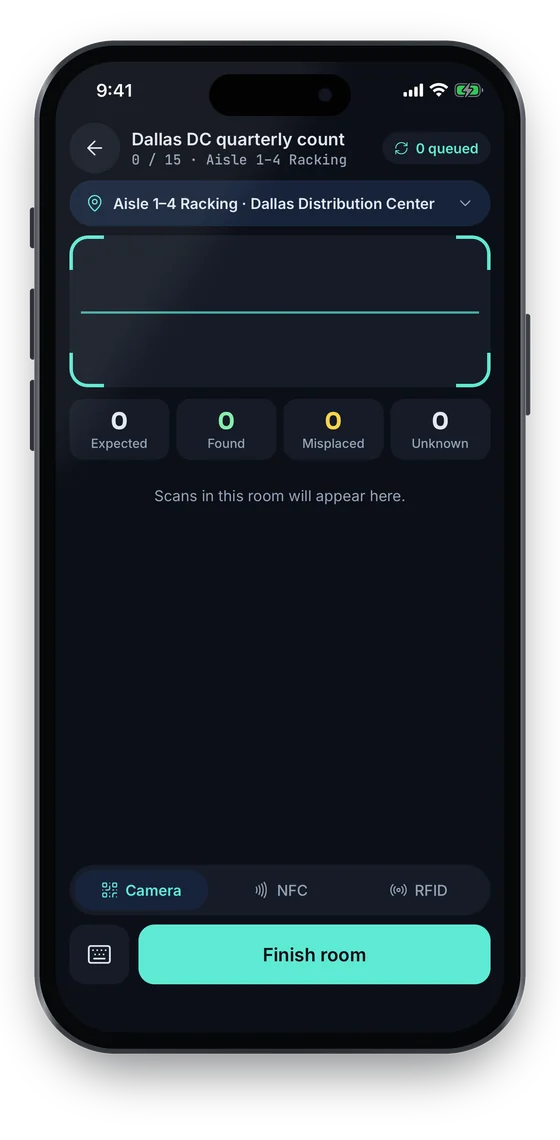
Count a classroom, lab or store room by scanning QR or barcode labels, even where the Wi-Fi drops; the scans sync once you are back online. The check-outs list shows who has each laptop or lab kit and what is overdue, with one-tap Return.

Coming soon on theApp StoreComing soon onGoogle Play
Counting Aisle 1–4 Racking with expected, found, misplaced and unknown counters and a queued-scans badge (sample data)
1Count a room
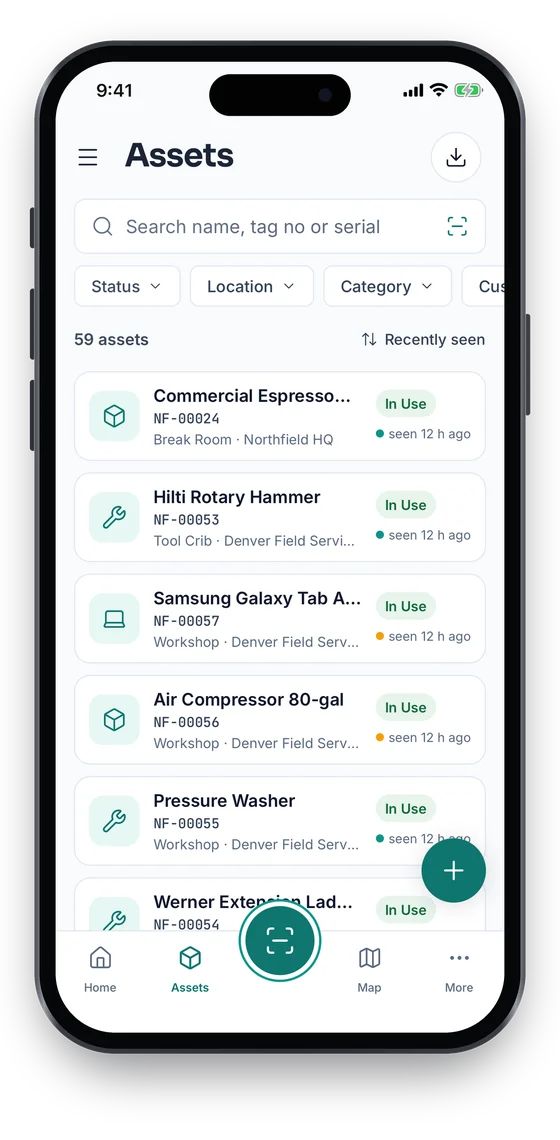
Asset list with search, status filters and last-seen times for each asset (sample data)
2Find any device
Check-outs list with overdue items and a Return button on each (sample data)
3Who has what

Swipe to see more screens →

Real screens from the Asetavo phone app (demo workspace, fictional company). iOS and Android apps coming soon to the App Store and Google Play.
Product in action

What your team sees

An illustrative education overview beside a real Asetavo screen.

Device check-out — Main campusIllustrative example
1,264
Devices checked out
38
Overdue returns
57
Awaiting inspection
212 / 240
Rooms audited this term
Recent activity
  • Chromebook #CB-1187Checked out to Grade 9 student · due 20 DecOut
  • Laptop #LT-0342Returned by staff leaver · inspection pendingInspect
  • Projector #AV-221Lecture Hall 3 · missing in room auditMissing
  • Microscope #LAB-078Science prep room · service completedReady
  • Tablet #TB-0915Overdue 12 days · Grade 7Overdue
Sample data for illustration — not a customer account.
Asetavo product screen

Every asset group, in one register

Categories and custom fields keep the details each group needs — serials, warranty, custodian, room.

IT & student devices

Student laptops & Chromebooks · Tablets · Staff laptops · Desktop PCs · Charging trolleys · Network equipment · Printers

Labs & teaching

Microscopes · Data loggers · Oscilloscopes · Fume cupboards · Engineering workshop tools · Musical instruments · Art & design kit

AV & classrooms

Projectors · Interactive displays · Document cameras · PA systems · Portable speakers · Cameras

Facilities & campus

Furniture · Boilers & HVAC · Kitchen equipment · Sports equipment · Grounds machinery · Minibuses · Keys

Library & shared resources

Loanable laptops · Calculators · Headphones · Special collections equipment · Exam-room devices

Use cases

Where education teams put it to work

1:1 device programmes

Run a one-device-per-student programme with a real record of who holds each laptop, its condition at issue and return, and the repair history in between. Overdue devices are listed by class or year group, so follow-up goes to the right teacher.

IT inventory across campuses

Every PC, printer, switch and display is registered to a campus and room with serials, warranty and purchase date. IT sees what is out of warranty, what is due for refresh and what has gone missing since the last count.

Science and engineering labs

Lab technicians keep instruments in a register with service and calibration records, check portable kit out to teachers for practicals, and audit the prep room in minutes before exam season.

Facilities and estates

Estates teams track boilers, HVAC, kitchen equipment and grounds machinery with PM schedules and work orders, and see everything installed in a building before a refurbishment or change of use.

Audit and governance reporting

Produce a campus-by-campus verified asset count for auditors, governors or the ministry, with variances explained and a record of who counted each room.

Grant- and donor-funded equipment

Tag equipment bought with a specific grant or donation using a custom field, so you can report on where it is and how it’s used when the funder asks.

Finance & depreciation

Purchase value, depreciation and replacement planning

Finance offices need the fixed asset register to agree with what is actually on campus. Asetavo keeps purchase value, depreciation and location on the same record, so the numbers finance reports are backed by a physical count.

  • Eight depreciation methods with book and tax schedules
  • Net book value by campus, department or funding source
  • Replacement planning from device age, warranty and repair history
  • Disposal records for obsolete or written-off equipment
Multi-location

One register for every campus

Multi-campus universities and school groups get a single asset register with a branch of the location tree for each campus. Local teams manage their own assets; central IT and finance see across all of them.

  • Campus-restricted roles for local IT and facilities teams
  • Transfers between campuses recorded with dates and approvers
  • Institution-wide reports and audit progress by campus
  • Shared asset categories and custom fields across campuses
School asset management system

A school asset management system, from register to year-end count

Most schools start with an asset register in a spreadsheet: one row per item, with its room, value and condition. A school asset management system keeps that register but adds labels, scanning and history, so the register stays true between audits instead of being rebuilt every summer.

  • Start from our free school asset register template, then import it with the Excel/CSV wizard
  • Every building, block and classroom as a location, with each item recorded in its room
  • QR labels scanned with a phone — free for your first 100 assets on Starter
  • Device check-outs to students and staff (every plan) and room-by-room stock-takes (Growth and above)
  • Depreciation and net book value for the finance office or bursar (Business plan)
Identification

The right tag for each asset

Education has many small, mobile devices and many rooms to count. QR covers everyday lookups; UHF RFID makes term-end counts and charging-trolley checks fast.

All plans

QR

Printed label · phone camera · line of sight

Durable QR labels on laptops, projectors and furniture let any staff member open an asset record from a phone. Included on every plan.

What is QR?
All plans

Barcode

1D label · any scanner · line of sight

Reuse library-style barcodes or existing asset numbers if your school already has scanners at the loans desk.

What is Barcode?
Business and up

UHF RFID

No line of sight · readers & portals · metres

Count a charging trolley of 30 laptops or a full IT store in one pass, and fit a reader at the IT store door so devices leaving without check-out raise an alert.

What is UHF RFID?
Growth and up

NFC

Tap-to-read chip · phone · a few cm

Tap-to-open tags for lab instruments and musical instruments where a printed label would be damaged by handling.

What is NFC?

Not sure which to use? Try the tag technology selector or compare plans.

Security & access

Control who sees and changes what

Schools handle information about students and staff, so Asetavo keeps personal data to what is needed for custody — a name and identifier on a check-out. Roles control who can see custodians, change records or dispose of equipment.

  • Role-based access with nine permission areas
  • Limit teachers and technicians to their own department or campus
  • Audit trail of every check-out, return, move and edit
  • Encrypted in transit and at rest, with tenant isolation
Security & access
Integrations

Fits the systems you already run

Asetavo works alongside your student information system, device management tools and finance software. It exchanges data through exports and a REST API rather than prebuilt connectors.

  • REST API to sync student and staff lists or push asset data
  • Excel and CSV export of registers, check-outs, audits and depreciation
  • Signed webhooks for alerts such as zone exits
  • Existing device spreadsheets imported with the Excel/CSV import wizard
Integrations & API
Implementation

From spreadsheet to live register

  1. 1
    Build the campus tree

    Campuses, buildings and rooms set up to match your estate.

  2. 2
    Import your lists

    Bring in existing IT, lab and facilities spreadsheets with the Excel/CSV import wizard.

  3. 3
    Tag during a quiet period

    Label devices over a holiday or during the start-of-term issue, room by room.

  4. 4
    Issue devices

    Check laptops out to students and staff with due dates as they are handed over.

  5. 5
    First room audit

    Run a room-by-room count to confirm the register before year-end.

Yes. Each device can be checked out to a named student or staff member with a due date. Overdue devices are listed so IT or class teachers can follow up, and each device keeps a history of every holder.

Stop searching spreadsheets for missing school equipment.

Bring your device list and campus map — we’ll show you check-outs, room audits and replacement planning set up for your institution.

No card required · Workspace ready in minutes · Simple USD pricing