Integrations & API

Connect Asetavo to the systems you already use

Asetavo does not replace your ERP, ledger or service desk. It feeds them and listens to them. On the Business plan and above, each workspace has a REST API for reading and writing assets, movements and reports, webhooks that push alert events as they happen, and a signed ingest endpoint for fixed RFID readers. Excel and CSV exports for the register and reports come with every plan.

Business and aboveCompare plans
Product screen · sample data
What it solves

What changes when integrations & api moves into Asetavo

The way it usually works today, and the way it works once it lives in one system.

Integrations & API in use on site
  1. Before: New assets are typed into the ERP by procurement and again into the asset list by operations, and the two never match.

    With Asetavo: Your procurement or ERP job creates the asset through POST /assets once, and both systems share the same tag number from day one.

  2. Before: Finance rebuilds the NBV figures every month from exported spreadsheets.

    With Asetavo: Your ledger integration pulls the register, depreciation runs and per-asset schedules from the API, or finance downloads the register as Excel or CSV.

  3. Before: Security hears about a forklift leaving the depot the next morning.

    With Asetavo: An alert rule with a webhook pushes a signed “left zone” event to your security system or service desk seconds after the reader sees it.

  4. Before: Fixed readers write into a black box that anyone on the network could spoof.

    With Asetavo: Readers sign every batch with their own secret. Asetavo rejects anything unsigned, stale, replayed or oversized.

Product in action

What your team actually sees

Coded from the real Asetavo screens, with sample data for a fictional company, Northfield Group.

Sign in, list assets, record a movement and export the register, the same calls documented on the developer pages. The base URL is your workspace’s own API host.

REST API in four calls

  1. 1
    POST /login
    Returns access and refresh tokens. Send the access token as Authorization: Bearer on every call.
  2. 2
    GET /assets
    Filter by text, category, location, status or custodian. Paginated, up to 200 per page.
  3. 3
    POST /movements
    Updates the asset’s location or custodian and appends to its history, attributed to the integration user.
  4. 4
    One envelope
    Every response has the form { success, message, data, meta? }, so error handling is the same everywhere.
Sample data
Capabilities

Everything in Integrations & API

Every card below is in the product today, on the plans shown above.

REST API

JSON over HTTPS for assets, locations, tags, movements, check-outs, stock-takes, work orders, contracts, depreciation, readers, zones, alerts and reports.

Bearer-token auth

Sign in as a named user. Access tokens last 12 hours or less, refresh tokens rotate, and each integration is a revocable device session.

Permission-scoped

The API enforces the same nine permissions as the app, deny-by-default. Finance fields need finance.

Signed webhooks

Alert rules can POST to your HTTPS endpoint, signed with HMAC-SHA256 and retried up to 3 times with backoff.

Excel and CSV export

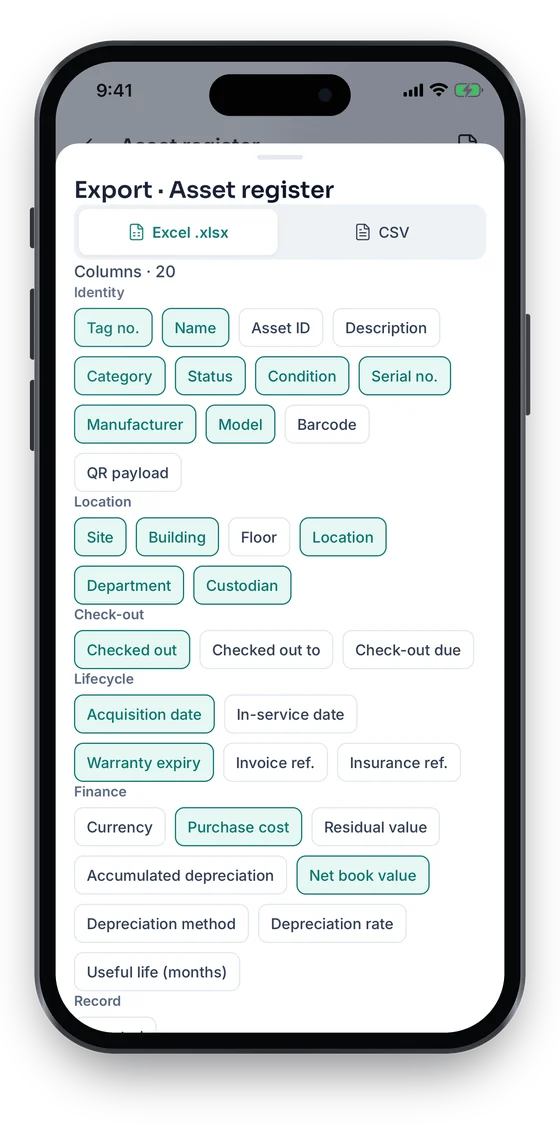
The asset register and reports as .xlsx or CSV on every plan; CSV is safe against formula injection.

Signed reader ingest

Fixed readers post HMAC-signed event batches with a timestamp and nonce. Up to 500 events or 256 KB per request, 600 events a minute per reader.

Excel & CSV import

Upload your existing register, map the columns, review problem rows and import — missing categories, locations and custodians are created for you.

Offline-safe app writes

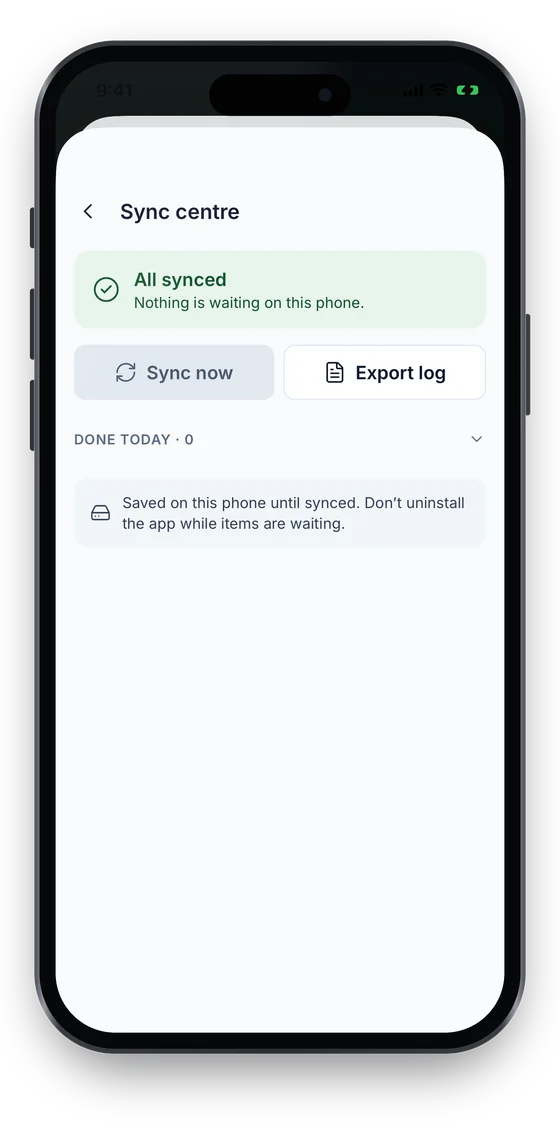
Changes made in the Asetavo app without signal wait on the phone, each with its own client id, and sync exactly once through the same API. The Sync centre shows what is waiting.

Not in the product yet

Everything else on this page is live today. These are the pieces we are still building.

  • Coming soonSingle sign-on (SSO)
  • RoadmapLong-lived API keys and more webhook event types
  • RoadmapNative accounting / ERP connectors

In the Asetavo app

From the phone into your other systems

Field changes made offline sync exactly once, so the REST API and your exports always see one clean record per action. From the phone, export any report to Excel or CSV and share it.

Coming soon on theApp StoreComing soon onGoogle Play
Sync centre showing All synced, with Sync now and Export log (sample data)
1Sync centre
Export sheet choosing Excel or CSV and grouped columns (sample data)
2Excel or CSV export

Swipe to see more screens →

Real screens from the Asetavo phone app (demo workspace, fictional company). iOS and Android apps coming soon to the App Store and Google Play.
How it works

From first step to everyday use

  1. 01
    Create an integration user

    Add a named user (for example “ERP sync”) and give it only the permissions it needs, such as view and create.

  2. 02
    Sign in for a token

    POST /login with that user’s email and password returns a bearer access token (12 hours or less) and a rotating refresh token.

  3. 03
    Read and write

    Call /assets, /movements, /checkouts, /work-orders, /reports and more on your workspace’s base URL. Every call is checked against the user’s permissions.

  4. 04
    Subscribe to events

    Create an alert rule with the webhook channel. Asetavo POSTs a signed JSON payload to your HTTPS endpoint when the rule fires.

  5. 05
    Export in bulk

    Download the asset register or a report as Excel or CSV by hand, or the CSV from a script, for BI tools and ledgers.

  6. 06
    Connect hardware

    Fixed RFID readers send HMAC-signed event batches to /ingest/events using their own per-reader secret.

Workflows, end to end

ERP creates the asset

  1. A purchase order for 20 laptops is received in the ERP.
  2. The ERP job signs in as “ERP sync” (view and create) and POSTs each laptop to /assets.
  3. Asetavo returns each new asset record, and the ERP stores its id and tag number against the PO line.
  4. IT prints labels and tags the laptops. From then on both systems refer to the same NF- numbers.

Zone-exit alert to the service desk

  1. Security creates an alert rule: forklifts, left zone Dallas DC, channel webhook.
  2. A portal reader signs and sends the read. Asetavo resolves the tag and the rule fires.
  3. Your endpoint receives the payload, verifies X-Asetavo-Signature, and opens a ticket.
  4. The on-call officer acknowledges the alert in Asetavo, which records who and when.

Monthly NBV into the ledger

  1. Finance posts the month’s book depreciation run in Asetavo.
  2. A scheduled script pulls GET /depreciation/runs and the run detail.
  3. It builds the journal and posts it to your accounting system.
  4. The register CSV is saved as supporting evidence for the close.
Compare

Integration methods compared

CriteriaREST APIWebhooksExcel / CSV exportReader ingest
DirectionRead and writeAsetavo → youAsetavo → youReader → Asetavo
TriggerYour code calls itAn alert rule firesDownload or scriptTag reads at a reader
AuthUser bearer tokenHMAC signature you verifyUser bearer tokenPer-reader HMAC secret
Best forERP, HR, ITSM, BI syncSecurity and service-desk alertsLedgers, audits, one-off analysisDoors, docks and gates
DataAlmost every objectAlert eventsRegister, stock-take varianceEPC or code, direction, RSSI
ImportPOST per record—Excel / CSV import wizard—

Spreadsheet import is self-serve through the Excel/CSV import wizard — no ticket to our team needed.

Deep dive

The detail behind it

What you can connect, and how

Every category connects through the Asetavo API, webhooks or CSV. There are no pre-built connectors to claim.

ERP
Create assets from purchase orders (POST /assets), keep tag numbers in sync, and read the register back (GET /assets).
Accounting / GL
Pull depreciation runs and per-asset schedules (GET /depreciation/runs, /assets/{id}/depreciation), or download the register CSV for NBV.
HR / HRIS
Maintain custodians and departments (/custodians, /departments), and list what a leaver still holds (GET /reports/by-custodian).
IT service desk (ITSM)
Look up a laptop by tag (GET /assets/lookup), open work orders (POST /work-orders), and receive alert webhooks as tickets.
IoT and RFID
Fixed readers post signed events to /ingest/events. Handhelds and phones use the mobile app or the stock-take scan API.
Data warehouse / BI
Schedule your own job to pull /reports/* and /assets, or load the register CSV.

Conventions and limits

Useful to know before you write the first line of integration code:

Base URL
Each workspace has its own API base: https://app.asetavo.com/api/w/<your-workspace>, where <your-workspace> is your workspace name.
Envelope
Every response is { success, message, data, meta? }. Lists include page, per_page, total and total_pages in meta.
Paging
per_page defaults to 25, maximum 200.
Throttling
Repeated failed sign-ins return HTTP 429 with a growing lock-out. Reader ingest above 600 events a minute returns 429.
Webhook delivery
HTTPS only, no redirects, short timeouts, up to 3 attempts with exponential backoff. Respond quickly with a 2xx and process asynchronously.
No SDKs
There are no official client libraries yet. The examples use curl, Node and Python.
FAQ

Integrations & API questions

Want to see it with your assets?

Walk us through your sites and we’ll show you integrations & api set up the way you’d use it.

Book a demo
Yes, on the Business plan and above. Each workspace on those plans has a REST API that covers assets, locations, tags, movements, check-outs, stock-takes, work orders, contracts, depreciation, readers, zones, alerts and reports, with JSON responses in one standard envelope.

Make Asetavo part of your stack

Start with the API reference, then connect your ERP, ledger, service desk or readers through the same secure endpoints the app uses.

No card required · Workspace ready in minutes · Simple USD pricing