Reports & dashboard

Turn asset data into operational decisions

Every scan, move, count and depreciation run updates the same register. Reports read from it, so the dashboard, the register, the by-location and by-custodian views and each audit variance show where things stand today, not at the last spreadsheet export.

All plans (financial reports on Business and above)Compare plans
Product screen · sample data
What it solves

What changes when reports moves into Asetavo

The way it usually works today, and the way it works once it lives in one system.

Reports in use on site
  1. Before: Answering “how many laptops are at the Dallas site and who has them?” means asking three people and merging their spreadsheets.

    With Asetavo: The by-location and by-custodian reports answer it from the register. Every count comes from asset records that scans and movements keep current.

  2. Before: Audit results sit in someone’s notebook, and nobody can say what was missing or what it was worth.

    With Asetavo: Each closed stock-take produces a variance report of found, missing, misplaced, unregistered and duplicate items, with the value at risk and an Excel or CSV export.

  3. Before: Finance and operations argue over totals because they report from different lists.

    With Asetavo: Asset count, total cost and total NBV come from one register summary, and money columns are shown only to users with the finance permission.

  4. Before: Overdue maintenance, expiring warranties and late returns are found by accident.

    With Asetavo: Maintenance due, calibrations due, expiring contracts and overdue check-outs are live lists in the app, ready whenever you open them.

Product in action

What your team actually sees

Coded from the real Asetavo screens, with sample data for a fictional company, Northfield Group.

Everything you can pull today, grouped by use. Reports can be exported or called through the API. In-app lists are live views of due, overdue and expiring items.

Report library

  1. 1
    Excel and CSV
    The asset register and reports export to Excel (.xlsx) or CSV on every plan. Every item here is also available as JSON through the REST API.
  2. 2
    In-app lists
    Maintenance due, calibrations due, expiring contracts and overdue check-outs as live lists you open whenever you need them.
  3. 3
    Finance group
    The depreciation report shows opening NBV, charge and closing NBV by period for users with finance access.
Sample data
Capabilities

Everything in Reports

Every card below is in the product today, on the plans shown above.

Live dashboard

Total assets, book value, depreciation, open stock-takes, by status, category and property, and recent movements.

Asset register report

Every asset with category, location path, status, cost and NBV, plus server-side totals.

By location and by custodian

Counts and value rolled up property › building › floor › room, and per person and department.

Depreciation report

Opening NBV, charge and closing NBV by period, with the year’s total.

Stock-take variance report

Found, missing, misplaced, unregistered and duplicate per closed session, with value at risk.

Excel and CSV export

The register and reports as .xlsx or CSV on every plan; CSV cells are made safe against formula injection.

Reports over the API

Register, by location, by custodian, by category, depreciation and variance as JSON for BI tools.

Operational lists

Maintenance due, calibrations due, expiring contracts, overdue check-outs and the alerts inbox as in-app views.

Reports and export on the phone

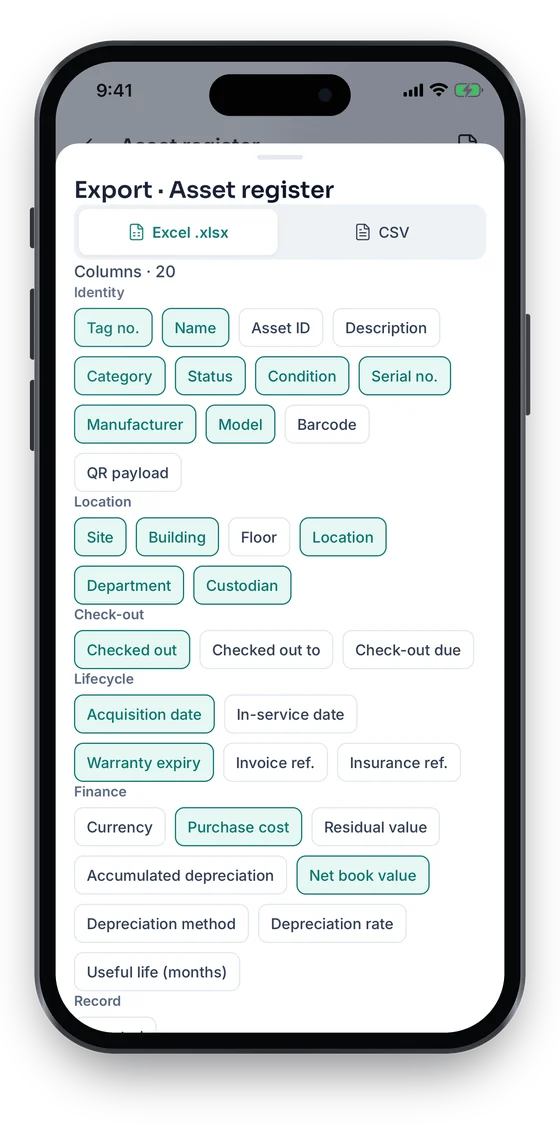
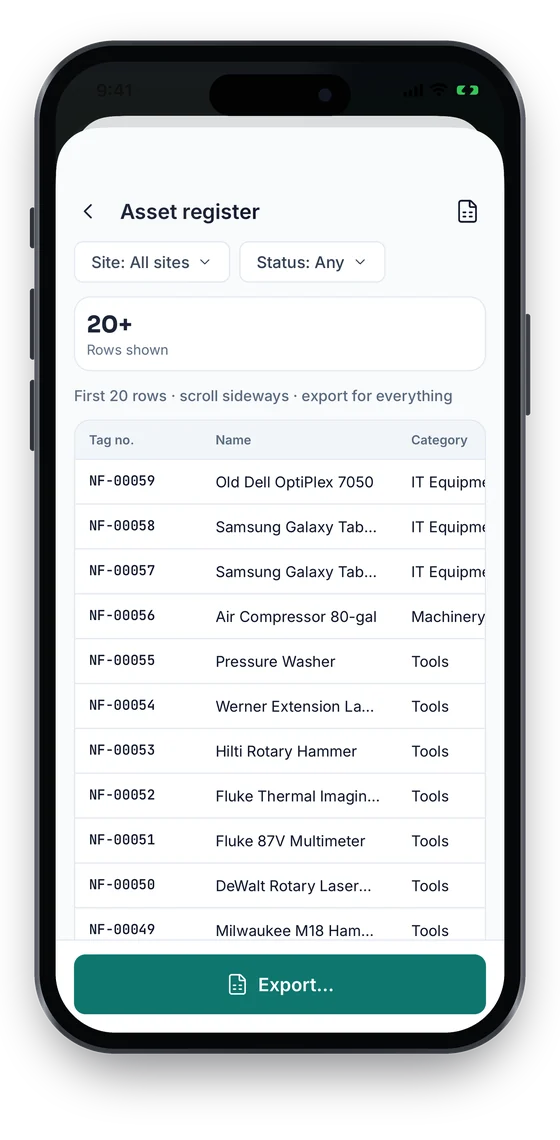
Run the register, by location, custodian or category, stock-take variance, depreciation, movements, check-outs and work orders in the Asetavo app, preview the first rows, then export Excel or CSV with the columns you pick and share it from the phone. Money columns need the Finance role.

Not in the product yet

Everything else on this page is live today. These are the pieces we are still building.

  • RoadmapScheduled / emailed reports
  • RoadmapPDF exports
  • RoadmapPush notifications for due, overdue and expiring items

In the Asetavo app

Reports, previewed and exported from the phone

Run the asset register, movements, check-outs, work orders, depreciation and more, and preview the first rows on the phone. Export to Excel or CSV with exactly the columns you need and share the file. Money columns need the Finance role.

Coming soon on theApp StoreComing soon onGoogle Play
Asset register report preview table filtered by site and status (sample data)
1Report preview
Export sheet choosing Excel or CSV and grouped columns (sample data)
2Excel or CSV

Swipe to see more screens →

Real screens from the Asetavo phone app (demo workspace, fictional company). iOS and Android apps coming soon to the App Store and Google Play.
How it works

From first step to everyday use

  1. 01
    Operations capture the data

    Registrations, scans, movements, check-outs, work orders, stock-takes and depreciation runs all write to the same records.

  2. 02
    Dashboard shows the state

    Totals, book value, the latest depreciation, open stock-takes, and assets by status, category and property, with recent movements.

  3. 03
    Pick a report

    Asset register, by location, by custodian, depreciation, or the variance report for a closed stock-take.

  4. 04
    Read by role

    Everyone with view access sees counts and locations. Cost and NBV columns and the depreciation report need the finance permission.

  5. 05
    Export or integrate

    Download the register or a report as Excel (.xlsx) or CSV, or pull any report as JSON through the REST API into your BI tool or ledger.

Workflows, end to end

Quarterly audit close

  1. The auditor closes the Dallas stock-take session.
  2. The variance report shows 7 missing items worth $18,430 and 12 misplaced.
  3. Misplaced items are confirmed as moved, which updates their location.
  4. Finance reviews the missing items and writes off what is not recovered.
  5. The variance report is exported to Excel and attached to the audit file.

Custodian accountability

  1. HR flags that Liam Chen is leaving the Denver depot.
  2. The by-custodian report lists everything assigned to him, with value.
  3. Operations reassigns or checks in each item before his last day.
  4. The report shows Liam with zero assets, and the history shows every hand-over.

Monthly operations review

  1. The operations manager opens the dashboard: status mix, value by site, open stock-takes.
  2. Maintenance due and overdue check-outs are reviewed in their lists.
  3. Finance adds the posted depreciation figure from the depreciation report.
  4. The register export goes to the BI team, who also pull the by-location report through the API.
Compare

Where each view lives and how to get it out

CriteriaTypeExcel / CSV exportAPI (JSON)
Asset registerReportYesYes
By locationReportYesYes
By custodianReportYesYes
By categoryDashboard—Yes
DepreciationReport (finance)YesYes
Stock-take varianceReportYesYes
Maintenance / calibrations dueIn-app list—Yes
Expiring contractsIn-app list—Yes
Overdue check-outsIn-app list—Yes

Exports download as Excel (.xlsx) or CSV, and the API returns every report as JSON for BI tools.

Deep dive

The detail behind it

What each report contains

Reports read directly from the register and its history. Nothing is copied into a separate reporting store.

Asset register
Tag, name, category, location path, status, cost and NBV per asset, plus total assets, Σ cost and Σ NBV for the whole register.
By location
Asset count and NBV at each level of the property › building › floor › room hierarchy.
By custodian
Custodian, department, asset count, Σ cost and Σ NBV: who is accountable for what.
By category
Count and value per category. Shown on the dashboard and available through the API.
Depreciation
For each period: opening NBV, charge, closing NBV and the method mix, plus the year’s total.
Variance
For a closed stock-take session: counts per variance type, value at risk, and each variance with expected and actual location and its resolution.

Exports, access and limits

What leaves the system, and who can see it:

Excel and CSV
Available for the asset register and reports, on every plan. In CSV, cells beginning with =, +, -, @, tab or carriage return are prefixed so spreadsheets treat them as text.
API
Every report is available as JSON (for example GET /reports/by-location) with a user token. Useful for Power BI, Looker or a data warehouse loaded by your own job.
Permissions
Reports need view access. Money columns, the book-value tiles and the depreciation report need finance.
FAQ

Reports questions

Want to see it with your assets?

Walk us through your sites and we’ll show you reports set up the way you’d use it.

Book a demo
A live dashboard plus the asset register, by location, by custodian, depreciation and stock-take variance reports. By-category figures are on the dashboard and in the API.

See your whole estate in one view

Start with your register and get counts, locations, custody and value from data your teams keep current.

No card required · Workspace ready in minutes · Simple USD pricing