Asetavo for Logistics

Track the assets moving through your supply chain

Returnable containers, pallets, roll cages, trailers, forklifts, handheld scanners and vehicles — know where each was last scanned or read, who it is checked out to, and which returnables are still sitting at customers. RFID at the dock doors, check-outs to drivers, and maintenance that keeps handling equipment on the floor.

  • Returnable transport items
  • Trailers and vehicles
  • Warehouse equipment
  • Handhelds and IT
Logistics team member using Asetavo
The operation

Follow the asset, not just the shipment

Your transport and warehouse systems follow shipments. The equipment that carries them — cages, containers, pallets, the trucks themselves — has no system of its own, so it leaks.

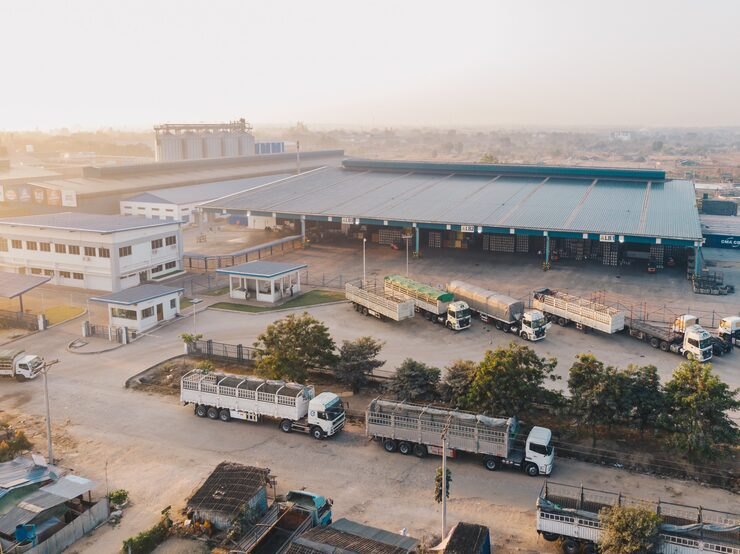
Logistics operations on site
  1. Step 1

    Your depots and docks

    Add each warehouse, zone, dock door and yard.

  2. Step 2

    Your equipment

    Tag forklifts, scanners, cages and returnable assets.

  3. Step 3

    Know when it leaves

    Readers at doors record movements and alert you when equipment leaves without a check-out.

Returnables and handling equipment stop quietly walking out of the building.

The problem

What goes wrong without a system

The day-to-day failures logistics teams describe before they move off spreadsheets and paper registers.

01

Returnables go out and do not come back

Containers, pallets and cages leave full on every delivery. Some come back on the next run, some sit in a customer's yard for months, some are used by the customer for their own shipments. Without a count per customer, you only notice when you have to buy more.
02

No record of which truck or driver took what

Handheld scanners, tail-lift trolleys, straps and loading equipment go out with drivers each morning. When something is missing at the end of the day, the only record is who was on shift.

03

Warehouse equipment is where you did not leave it

Forklifts, pallet jacks and handhelds migrate between zones and sites. Supervisors lose the first half-hour of a shift finding equipment, and charging bays are empty while units sit idle elsewhere.

04

Handling equipment downtime stops the dock

A forklift out of service or a failed dock leveller slows every load that shift. When servicing is tracked on a whiteboard, inspections slip and breakdowns arrive at peak volume.

05

Counting the returnable pool is guesswork

Physically counting thousands of cages and containers across sites takes days, and the number is out of date the moment trucks move. Most operators simply estimate the pool, and the estimate is usually optimistic.

How Asetavo helps

One platform, set up for logistics

RFID readers at dock doors

Fix UHF readers at outbound and inbound docks. Tagged cages, containers and pallets are read as they pass, updating each asset's last-seen location and movement history without anyone scanning by hand.

Learn more

Returnables checked out to customers

Check returnables out to the customer they were delivered to, with an expected return date. Your outstanding balance per customer is a filter, and overdue units are visible for follow-up.

Learn more

Equipment checked out to drivers and vehicles

Issue handhelds, trolleys and loading kit to a driver or a vehicle at the start of a shift and check it back in at the end. You always know who last had it.

Learn more

Zones and exit alerts

Define docks, yards and storage areas as zones. An asset leaving through a dock without an open check-out, an unregistered tag at a door or a reader that goes silent can each raise an alert.

Learn more

Maintenance for MHE and vehicles

Keep forklifts, reach trucks, dock levellers and vans on preventive-maintenance schedules. Planners generate work orders from the due list and technicians record the service against the unit.

Learn more

Bulk counts of the returnable pool

Walk a yard or storage area with a handheld reader and count hundreds of tagged containers in a pass. Audit sessions reconcile found, missing and unregistered units against the register.

Learn more

Multi-site view

Warehouses, distribution centres and depots sit on one location tree, so you can see where the pool is concentrated and rebalance equipment between sites.

Learn more

Signed webhooks into your systems

Push dock and zone alerts to your own transport or warehouse tools as HMAC-signed webhooks, and pull asset data through the REST API.

Learn more
Industry workflows

The asset lifecycle, the way logistics runs it

  1. 01Purchase
  2. 02Tag
  3. 03Enter pool
  4. 04Dispatch
  5. 05At customer
  6. 06Return
  7. 07Inspect & repair
  8. 08Retire

Returnables loop

  1. Issued
  2. Customer
  3. In transit
  4. Returned

Containers are read at the outbound dock and checked out to the receiving customer with an expected return date. When they come back on a return run, the inbound dock read or a handheld scan checks them in and sends them to inspection. The gap between issued and returned, per customer, is your outstanding balance.

Dispatch equipment to a driver

  1. Asset
  2. Vehicle
  3. Driver
  4. Route

At the start of a shift, the transport office checks a handheld, trolley and straps out to the driver and the vehicle for that day's route. Asetavo records who has it and when it is due back; it does not track the vehicle's position along the route. At the end of the shift everything is checked back in, and anything missing is flagged to that driver.

Warehouse flow

  1. Received
  2. Stored
  3. Picked
  4. Dispatched

Cages and containers are read as they arrive, located to a storage zone, moved to a pick face and read again at the outbound dock. Each read updates the last-seen location, so the warehouse can see how many empties are available and where.

Maintenance for MHE and vehicles

  1. Vehicle or equipment
  2. Service
  3. Return to operation

A reach truck comes up on its PM due list. The planner generates a work order; the unit is marked out of service while the technician works on it, and returns to operation when the work order is closed with parts and labour recorded.

On the phone · Logistics

Move a whole cage or bay in one pass

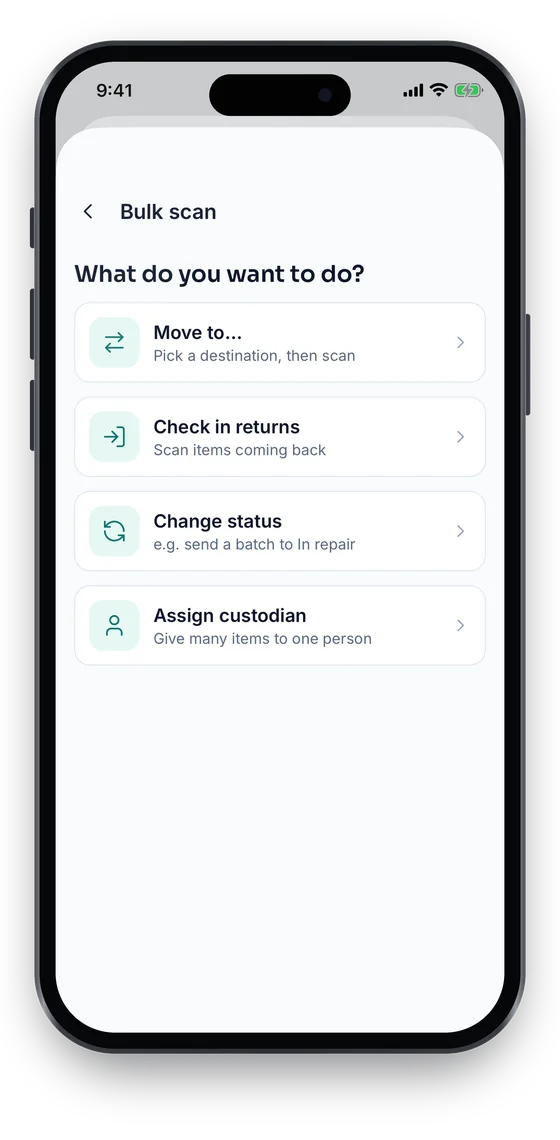
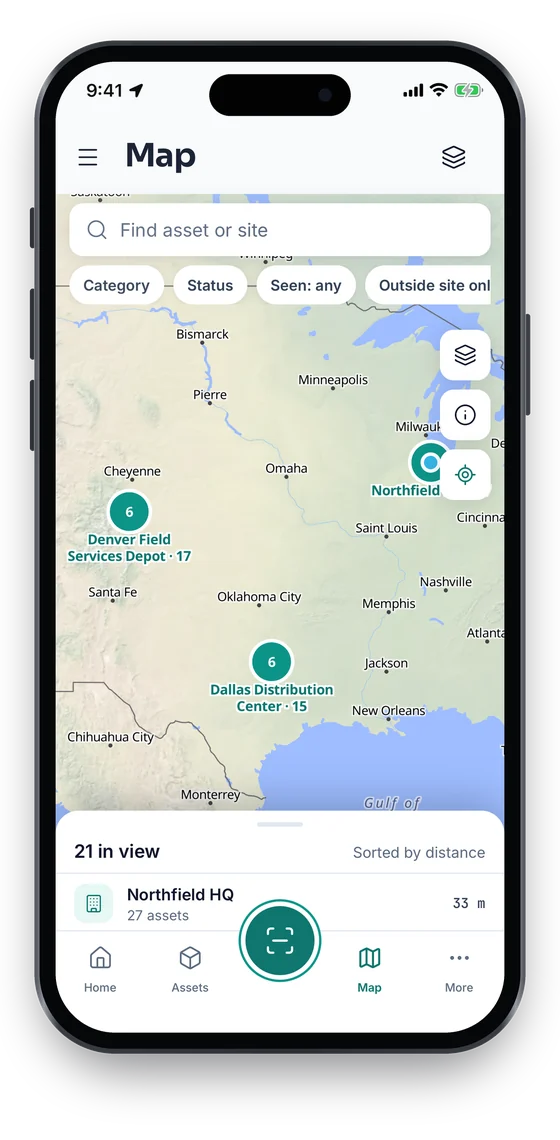
Bulk scan moves, checks in or re-statuses a cage of returnables or a bay of equipment at once. The Map tab shows depots, geofences and where each item was last scanned (Growth and up), and stock-takes run bay by bay. Location is captured only when someone acts in the app, never in the background.

Coming soon on theApp StoreComing soon onGoogle Play
Bulk scan options: move to, check in returns, change status or assign a custodian (sample data)
1Bulk move
Map of Chicago, Dallas and Denver sites with asset clusters (sample data)
2Depots on the map
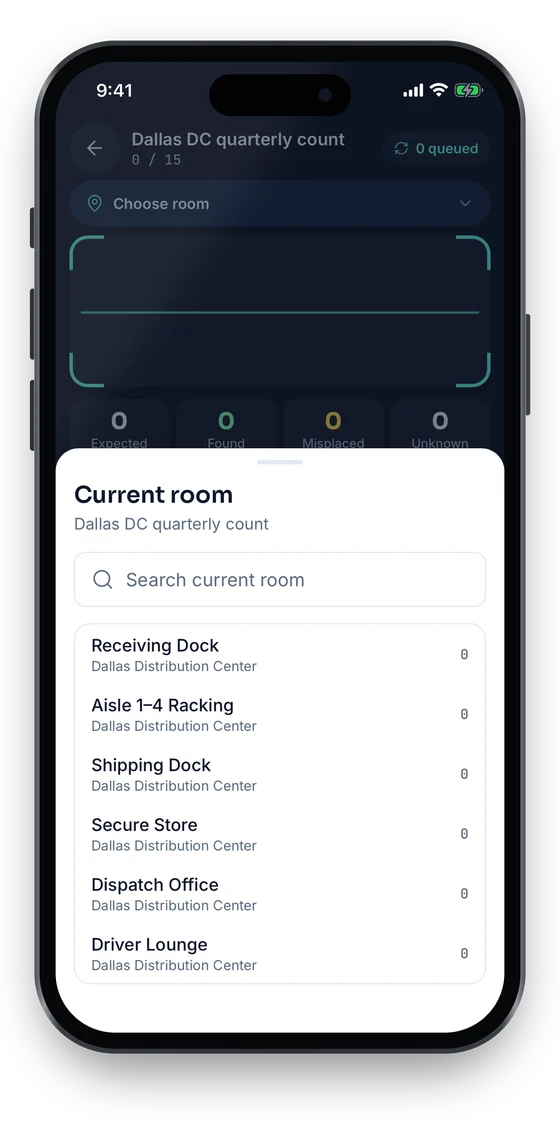
Stock-take Dallas DC quarterly count, choosing the current room to count (sample data)
3Count by bay

Swipe to see more screens →

Real screens from the Asetavo phone app (demo workspace, fictional company). iOS and Android apps coming soon to the App Store and Google Play.
Product in action

What your team sees

An illustrative logistics overview beside a real Asetavo screen.

Returnables overviewIllustrative example
1,850
Containers
1,622
In circulation
147
At customers
51
Overdue returns
30
Under inspection
Recent activity
  • Roll Cage #RC-04412Read at DC North Dock 3 · checked out to customerAt customer
  • Container #CT-10877Due back 12 days ago · customer accountOverdue
  • Handheld #HH-219Checked out to driver · Van 14Out
  • Reach Truck #MH-031PM work order openIn service
  • Pallet batch (48)Read at Warehouse inbound dockReturned
Sample data for illustration — not a customer account.
Asetavo product screen

Every asset group, in one register

Categories and custom fields keep the details each group needs — serials, warranty, custodian, room.

Returnable transport items

Returnable containers · Pallets · Roll cages · Totes and crates · Stillages · Dollies

Trailers and vehicles

Trailers · Delivery vans · Trucks · Yard tractors · Tail-lift units

Warehouse equipment

Forklifts and reach trucks · Pallet jacks · Dock levellers · Racking inspections · Battery chargers

Handhelds and IT

Handheld scanners · Driver devices · Label printers · Dock-office PCs · Radios

Tools and loading kit

Load straps and bars · Trolleys · Tyre and workshop tools · Safety equipment

Use cases

Where logistics teams put it to work

Know your returnable balance with each customer

Every container checked out to a customer stays on their balance until it is read or scanned back in. Account managers see how many units each customer holds and how many are overdue, and can raise it at the next delivery with a list rather than an estimate.

Stop buying cages to replace ones you own

Before ordering more cages or containers, check the pool: how many are on site, how many are out, how many are overdue and how many are waiting for repair. Recovering units from customers is usually cheaper than buying new ones.

Hold drivers accountable for loaned equipment

Handhelds and loading equipment are checked out to the driver and vehicle each shift. At check-in, anything not returned is visible straight away against a named driver, instead of being discovered at the next stock count.

Keep forklifts available for peak

Put MHE on preventive-maintenance schedules and record every service and repair on a work order. Supervisors see which units are out of service and why, and planners can bring servicing forward before a busy period.

Rebalance equipment across sites

With every warehouse and depot on one location tree, operations can see that one site is short of cages while another has a surplus, and transfer units with a recorded movement instead of buying for the short site.

Count the pool in hours

Tag returnables with UHF RFID and count a yard or storage area with a handheld reader. The audit session reconciles reads against the register and highlights units that are missing or were never registered.

Maintenance

Keep handling equipment and vehicles on the road

Material-handling equipment, dock levellers and vans need regular servicing and inspections. Asetavo holds PM schedules, work orders and service history on each unit, next to its location and custodian, so the workshop knows which unit is due and where it was last seen.

  • Preventive-maintenance schedules for forklifts, reach trucks, levellers and vehicles
  • Due list of upcoming services; planners generate work orders from it
  • Work orders with parts, labour, cost and notes
  • Inspection records and certificates attached to each unit
Finance & depreciation

Stop losing returnable assets

Returnables are small individually but add up to a significant capital pool. Losses show up as replacement purchases, not as a line anyone owns. Asetavo puts the pool on the register — with purchase cost, depreciation and a clear record of who holds each unit — so losses can be measured, recovered or charged back.

  • Outstanding returnables per customer from check-out records
  • Overdue units listed for recovery or charge-back in your own billing process
  • Eight depreciation methods for trailers, MHE and the returnable pool
  • Disposals and write-offs recorded with gain or loss
Multi-location

Warehouses, depots and DCs in one view

Logistics networks are multi-site by definition. Asetavo puts every warehouse, distribution centre and depot on one tree, with docks and zones inside each, so equipment and returnables can be seen and moved across the whole network.

  • One location tree for every site, dock and yard
  • Transfers between sites with movement history
  • Per-site stock-takes that roll up network-wide
  • Reports by site, customer or asset category
Identification

The right tag for each asset

Returnables move in volume, get stacked, shrink-wrapped and handled roughly, and pass through docks faster than anyone can scan them one by one. That is where UHF RFID pays off. For lower-volume equipment, a QR label and a phone are enough.

Business and up

UHF RFID

No line of sight · readers & portals · metres

Best for containers, cages, pallets and stillages. Fixed readers at dock doors read tags as loads pass, and handhelds count stacks without unstacking. Use on-metal tags on steel cages and stillages. Business plan and above.

What is UHF RFID?
All plans

QR

Printed label · phone camera · line of sight

For forklifts, handhelds, trolleys and loading equipment that are checked out one at a time. Drivers and supervisors scan with a phone. Available on every plan.

What is QR?
All plans

Barcode

1D label · any scanner · line of sight

If your warehouse already scans barcodes on returnables, those codes can be mapped to asset records during onboarding and used alongside RFID.

What is Barcode?
Growth and up

NFC

Tap-to-read chip · phone · a few cm

For driver devices and small, high-value items where a tap is quicker than aiming a camera. Growth plan and above.

What is NFC?

Not sure which to use? Try the tag technology selector or compare plans.

Security & access

Control who sees and changes what

Drivers, dock staff, supervisors, the workshop and finance all touch the asset register. Role-based permissions keep each group to its own actions, reader events are authenticated, and every check-out and movement is on the audit trail when a customer disputes a balance.

  • Nine permissions, including devices, alerts, audit and finance
  • HMAC-signed, replay-protected events from dock readers
  • Audit trail of every check-out, check-in, read and edit
  • Revocable device sessions for shared handhelds and phones
  • Customer balances backed by a timestamped movement history
Security & access
Integrations

Fits the systems you already run

Your WMS, TMS, fleet and telematics systems stay in charge of shipments, routes and vehicle location. Asetavo manages the assets. The two connect via the REST API, alerts can be pushed out as signed webhooks, and everything exports to Excel or CSV. There are no pre-built named connectors.

  • REST API for assets, movements, check-outs and stock-takes
  • HMAC-signed alert webhooks for dock and zone events
  • Bring-your-own fixed and handheld RFID readers via signed ingest
  • WMS, TMS or telematics sync via the REST API
  • Excel and CSV export of balances, movements and the register
Integrations & API
Implementation

From spreadsheet to live register

  1. 1
    Map sites, docks and customers

    Set up each warehouse, DC and depot with its docks and zones, and list customers who hold returnables as custodians.

  2. 2
    Decide what gets tagged how

    UHF RFID for returnables that move in volume, QR for MHE, handhelds and loading kit. Test RFID tags on your actual cages and containers before ordering in bulk.

  3. 3
    Tag the pool as it comes home

    Tag returnables as they pass through inbound docks and inspection, rather than trying to recall everything at once. The tagged pool grows every day.

  4. 4
    Commission dock readers

    Install fixed readers at the busiest docks, confirm signed events are arriving, and set zone and exit rules.

  5. 5
    Start customer and driver check-outs

    Check returnables out to customers on dispatch and equipment out to drivers each shift, so balances and custody build from day one.

  6. 6
    Load PM schedules and run a baseline count

    Add service schedules for MHE and vehicles, then run a network-wide stock-take to establish the starting pool.

Each container, pallet or cage gets a tag and a record. When it leaves, it is read at the dock and checked out to the customer with an expected return date. When it comes back, a dock read or handheld scan checks it in. Balances per customer and overdue units come straight from those records.

Get your returnables coming back

Bring your returnable pool size, your sites and a list of customers. We will show dock reads, customer balances, driver check-outs and a pool count on your data.

No card required · Workspace ready in minutes · Simple USD pricing